ENGLISH
Step 3: Add Bar Brackets
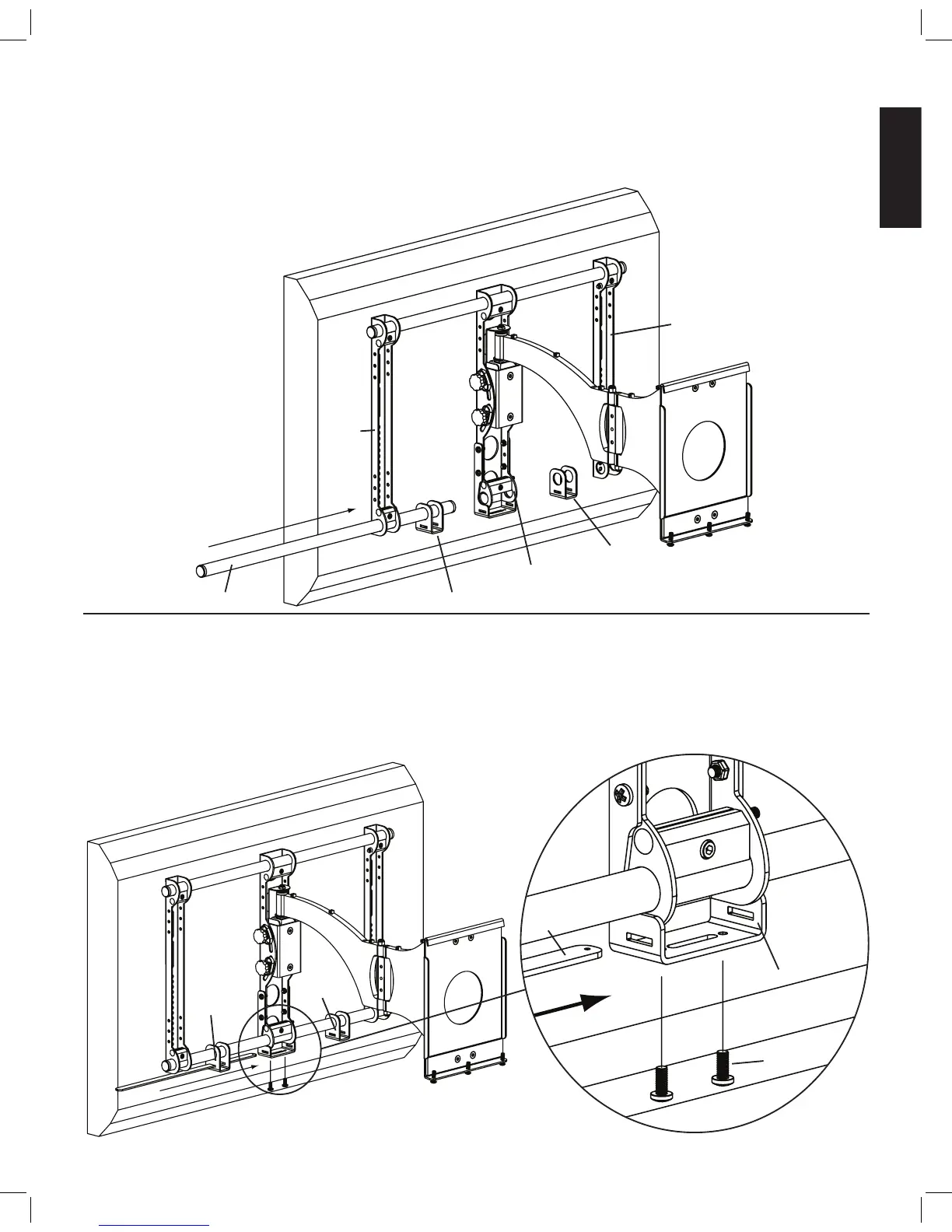
Slide the lower Cross Tube through the Bar Bracket (e), the Axis Assembly, a second Bar Bracket and through the second Monitor Brack-
et. Tighten all three Vise Assemblies secure the Cross Tube once it is slid through the second Monitor Bracket. See Diagram 3 below.
Diagram 3
monitor bracket
monitor
bracket
e
axis assembly
cross tube e
Step 4: Add Support bar
Slide the Support Bar (g) through the Bar Bracket (e), Axis Bracket (d) and through the other Bar Bracket. Make sure the Support Bar
is centered on the wall mount. Thread each 1/4 - 20 x 5/8 Bolt (k) through each hole in the bottom of the Axis Bracket until they bottom
out in the Support bar. See Diagram 4 below.
Diagram 4 Detailed View
g
d
e
e
k


 To Next Page