ENGLISH
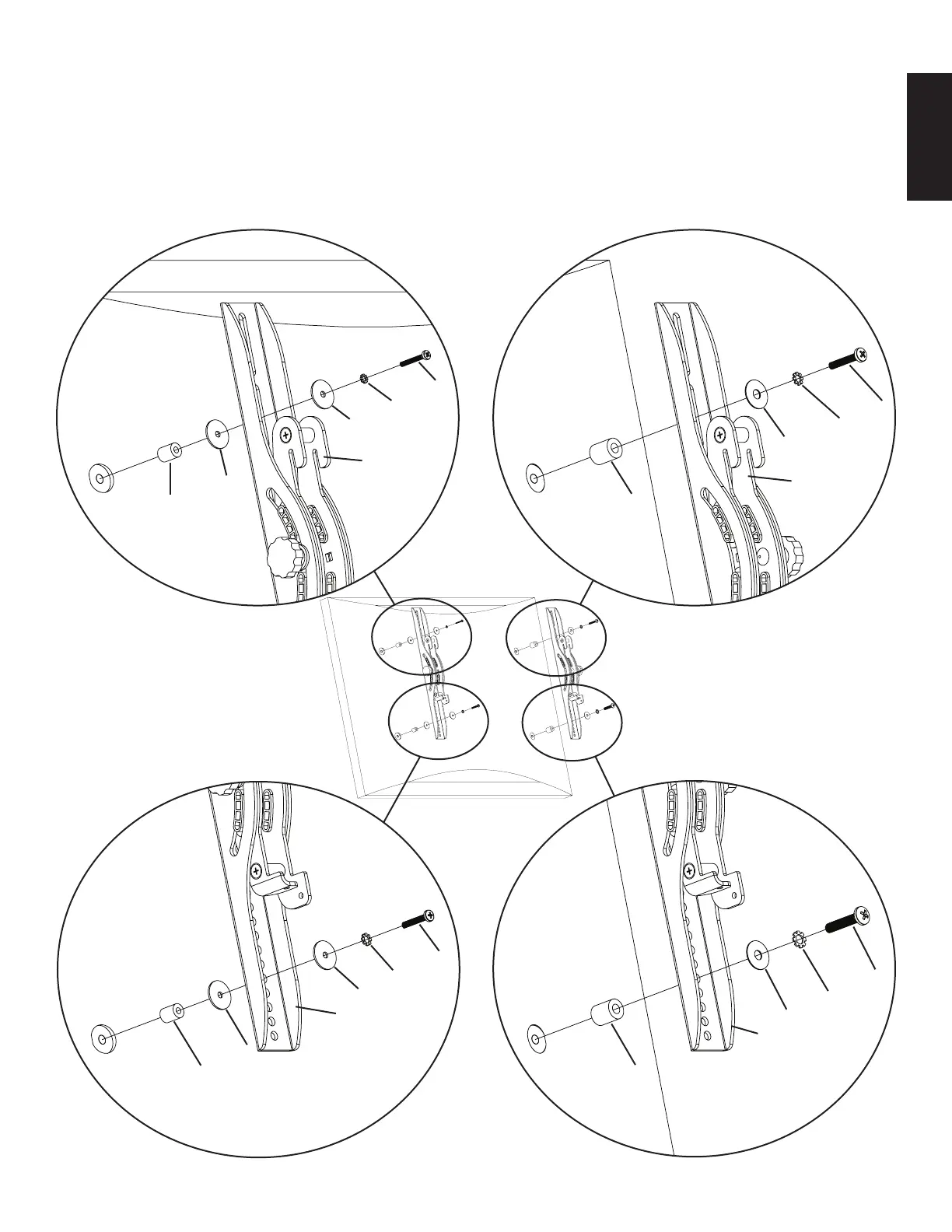
Step 2: Mount Monitor Brackets to a television with a curved back or an obstruction near the threaded insert
First, determine the diameter of the Bolt (h,i,j,k) your TV requires by hand threading them into the threaded insert on the back of the TV.
If you encounter any resistance stop immediately! Once you have determined the correct diameter, see the appropriate Diagram below.
You will thread the Bolt through the appropriate Lock Washer (l,m,n,o), the corresponding Washer (r,s), the Monitor Bracket (b,c), a
Spacer (p,q), a second Washer (r - M4/M5 diameter only) and nally into the TV. Make sure the Monitor Brackets are vertically centered
and level with each other. See the appropriate Diagram below.
M4 Diameter Bolt M6 Diameter Bolt
h
l j
r n
s
b
r c
p q
Diagram 2
M5 Diameter Bolt M8 Diameter Bolt
i
m k
r o
b s
c
r
p q


 To Next Page