Step 8: Projector Alignment Instructions
The VMPR1 can be adjusted for vertical elevation (pitch), horizontal tilt (roll), and rotation (yaw). Once the desired position is located
and all the screws of the VMPR1 are tightened, the projector may be removed from its location and replaced using the four Tapered Nuts
(n) without loosing the registration of the projector. Align the projector as follows:
Roll Adjustment:
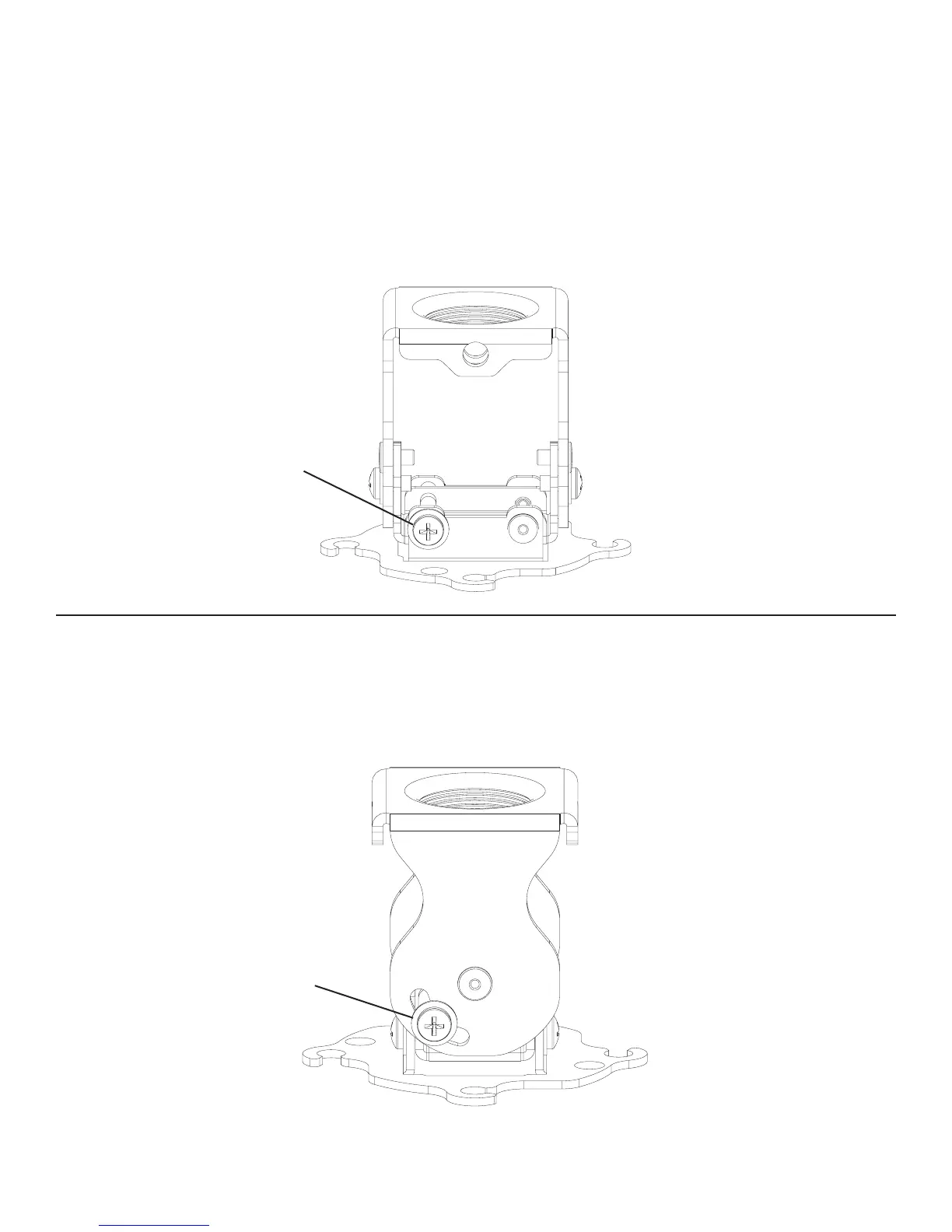
Adjust roll using the threaded x 3/8” pitch adjustment screws located on the front and the back of the adjustment plate. First, loosen
the threaded x 3/8” pitch adjustment screws located on Diagram 8. Next, adjust projector angle to desired roll. Proceed to tighten the
threaded x 3/8” roll adjustment screws located on the front and the back of the adjustment plate.
Diagram 8
roll adjustment screw
Step 9: Pitch Adjustment
Adjust pitch using the threaded x 3/8” pitch adjustment screws, one on each side of the adjustment plate. First, loosen the threaded x 3/8”
pitch adjustment screws on each side of the adjustment plate. (see Diagram 9.) Next, adjust projector to desired pitch position. Proceed
to tighten the threaded x 3/8” pitch adjustment screws on each side of the adjustment plate.
Diagram 9
pitch adjustment screw


 To Next Page
 Loading...