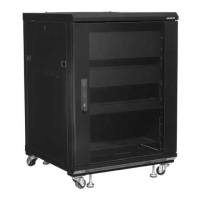
The SANUS Component Series Rack, specifically the CFR2100 series, is designed to support audio/video equipment. This series includes models CFR2115, CFR2127, CFR2136, and CFR2144, each varying in size and weight capacity.
Function Description:
The SANUS Component Series Rack serves as a robust and organized housing solution for audio/video components. It is designed to manage and protect equipment, facilitate cable organization, and provide adequate ventilation to prevent overheating. The rack's structure allows for easy access to components for installation, maintenance, and wiring. Its modular design, with adjustable shelves and blanking panels, offers flexibility in configuring the internal space to accommodate various equipment sizes and types. The option to add a cooling fan further enhances its functionality by ensuring optimal operating temperatures for sensitive electronics. The rack can also be ganged with other units, expanding its capacity and versatility for larger installations.
Important Technical Specifications:
-
Weight Capacities:
- CFR2115: 226.8 kg (500 lb)
- CFR2127: 340.2 kg (750 lb)
- CFR2136: 385.5 kg (850 lb)
- CFR2144: 453.6 kg (1,000 lb)
- Each 2U shelf supports up to 22.6 kg (50 lb).
- Each 1U shelf supports up to 13.6 kg (30 lb).
- Each optional 3U shelf supports up to 36.2 kg (80 lb).
-
Dimensions (W x D x H):
- CFR2115 (15U AV Rack): 23.6" x 23.6" x 34" / 60 x 60 x 86.4 cm
- CFR2127 (27U AV Rack): 23.6" x 23.6" x 55" / 60 x 60 x 139.7 cm
- CFR2136 (36U AV Rack): 23.6" x 23.6" x 70.5" / 60 x 60 x 179.15 cm
- CFR2144 (44U AV Rack): 23.6" x 23.6" x 84.75" / 60 x 60 x 215.3 cm
-
Rack Spaces:
- CFR2115: 15U
- CFR2127: 27U
- CFR2136: 36U
- CFR2144: 44U
-
Construction: Heavy-gauge welded steel.
-
Door: Lockable tempered glass front door, reversible for left or right opening.
-
Panels: Quick-release, removable back and side panels for easy access. Lockable steel back panel for added security.
-
Ventilation: Improved air circulation with added cooling vents on top and bottom of the rack. Two 3U opening panels can be placed on top or bottom of the rear rack door for added versatility.
-
Shelves: Vented shelves with protective back stops to prevent components from slipping or sliding.
-
Mobility: Swivel casters and adjustable feet for stable positioning and mobility.
-
Included Components (varies by model): Shelves (1U, 2U, 3U), Blanking Panels (1U, 2U, 3U), Tie Bars.
Usage Features:
- Loading Requirements: To ensure stability and prevent injury, the rack must always be loaded from the bottom up, with the heaviest items placed first. At least 50% of the total weight should be mounted in the lower 1/3 of the rack. When loading the rack on its back and then lifting it to an upright position, specific precautions must be followed: leveling feet must be adjusted all the way in, no more than 20% of the total rated load should be loaded, all equipment must be securely fastened, and caution is required during lifting due to casters.
- Component Security: Rack shelf backstops (03) can be inserted into slots behind components and twisted 90 degrees to secure them. Component straps (04) can be threaded through slots in the sides of shelves and wrapped over components for additional security.
- Cable Management: The rack features access panels for cable management, allowing for organized routing and concealment of cables, which contributes to a cleaner and safer setup.
- Ventilation: An optional cooling fan can be installed at the top or bottom of the rack to provide additional ventilation. This is crucial for preventing damage to components due to overheating, ensuring adequate airflow, and maintaining an operating temperature inside the rack that does not exceed 104°F (40°C).
- Adjustability: Shelves and blanking panels can be adjusted by aligning their bottom (B) with the lines (L) on the rack rail. Rack rails themselves can also be adjusted, requiring the removal of shelves and blanking panels beforehand.
- Door Reversibility: The front door can be reversed to open from either the left or right side, offering flexibility in placement and access. This involves releasing and re-securing pins, removing a spacer, and reattaching the door handle and locking cam.
- Security: An optional keyed lock (sold separately) can be added to the door for enhanced security, protecting valuable AV equipment.
- Ganging: Racks can be ganged together using a ganging kit (sold separately). This involves removing side panels, moving racks together until they touch, ensuring both racks are level, and securing them with ganging clips (GC) into the frame slots.
Maintenance Features:
- Unpacking and Inspection: Before assembly, all parts should be verified as included and undamaged. Damaged parts should not be used, and customer service should be contacted for replacements. Supplied parts are located inside the rack, accessible by removing the back panel.
- Tool Requirements: Basic tools such as a screwdriver and wrench are needed for assembly and adjustments.
- Cleaning: The tempered glass front door and steel panels can be cleaned as needed.
- Leveling: Adjustable feet allow for leveling the rack, which is important for stability and preventing potential injury or property damage. Nuts on the feet should be tightened until flush with the bottom of the rack.
- Fan Installation: The cooling fan installation involves removing a vented panel, being cautious of sharp edges, and mounting the fan with provided screws (05).
- Troubleshooting: In case of questions or doubts about safety, installation, assembly, or use, customers are advised to contact manufacturer Customer Service or a qualified contractor. Manufacturer is not responsible for damage or injury caused by incorrect assembly or use.

 Need help?
 General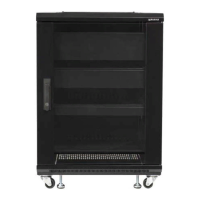

 To Next Page