PC5 pH/Cond. Tester Operation Manual
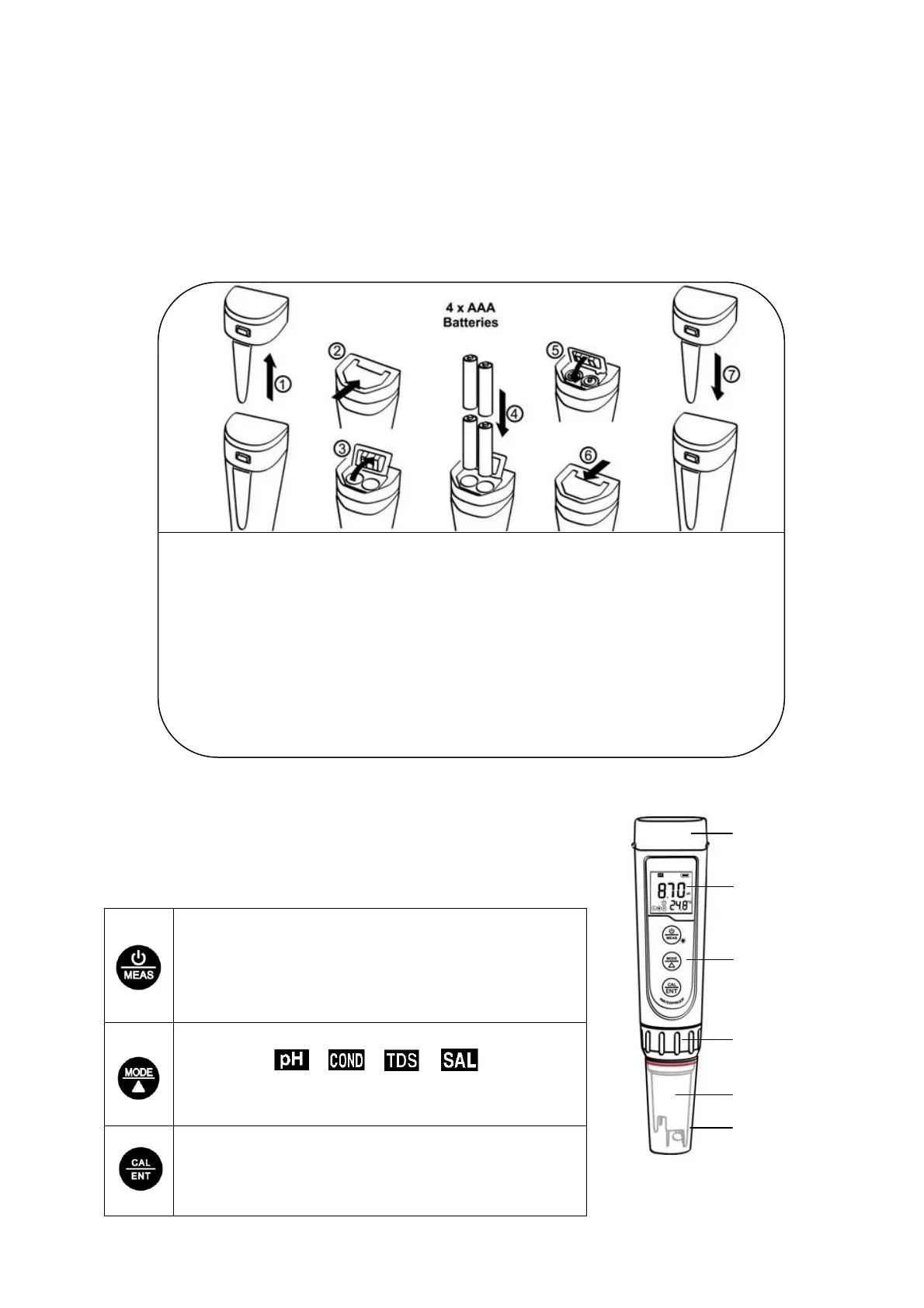
1. Battery Installation
Please install batteries according to the following steps. Please note polarity: “+” (anode) is
upward; “-” (cathode) is downward.
2. Keypad
Short press: key-hold time < 2 seconds
Long press: key-hold time > 2 seconds
1. Short press to turn ON the tester and long press to turn
OFF the tester;
2. When turned OFF, long press to enter parameter setting;
3. In measurement mode, short press to turn on backlight.
1. In measurement mode, short press to switch
parameter → → → ;
2. In mode setting, short press to change parameter
(Unidirectional).
1. Long press to enter calibration mode;
2. In calibration mode, short press to confirm calibration;
3. When measured value is locked, short press to unlock.
① Pull the battery cap up
② Push the battery cover along to the direction of arrow
③ Open the battery cover
④ Insert the batteries (4×AAA) and ensure the batteries polarity is as per drawing
⑤ Close the battery cover
⑥ Lock the battery cover along to the direction of arrow
⑦ Fit the tester’s cap while making sure to push all the way down. The tester’s
waterproof design may be compromised if the cap is not fitted correctly.



 To Next Page