6
CIGARETTE LIGHTER ADAPTOR
The supplied cigarette lighter adaptor is
designed for use with vehicles that have
a 12V, negative ground electrical system.
Most vehicles have this type of electrical
system, but if you are unsure about the
type your vehicle has, contact the ve-
hicle dealer.
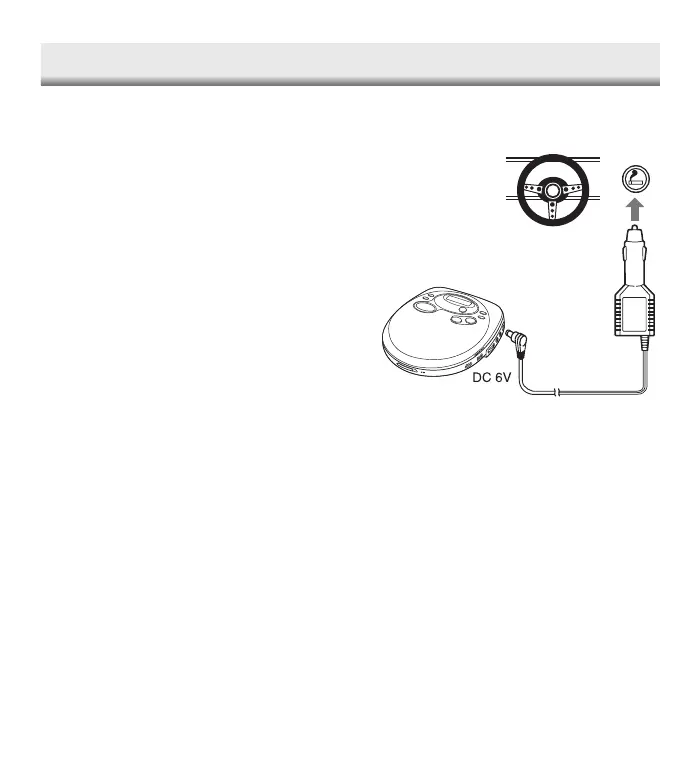
Plug one end of the cigarette lighter
adaptor into the DC 6V socket, then plug
the other end into the cigarette lighter
socket.
Caution:
• Use this unit only with the supplied
cigarette lighter adaptor.
• Be sure to clean the cigarette lighter
socket before use.
• After use, disconnect the cigarette
lighter adaptor.
13
VARIOUS PLAYING MODE
Press the P-MODE button repeatedly
during stop to select a various play mode
available. Each time the button is pressed,
the mode changes as shown below:
Repeat one ( ) v Repeat all ( )
v Introscan (INTRO) v Random play
(RAND) v Released
• During programmed play mode.
"RAND" (random play) can not be
selected.
Once the desired play mode is displayed,
press the PLAY/PAUSE button to begin
play in that mode.
REPEAT PLAY
You can play tracks repeatedly in normal
or programmed play modes.
Single track repeat
Press the P-MODE button once during
play “ ” appears on the display.
All tracks repeat
Press the P-MODE button twice during
play. “ ” appears.
• To cancel repeat play, press the P-
MODE button repeatedly until “ ”
or “ ” is disappeared.
INTROSCAN
1. Press the P-MODE button three times
during stop. “INTRO” appears.
2. Press the PLAY/PAUSE button. The
first 10 seconds of each track on a
disc are played from the first track.
3. When the desired track is playing,
press the P-MODE button twice. Nor-
mal play continues.
RANDOM PLAY
1. Press the P-MODE button four times
during stop. “RAND” appears.
2. Press the PLAY/PAUSE button. All
tracks on the disc are played in ran-
dom order.
• To cancel random play, press the P-
MODE button once.
CDP-4100CR/AU-final 2/3/05, 10:50 AM7


 To Next Page