EasyManua.ls Logo

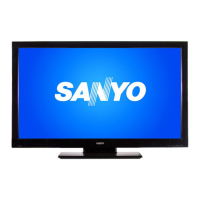
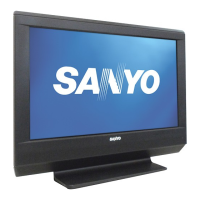
Sanyo DP19241 - User Manual

Sanyo DP19241
27 pages
Print Icon
To Next Page IconTo Next Page
Loading...
ENGLISH
© 2011 Sanyo Manufacturing Corporation
19-Z6AE
Owners Manual
Manual del usuario
DP19241
47 cm diagonal / diagonale
18. 5
HDTV LCD
TVHD de LCD
Part No. / No. de parte:
J3FR0321A- -
Model No. / No. de Modelo
LED
ESPAÑOL
3FR0321A_En.indd 13FR0321A_En.indd 1 1/7/11 4:31:53 PM1/7/11 4:31:53 PM

Other manuals for Sanyo DP19241

Questions and Answers

  • R
    Rachel SheltonAug 15, 2025
    What to do if my Sanyo DP19241 LCD TV does not operate?
    • K
      Kenneth ManningAug 15, 2025
      If your Sanyo LCD TV isn't turning on, ensure the power cord is securely plugged into both the TV and the wall outlet. Try a different AC outlet to rule out power issues. Also, check your fuse or circuit breaker. As a last resort, unplug the unit for an hour, then plug it back in.
  • T
    Timothy FrederickAug 18, 2025
    How to fix no CATV reception on Sanyo DP19241 LCD TV?
    • J
      John PowellAug 18, 2025
      If your Sanyo LCD TV is not receiving CATV, check all Cable TV connections. Set the Signal Type menu option to the Cable mode. Additionally, try another station.
  • J
    Joshua RothAug 21, 2025
    Why is my Sanyo DP19241 LCD TV remote not working?
    • C
      Colleen DiazAug 22, 2025
      If your Sanyo LCD TV remote isn't working, first, check the batteries to ensure they are not weak, dead, or inserted incorrectly. Move closer to the TV (within 15 feet) and make sure the remote is aimed at the sensor. Confirm there are no obstructions between the remote and the TV. Verify that the power cord is plugged in.
  • M
    melissamitchellAug 25, 2025
    Why does my Sanyo DP19241 keep shutting off?
    • K
      Kelly JonesAug 25, 2025
      If your Sanyo LCD TV keeps shutting off, check if the Sleep Timer is set. Another possible cause is a power interruption.
  • M
    Martha MartinezAug 27, 2025
    Why does my Sanyo DP19241 have poor or no picture?
    • A
      Andre DeanAug 27, 2025
      If your Sanyo LCD TV has poor or no picture, try tuning to another station. Make sure channels are set into memory. Check the antenna or Cable TV connections and adjust the antenna. Look for any sources of possible interference. Finally, check the picture control adjustments.
  • R
    Ryan MosesAug 30, 2025
    Why does my Sanyo LCD TV have poor sound or no sound?
    • N
      Nicole FergusonAug 31, 2025
      If your Sanyo LCD TV has poor or no sound, try tuning to another station. Check the sound adjustments (Volume or Mute). Also, check for sources of possible interference.
  • P
    Pamela PerrySep 2, 2025
    Why does my Sanyo LCD TV have poor color or no color?
    • J
      Jessica BurgessSep 2, 2025
      If your Sanyo LCD TV has poor or no color, try tuning to another station. Make sure channels are set into memory. Check the picture control adjustments. Also, check the antenna or Cable TV connections, adjust the antenna, and check for sources of possible interference.
  • J
    Jerry RoySep 5, 2025
    Why does my Sanyo DP19241 LCD TV have poor reception on some channels?
    • J
      John DavenportSep 5, 2025
      If your Sanyo LCD TV has poor reception on some channels, try tuning to another station. Make sure channels are set into memory. Adjust the antenna to receive the desired station. Also, check for sources of possible interference.
  • T
    tabithadavisSep 8, 2025
    How to remove horizontal bars on Sanyo LCD TV screen?
    • C
      Christina BlairSep 8, 2025
      If you see horizontal or diagonal bars on your Sanyo LCD TV screen, check the antenna connections, adjust or re-direct the antenna. Also, check for sources of possible interference.
  • H
    Hannah BurtonSep 12, 2025
    What to do if Sanyo LCD TV has no reception above channel 13?
    • J
      John WolfeSep 12, 2025
      If your Sanyo LCD TV isn't receiving channels above 13, ensure the Signal Type option is in the appropriate mode. Also, check the UHF antenna connections.

Summary

Warranty Information

One-Year Limited Warranty

Details the limited warranty for parts and labor.

Warranty Application and Claims

Explains how to apply for warranty service and make claims.

Electrical Safety and FCC Compliance

Electrical Hazard Warnings

Cautions against electric shock, fire, and moisture.

Important Safety Instructions Part 1

General Handling and Placement Safety

Covers reading instructions, water, cleaning, heat, cords, and accessories.

Important Safety Instructions Part 2

Service, Repair, and Connection Safety

Safety measures for servicing, repair, and connecting equipment.

Child Safety Guidelines

Recommendations for safe use of the flat panel display around children.

Safety Precautions and Panel Handling

Condensation and LCD Panel Care

Instructions for preventing condensation and handling the LCD panel.

Wall Mounting Safety

Safety notes and recommendations for wall mounting the TV.

Stand Installation and Removal

Remote Control Operation

Remote Control Buttons Explained

Descriptions of each button on the remote control.

Antenna and Cable Connections

Cable TV Connection Options

Explains connections for basic and scrambled cable TV services.

Connecting External Audio;Video Devices

Advanced Audio and Video Connections

HDMI and DVI Device Connections

Instructions for connecting HDMI or DVI devices.

PC Connectivity and Settings

Connecting to a Personal Computer

Guide for connecting a PC via RGB or DVI.

Initial TV Setup and Operation

Auto Setup Procedure

Step-by-step guide for initial channel programming.

Channel Management Features

V-Chip Parental Controls

Registering a V-Chip Password

Steps to register a password for V-Chip.

Setting V-Chip Restrictions

How to set content rating limits for TV and movies.

Advanced V-Chip and Closed Captioning

Troubleshooting Guide

General Troubleshooting Checklist

Common problems and their potential solutions.

Specific Troubleshooting Scenarios

Solutions for digital issues, reception, remote, and captions.

Sanyo DP19241 Specifications

Power IconPower
power supplyAC 120V 60Hz
power consumption (operation)24W
power consumption (stand by)0.3W
Operating Environment IconOperating Environment
operating temperature5˚C - 40˚C
operating humidityLess than 80% RH
Display IconDisplay
display typeTransmission TFT color LCD panel
display size47.01 cm
number of pixels1366 (H) × 768 (V)
Audio IconAudio
audio output power2.0W + 2.0W
speaker size25.4 mm × 68.6 mm
hdmi audio2-channel PCM
Weight and Dimensions IconWeight and Dimensions
weight2.6 kg
width450 mm
height337.5 mm
depth168 mm

Related product manuals