EasyManua.ls Logo

Sanyo KMS0912 - User Manual

Sanyo KMS0912
16 pages
Print Icon
To Next Page IconTo Next Page
Loading...
SA&YO
Dual-Zone
Split
System
Air
Conditioner
INSTRUCTION
MANUAL
Combination of:
2 indoor units
KMS0912
+ 1 outdoor unit CM 1812
Save
These
Instructions!
Pub.
01-85264179352000
OSANYO
1992,
1993
SY33-1

Other manuals for Sanyo KMS0912

Question and Answer IconNeed help?

Do you have a question about the Sanyo KMS0912 and is the answer not in the manual?

Summary

Product Information

Alert Symbols and Safety Warnings

Installation Location Guidelines

Electrical Requirements for Installation

General Safety Instructions

Air Conditioner Component Identification

Indoor Unit Display and Selector

Remote Receiver and Indicator Lamps

Details the indoor unit's remote receiver, operation lamp, and timer lamp.

Operation Selector Switch Usage

Explains the ON, OFF, and TEST positions of the indoor unit's selector.

Remote Control Transmitter Overview

Transmitter Display and Sensor Function

Describes the remote control's display screen and temperature sensor.

Remote Control Operation Buttons

Details the ON/OFF, Temperature, Timer, Program, and Night Setback buttons.

Remote Control Cover Access

Explains how to open and use the protective cover on the remote.

Remote Control Selector Switches

Mode, Timer, and Fan Speed Selectors

Explains the function of MODE, Timer, and Fan Speed selector switches.

Remote Sensor Functionality

Further details the role of the remote's temperature sensor.

Using the Remote Control Unit

Remote Control Battery Installation

Step-by-step guide for installing batteries in the remote control.

Remote Control Mounting and Placement

Recommended locations for placing and mounting the remote control unit.

Remote Control Operation Guide

Cooling Mode Operation Steps

Step-by-step instructions for operating the unit in cooling mode.

Optimal Remote Placement for Sensing

Emphasizes selecting an optimal position for the remote as a sensor.

Critical Operation Precautions

Provides cautions regarding selector switch usage and power cycling.

Advanced Remote Operation Features

Night Setback Mode for Cooling

Explains the night setback function for energy saving and comfort.

Automatic Fan Speed Control

Details how the air conditioner automatically controls fan speed.

Manual Fan Control and Fan-Only Mode

Manual Fan Speed Adjustment

How to manually set fan speed during cooling operations.

Fan-Only Mode Activation

Steps to operate the unit solely as a circulation fan.

Operation Without Remote Control

Instructions for operating the unit using the indoor unit's controls.

Setting the Timer Functions

Setting the Current Time

Instructions to set the current time on the air conditioner unit.

Setting Timer for Unit OFF

Guide to setting the timer to stop the unit automatically.

Setting Timer for Unit ON

Guide to setting the timer to start the unit automatically.

Setting Daily Auto ON;OFF Timer

Instructions for setting daily scheduled start and stop times.

Adjusting Airflow Direction

Horizontal Airflow Adjustment Method

How to adjust airflow left or right using the vertical vane.

Vertical Airflow Adjustment Method

How to adjust airflow up or down using the flap.

Air Conditioner Care and Cleaning

Indoor Unit Casing and Grille Cleaning

Instructions for cleaning the indoor unit's exterior and grille.

Air Filter Cleaning Procedure

How to remove, clean, and replace the air filter.

Outdoor Unit Maintenance Advice

Recommendation for annual cleaning of the outdoor unit's internal components.

Troubleshooting Common Issues

Unit Fails to Start

Lists possible causes and remedies for the air conditioner not running.

Compressor Operation Problems

Addresses issues with the compressor running intermittently or stopping.

Causes of Poor Cooling

Explains common reasons for reduced cooling performance.

Energy Saving Tips

Operating Range Specifications

Summary

Product Information

Alert Symbols and Safety Warnings

Installation Location Guidelines

Electrical Requirements for Installation

General Safety Instructions

Air Conditioner Component Identification

Indoor Unit Display and Selector

Remote Receiver and Indicator Lamps

Details the indoor unit's remote receiver, operation lamp, and timer lamp.

Operation Selector Switch Usage

Explains the ON, OFF, and TEST positions of the indoor unit's selector.

Remote Control Transmitter Overview

Transmitter Display and Sensor Function

Describes the remote control's display screen and temperature sensor.

Remote Control Operation Buttons

Details the ON/OFF, Temperature, Timer, Program, and Night Setback buttons.

Remote Control Cover Access

Explains how to open and use the protective cover on the remote.

Remote Control Selector Switches

Mode, Timer, and Fan Speed Selectors

Explains the function of MODE, Timer, and Fan Speed selector switches.

Remote Sensor Functionality

Further details the role of the remote's temperature sensor.

Using the Remote Control Unit

Remote Control Battery Installation

Step-by-step guide for installing batteries in the remote control.

Remote Control Mounting and Placement

Recommended locations for placing and mounting the remote control unit.

Remote Control Operation Guide

Cooling Mode Operation Steps

Step-by-step instructions for operating the unit in cooling mode.

Optimal Remote Placement for Sensing

Emphasizes selecting an optimal position for the remote as a sensor.

Critical Operation Precautions

Provides cautions regarding selector switch usage and power cycling.

Advanced Remote Operation Features

Night Setback Mode for Cooling

Explains the night setback function for energy saving and comfort.

Automatic Fan Speed Control

Details how the air conditioner automatically controls fan speed.

Manual Fan Control and Fan-Only Mode

Manual Fan Speed Adjustment

How to manually set fan speed during cooling operations.

Fan-Only Mode Activation

Steps to operate the unit solely as a circulation fan.

Operation Without Remote Control

Instructions for operating the unit using the indoor unit's controls.

Setting the Timer Functions

Setting the Current Time

Instructions to set the current time on the air conditioner unit.

Setting Timer for Unit OFF

Guide to setting the timer to stop the unit automatically.

Setting Timer for Unit ON

Guide to setting the timer to start the unit automatically.

Setting Daily Auto ON;OFF Timer

Instructions for setting daily scheduled start and stop times.

Adjusting Airflow Direction

Horizontal Airflow Adjustment Method

How to adjust airflow left or right using the vertical vane.

Vertical Airflow Adjustment Method

How to adjust airflow up or down using the flap.

Air Conditioner Care and Cleaning

Indoor Unit Casing and Grille Cleaning

Instructions for cleaning the indoor unit's exterior and grille.

Air Filter Cleaning Procedure

How to remove, clean, and replace the air filter.

Outdoor Unit Maintenance Advice

Recommendation for annual cleaning of the outdoor unit's internal components.

Troubleshooting Common Issues

Unit Fails to Start

Lists possible causes and remedies for the air conditioner not running.

Compressor Operation Problems

Addresses issues with the compressor running intermittently or stopping.

Causes of Poor Cooling

Explains common reasons for reduced cooling performance.

Energy Saving Tips

Operating Range Specifications

Overview

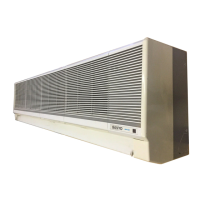
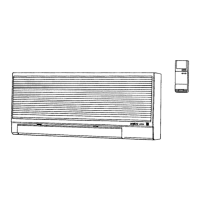
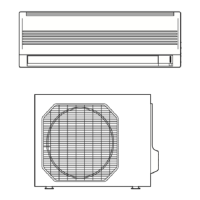
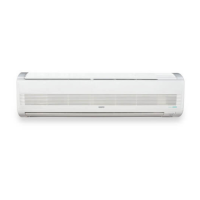
This document is an instruction manual for a Sanyo Dual-Zone Split System Air Conditioner. The system consists of two indoor units (KMS0912) and one outdoor unit (CM1812). The manual provides comprehensive information on the product, its operation, safety, and maintenance.

Function Description:

The Sanyo Dual-Zone Split System Air Conditioner is designed to provide comfortable room conditions by cooling the air. It's a split system, meaning it has separate indoor and outdoor units connected by refrigerant tubes. The "Dual-Zone" aspect indicates that it can control the temperature in two separate areas using the two indoor units, which can be operated simultaneously or independently. The system works by drawing in room air through air filters, cooling it, and then blowing the conditioned air back into the room. Moisture in the room condenses and drains off through a hose. The outdoor unit houses the compressor, fan motor, heat exchanger coil, and other electrical components necessary for the cooling cycle.

Important Technical Specifications:

  • Model Combination: 2 indoor units KMS0912 + 1 outdoor unit CM1812.
  • Power Supply: 60Hz, single-phase, 230/208 volts.
  • Cooling Temperature Range:
    • Maximum Indoor Air Intake: 95°F DB / 75°F WB
    • Minimum Indoor Air Intake: 67°F DB / 57°F WB
    • Maximum Outdoor Air Intake: 115°F DB
    • Minimum Outdoor Air Intake: 67°F DB
  • Set Temperature Range (Cooling): 64°F minimum to 84°F maximum.
  • Compressor Delay Circuit: Built-in 3-minute time delay for reliable operation after power-on or power failure.

Usage Features:

The air conditioner is primarily controlled by a wireless remote control unit, which acts as both a transmitter for commands and a sensor for room temperature.

  • Remote Control Unit Functions:
    • ON/OFF Operation: Turns the unit on and off.
    • Mode Selection: Allows selection between "COOL" (cooling) and "FAN" (circulation only) modes.
    • Temperature Setting: "COOLER" and "WARMER" buttons adjust the set temperature in 2°F increments.
    • Fan Speed Selection: Options include "AUTO," "HIGH," "MED," and "LOW." In "AUTO" mode, a microcomputer automatically adjusts fan speed based on the difference between room and set temperatures.
    • Timer Setting: Allows programming for ON, OFF, or daily ON/OFF operations. The remote displays current time, ON time, and OFF time.
    • Night Setback Mode: In "COOL" mode, this feature automatically raises the set temperature by 2°F after 30 minutes, and again by 2°F after another 30 minutes, to save energy while providing gentle cooling. A star mark appears on the display when activated.
    • Airflow Direction Adjustment:
      • Horizontal: Adjusted manually by moving the vertical vane left or right.
      • Vertical: Adjusted manually by holding both ends of the flap and moving it up or down. A 30° downward limit is recommended in COOL mode to prevent condensation drip.
  • Indoor Unit Display and Operation Selector:
    • Remote Control Receiver: Picks up infrared signals from the remote.
    • Operation Lamp: Lights up in continuous COOL or FAN mode.
    • Timer Lamp: Lights up when the system is timer-controlled.
    • Operation Selector:
      • ON Position: For normal operation with the remote control.
      • OFF Position: For when the unit won't be used for several days or longer (does not disconnect power completely).
      • TEST Position: For servicing only.
  • Operation without Remote Control: If the remote is lost or malfunctioning, the indoor unit's operation selector can be used to turn the unit ON (by switching from OFF to ON) or OFF. The set temperature and fan speed will default to the latest selections before stopping.

Maintenance Features:

Regular maintenance is crucial for optimal performance and longevity.

  • Safety Precautions: Always turn off and disconnect power before cleaning. Do not pour water on the indoor unit to prevent damage and electric shock.
  • Casing and Grille (Indoor Unit): Clean with a vacuum cleaner brush or a clean, soft cloth. For stains, use a cloth moistened with mild liquid detergent. Exercise care not to force vanes out of place.
  • Air Filter:
    • Frequency: Check and clean at least once every two weeks.
    • Removal: Move the air outlet flap to its lowest position, then hold the air filter by the tab at the bottom and pull downward.
    • Cleaning: Use a vacuum cleaner for light dust. For sticky dust, wash in lukewarm, soapy water, rinse in clean water, and dry.
    • Replacement: Ensure the "FRONT" mark on the filter faces you.
  • Internal Coil and Outdoor Unit Components: Must be cleaned annually by a dealer or service center.
  • Remote Control Batteries:
    • Type: Two fresh leak-proof AAA alkaline batteries.
    • Replacement: Replace when the remote control lamp fails to light or when it cannot change settings. Remove batteries if the unit won't be used for more than one month.
    • Reset: Pressing the ACL button resets current time, ON time, and OFF time to 0:00.

Energy Saving Tips:

  • Do not block the air intake and outlet of the unit.
  • Prevent direct sunlight from entering the room by using sunshades, blinds, or curtains.
  • Keep the air filter clean.
  • Keep windows, doors, and other openings closed to prevent conditioned air from escaping.

Sanyo KMS0912 Specifications

General IconGeneral
BrandSanyo
ModelKMS0912
CategoryAir Conditioner
LanguageEnglish

Related product manuals