EasyManua.ls Logo

Sanyo MGP17 - Page 3

Sanyo MGP17
12 pages
Print Icon
To Next Page IconTo Next Page
To Previous Page IconTo Previous Page
Loading...
ADJUSTMENT
PROCEDURES
GENERAL
REMARKS
3.
While
Playing
back
the
test
tape,
adjust
the
tape
speed
by
©
Before
adjusting
the
mechanism
of
this
unit,
wipe
the
tape
turning
the
potentiometer
(P401)
on
the
P.C.Board
with
an
contacting
surfaces
of
the
Head,
Pinch
Roller
and
Capstan,
alignment
tool
until
the
frequency
counter
reads
3kHz.
and
the
surfaces
of
the
driving
parts
Such
as
the
Drive
Belt,
Take-up
Belt,
Flywheel
and
Pulley
with
a
soft
cloth
soaked
in
alcohol.
Trouble
may
occur
because
of
oil
and
grease
stains.
©
Carefully
handle
the
belt
because
grease
easily
attaches
to
it.
Then,
check
the
used
rubber
parts.
If
the
rubber
has
deteriorated
or
is
Scratched,
replace
the
Parts
with
new
ones.
EQUIPMENT
REQUIRED
©
Frequency
Counter
Dualtrace
Oscilloscope
VTVM
(2
sets)
Dummy
Load
(32:0)
Test
Tapes
#
3kHz
test
tape
(Example:
TEAC
MTT-111)
for
the
Tape
Speed
Adjustment
*
10kHz
test
tape
(Example:
TEAC
MTT-114)
for
the
Head
HEAD
AZIMUTH
ADJUSTMENT
Azimuth
Adjustment
1.
Connect
two
VTVMs
and
a
dualtrace
Oscilloscope
to
the
©
Alignment
Too!
Headphone
Jack
as
illustrated,
NOTE:
Set
the
osci
lloscope
as
follows:
Before
the
Electrical
Adjustments,
set
the
Switch
and
EM
ODE
siscasntpsi
tir
scnesslecicve:
CHOP
(chopped)
Control
as
follows:
B
SQURCE
kee
elt
cuag
i
«:
INT
(internal),
CH1
or
CH2
¥
VOLUME
COMLNOL
sseevsssessdovisaresoasedectessec:
As
desired
PSWEEP
MODE
o.oo
occcscccscscas
cs...
AUTO
(automatic)
#
Graphic
EQ.
Controls
«00...
0
(click
position)
#
Install
new
two
batteries
to
the
battery
compartment
for
the
adjustment.
TAPE
SPEED
ADJUSTMENT
1.
Remove
the
Battery
Compartment
Lid
and
take
out
the
batteries
from
the
compartment,
and
connect
the
regulated
DC
3V
power
Supply
to
the
Ext.
Power
Jack.
2.
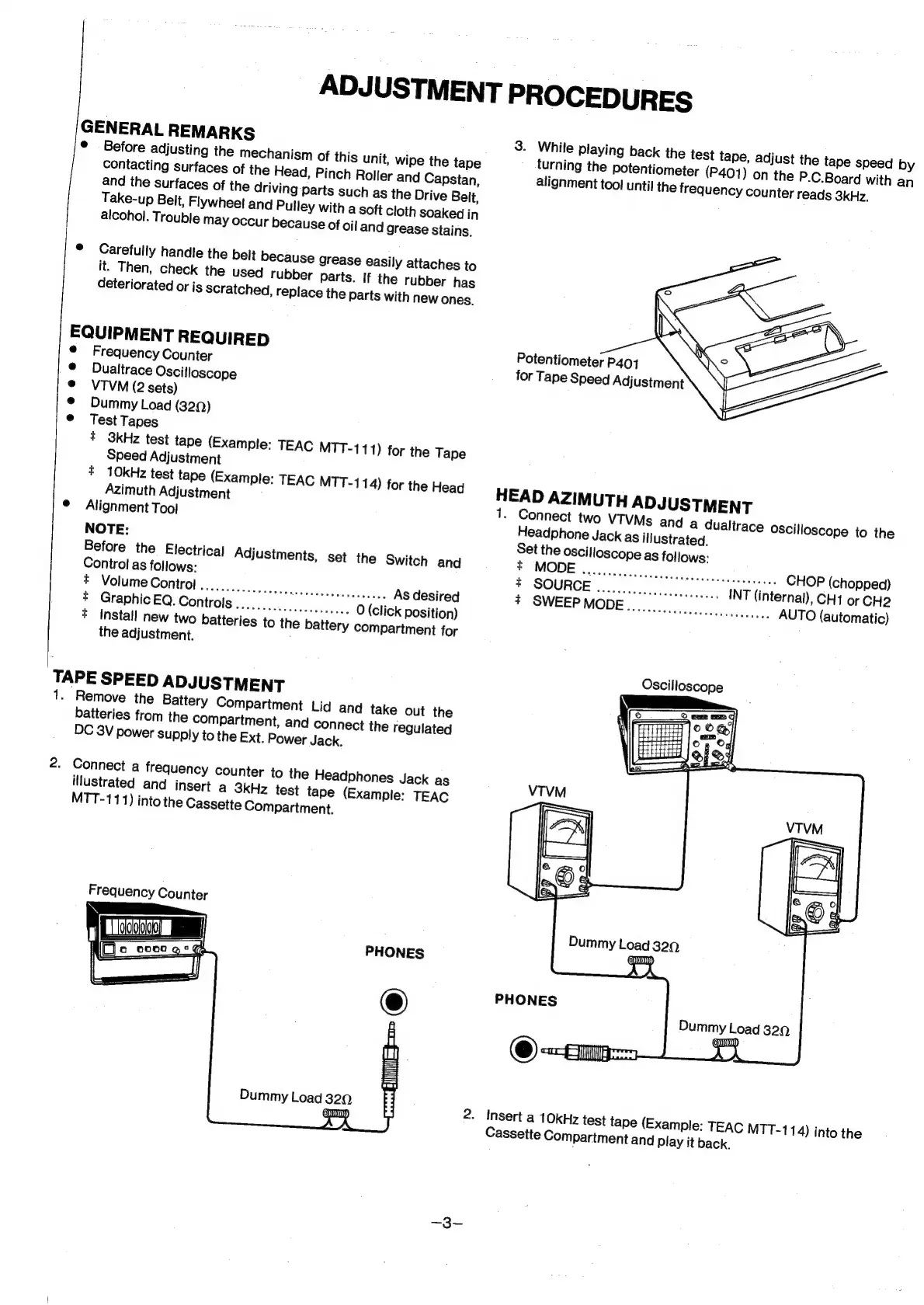
Connect
a
frequency
counter
to
the
Headphones
Jack
as
illustrated
and
insert
a
3kHz
test
tape
(Example:
TEAC
MTT-111)
into
the
Cassette
Compartment.
Frequency
Counter
LJoloooigo]
a
[Fic
cong:
Gd
:
I
PHONES
2.
Insert
a
10kHz
test
tape
(Example:
TEAC
MTT-114)
into
the
Cassette
Compartment
and
play
it
back.