EasyManua.ls Logo

Sanyo RD2016 - Page 5

Sanyo RD2016
16 pages
Print Icon
To Next Page IconTo Next Page
To Previous Page IconTo Previous Page
Loading...
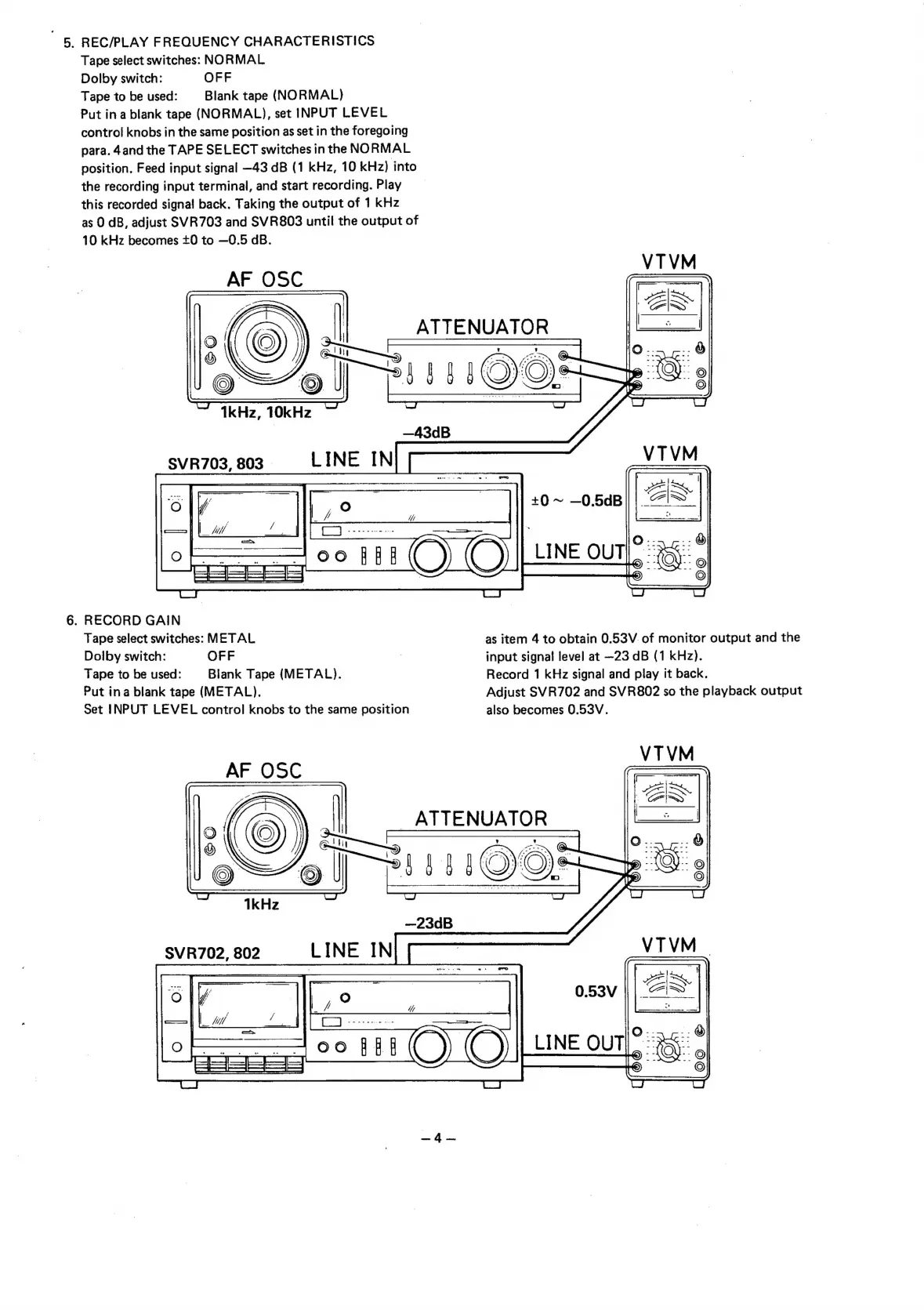
5.
REC/PLAY
FREQUENCY
CHARACTERISTICS
Tape
select
switches:
NORMAL
Dolby
switch:
OFF
Tape
to
be
used:
Blank
tape
(NORMAL)
Put
ina
blank
tape
(NORMAL),
set
INPUT
LEVEL
control
knobs
in
the
same
position
as
set
in
the
foregoing
para.
4and
the
TAPE
SELECT
switches
in
the
NORMAL
position.
Feed
input
signal
—43
dB
(1
kHz,
10
kHz)
into
the
recording
input
terminal,
and
start
recording.
Play
this
recorded
signal
back.
Taking
the
output
of
1
kHz
as
0
dB,
adjust
SVR703
and
SVR803
until
the
output
of
10
kHz
becomes
+0
to
—0.5
dB.
AF
OSC
ATTENUATOR
TkHz,
10kHz
LINE
IN
SVR703,
803
|
6.
RECORD
GAIN
Tape
select
switches:
METAL
as
item
4
to
obtain
0.53V.
of
monitor
output
and
the
Dolby
switch:
OFF
;
input
signal
level
at
~23
dB
(1
kHz).
Tape
to
be
used:
Blank
Tape
(METAL).
Record
1
kHz
signal
and
play
it
back.
Put
ina
blank
tape
(METAL).
Adjust
SVR702
and
SVR802
so
the
playback
output
Set
INPUT
LEVEL
control
knobs
to
the
same
position
also
becomes
0.53V.
eee
eee
=

Related product manuals