EasyManua.ls Logo

Sanyo RD250 - Parts Location

Sanyo RD250
11 pages
Print Icon
To Next Page IconTo Next Page
To Previous Page IconTo Previous Page
Loading...
ADJUSTMENT
OF
AMPLIFIER
UNIT
*
Adjust
as
follows
after
cleaning
the
head
and
adjusting
its
azimuth
properly.
*Set
the
input
switch
at
the
LINE
side.
TEST
OSCILLATOR
{OSCILLATOR
&
ATTEMUATOR)
OSCILLOSCOPE
(1)
(2)
(3)
LINE
IN
LINE
OUT
Adjustment
of
playback
output
DOLBY
NR
switch:
OFF
Tape
selector:
NORMAL
Test
tape:
MTT-150
(Dolby
tape)
Play
back
test
tape,
and
turn
SVR701
(L-ch),
SVR801
(R-ch)
until
the
playback
output
becomes
0.55
V.
Adjustment
of
level
meter
DOLBY
NR
switch:
OFF
Tape
selector:
NORMAL
Test
tape:
MTT-150
(Dolby
tape)
Play
back
test
tape,
and
turn
SVR703
(L-ch),
SVR803
(R-ch)
until
the
+3
dB
LED
on
level
meter
begins
to
light
up.
Adjustment
of
record,
playback
output
DOLBY
NR
switch:
OFF
Tape
selector:
METAL
Input
signal:
—20
dB,
1
kHz
Tape:
Metal
tape
(AC-711
or
the
like)
.
Feed
input
signal
to
record
input
terminal,
and
pause
the
set
in
record
mode.
.
Turn
the
input
level
adjusting
knob
until
the
record
monitor
output
becomes
0.4
V.
.
Record
this
input
signal.
.
Press
the
rewind
button
the
rewind
the
tape
to
the
record
starting
position.
.
Press
the
play
button.
.
Make
sure
the
playback
output
is
0.4
V.
.
If
other
than
0.4
V,
turn
SVR702
(L-ch),
SVR802
(R-ch)
to
adjust.
.
Repeat
steps
3.
to
7.
to
adjust
the
playback
output
to
0.4
V
precisely.
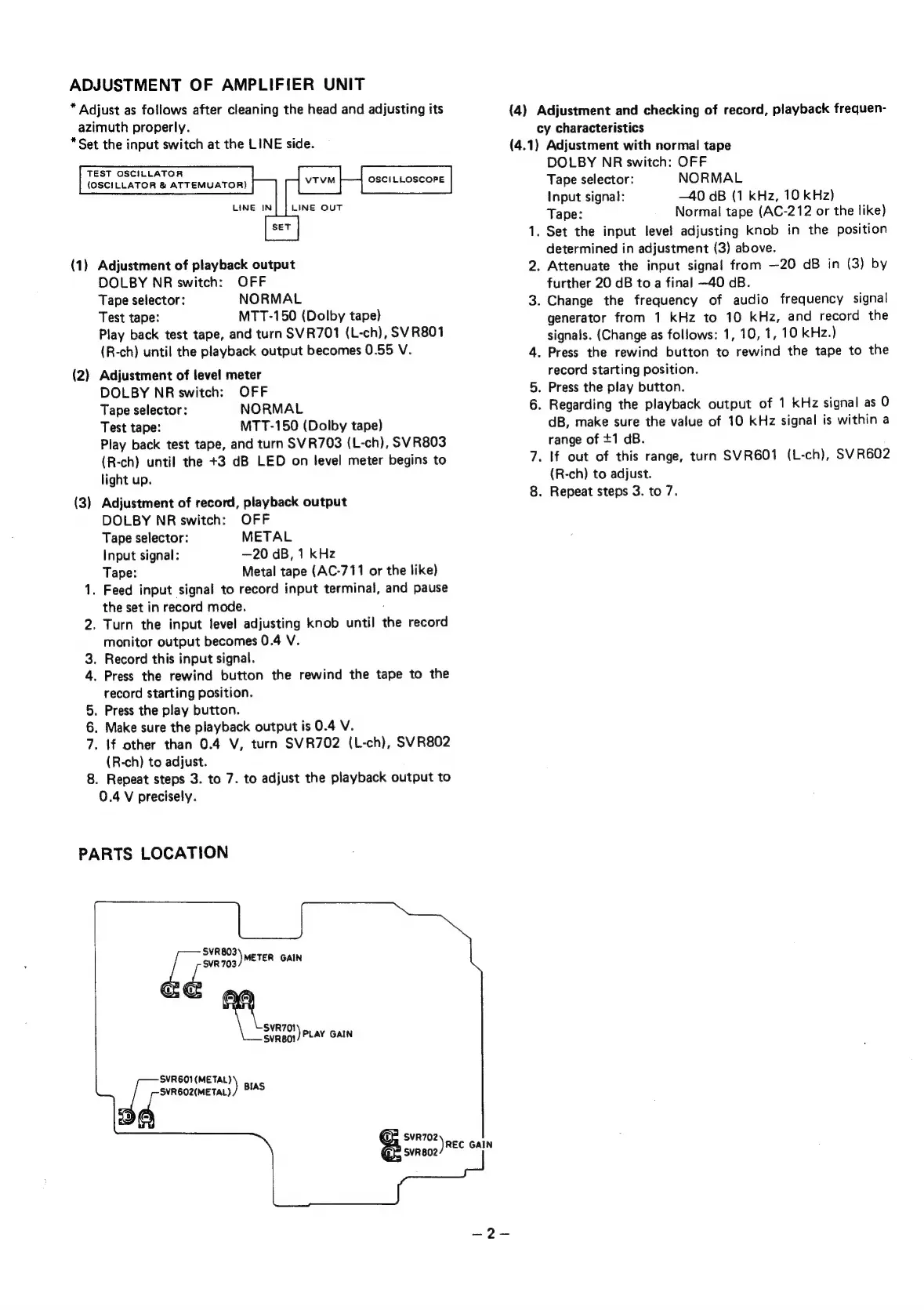
PARTS
LOCATION
SVR803
SVR
703
)
METER
GAIN
S
a
SVR701
Svnaot)
PLAY
GAIN
SVR601(METAL)
SVR602(METAL)
rt
)
BIAS
Syn
702
Rec
GAIN
SVR802
(4)
Adjustment
and
checking
of
record,
playback
frequen-
cy
characteristics
(4.1)
Adjustment
with
normal
tape
DOLBY
NR
switch:
OFF
Tape
selector:
NORMAL
Input
signal:
—40
dB
(1
KHz,
10
kHz)
Tape:
Normal
tape
(AC-212
or
the
like)
1.
Set
the
input
level
adjusting
knob
in
the
position
determined
in
adjustment
(3)
above.
2.
Attenuate
the
input
signal
from
—20
dB
in
(3)
by
further
20
dB
to
a
final
—40
dB.
3.
Change
the
frequency
of
audio
frequency
signal
generator
from
1
kHz
to
10
kHz,
and
record
the
signals.
(Change
as
follows:
1,
10,
1,
10
kHz.)
4.
Press
the
rewind button
to
rewind
the
tape
to
the
record
starting
position.
5.
Press
the
play
button.
6.
Regarding
the
playback
output
of
1
kHz
signal
as
0
dB,
make
sure
the
value
of
10
kHz
signal
is
within
a
range
of
+1
dB.
7.
If
out
of
this
range,
turn
SVR6O1
(L-ch),
SVR602
(R-ch)
to
adjust.
8.
Repeat
steps
3.
to
7.

Related product manuals