In [WHITE BALANCE], select the desired fixed white balance mode and click SET .
3200:
For indoors (Fixes the color temperature to 3200K.)
5600:
For outdoors (Fixes the color temperature to 5600K.)
FLUORESCENT:
For fluorescent lighting (Fixes the color temperature to 4200K.)
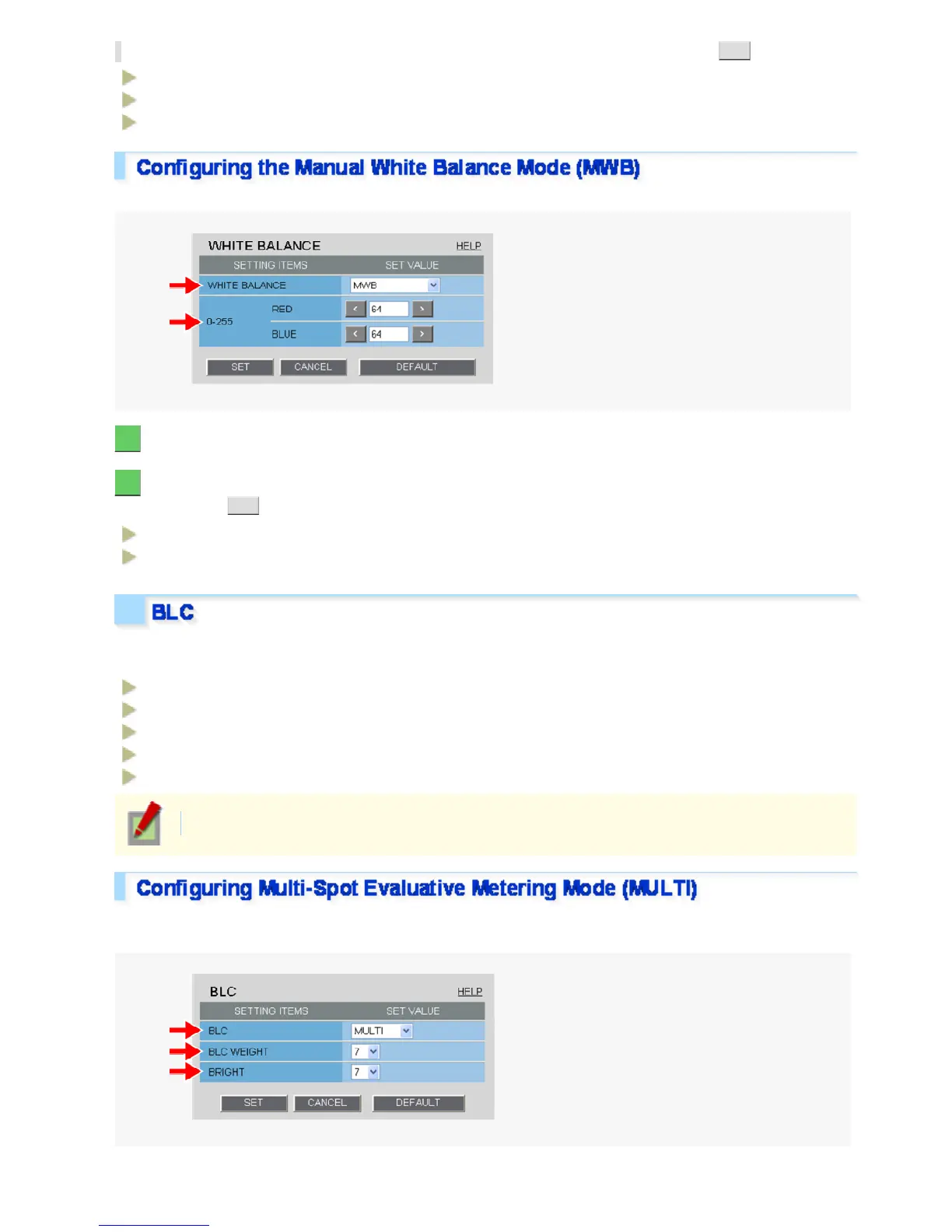
Use the following procedure to manually adjust the gain values for the red and blue signals.
1 In [WHITE BALANCE], select “MWB”.
2 In [RED] and [BLUE], specify the gain values for the red and blue signals, respectively,
and click SET .
RED:
0 (li
ht) to 255 (dark)
BLUE:
0 (light) to 255 (dark)
You can use the backlight compensation (BLC) function to make the subject easily visible under strong backlight
conditions.
OFF:
Disables the backlight compensation function.
MULTI:
Selects the multi-spot evaluative metering mode.
CENTER:
Selects the center-weighted evaluative metering mode.
MASKING:
Selects the light source masking mode.
FACE:
Selects the face detection backlight compensation mode.
The configured settings will be applied to “CAM1” or “CAM2”, whichever you selected under [VIEW].
Multi-spot evaluative metering compensates for the backlighting problem by evaluating the photometry of the
entire screen.
Workin




 To Next Page