12 13
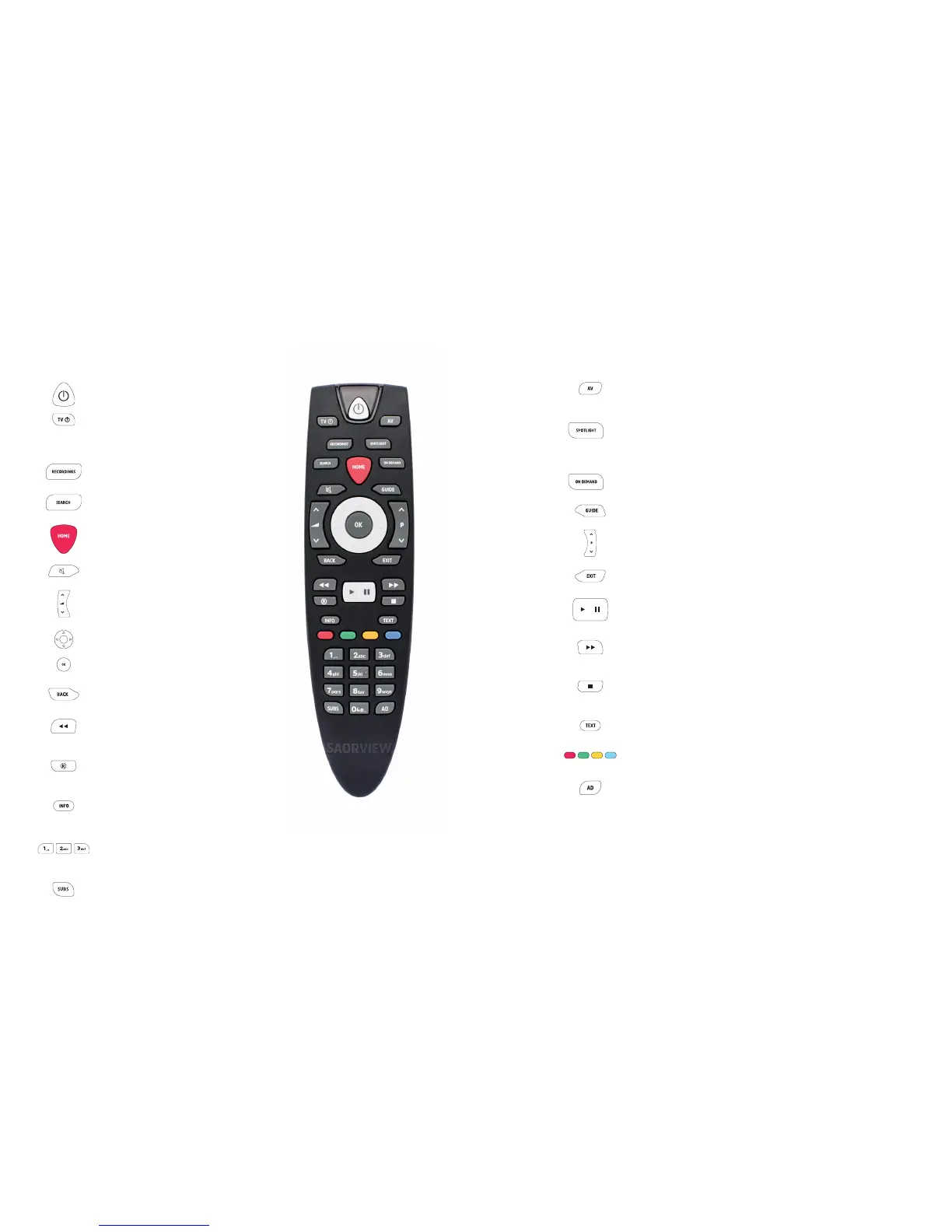
Your Saorview Remote Control
Power
Put the box into standby, and on again.
TV
Your Saorview remote control can be used
to operate your TV. See page 14 for how to
programme your remote control.
Recordings
Go straight to your recordings. See footnote.*
Search
Title search for programmes on Saorview
channels.
Home
Bring up the home screen and the menu.
Mute
Turn o the volume.
Volume up and down
Increase or decrease the volume.
Up Down Le Right arrows
Move around the Guide and menus.
OK
Confirm your selection.
Back
Go back one step.
Rewind
Rewind recordings and On Demand
programmes.*
Record
Record what you’re watching or set a recording
in the TV guide.
Info
Press for more information when you see the i
icon on the screen.
Number buons
Use the number buons to enter channel
numbers.
Subtitles
Turn subtitles on or o on Saorview channels
when available.
* Recordings will be enabled following a soware
update scheduled for middle of 2018. Register for
a Saorview ID and we will let you know when the
recordings feature is enabled.
AV
Change your TV’s AV input seing. See page 14
on how to programme your remote control.
Spotlight
The Saorview team’s picks of the best
programmes to watch this week on Saorview
channels and On Demand.
On Demand
Bring up the On Demand menu.
Programme Guide
Open up the Guide for Saorview channels.
Channel up and down
Scroll through channels.
Exit
Take you back to live TV.
Play / Pause
Pause live TV, recordings and On Demand
playback, and play.*
Fast forward
Fast forward recordings and On Demand
programmes.*
Stop
Stop playback of a recording and On Demand
playback.*
Text
View Digital Teletext on Saorview.
Colour buons
Give you more options on-screen.
Audio Description
Turn audio description on or o on Saorview
channels when available.


 To Next Page