12
13
14
27
The Sapling Company, Inc.
1633 Republic Road
Huntingdon Valley, PA 19006
USA
P. (+1) 215.322.6063
F. (+1) 215.322.8498
www.sapling-inc.com
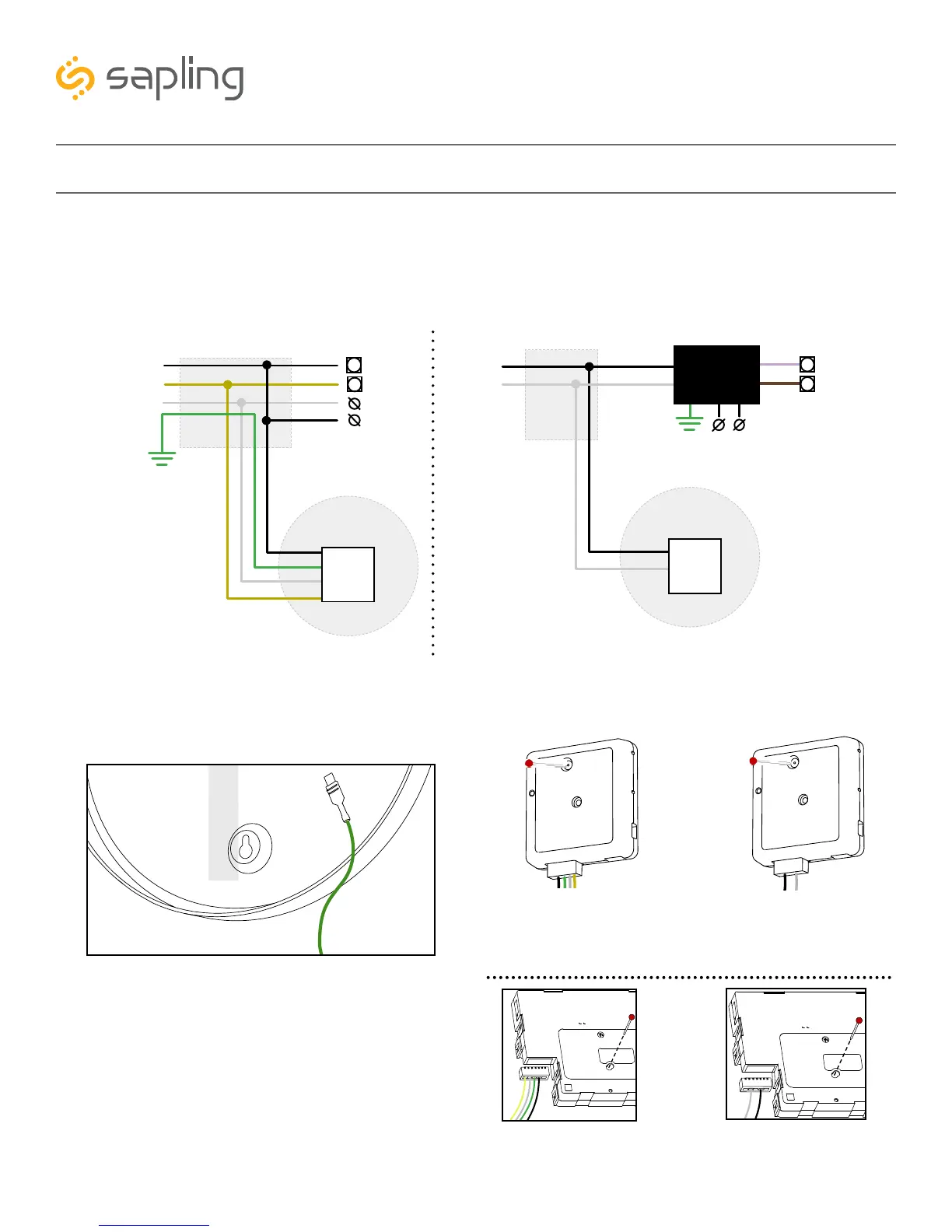
Flag Mount Installation - Round Metal Clock
12) Attach the power connector to the wires you threaded through the pole. Consult the diagrams
below for additional help, or see the sections of this manual labeled “3-Wire Synchronous (Sync-Wire)
Communication Wiring Information” or “2-Wire Digital Communication Wiring Information” for additional
details, depending on your system.
13) Attach the grounding wire to the grounding tab
below and to the right of the
clock movement.
14) Remove the gearbox pin, then, Attach a power
connector to the port on the bottom of the movement.
2-Wire Digital3-Wire Sync
Yellow
Black
White
Black
White
Yellow
27/24
26/23
To next
clock
Power
Common
Master Clock
CLOCK 1
Gang
Box
Green
Green
Ground
Black
White
Black
White
18
19
To next
clock
Master Clock
CLOCK 1
Gang
Box
115VAC o r
230VAC
A2/B2/C2
A1/B1/C1
Input A
Input B
Converter
Box
3-Wire Sync 2-Wire Digital
Black
Green
White
Yellow
Black
White
Yellow
White
Green
Black
White
Black
3-Wire Sync 2-Wire Digital



 To Next Page