Front Panel
2 AA Batteries
Base
Batteries Installation
Battery Location:
Batteries are optional (to provide backup power) if your thermostat was wired
to run on AC power when installed.
Battery replacement:
Install fresh batteries immediately when the “ ” warning begins flashing. Low Batt
The warning flashes about 60 days before batteries are depleted. Even if the
warning does not appear, you should replace batteries once a year, or before
leaving home for more than 1 month.
To replace batteries, set system to OFF, remove thermostat from wall and
install the batteries in the rear along thetop of the thermostat.
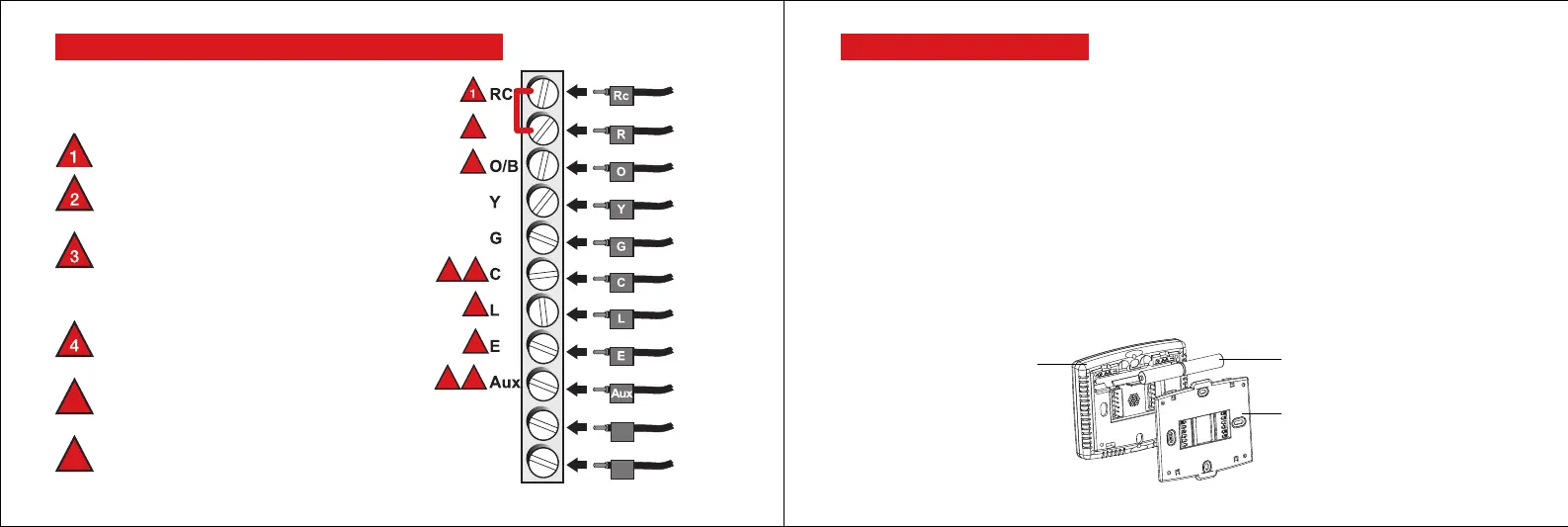
Alternate Wiring-For Heat Pumps Only
If labels do not match letters on the thermostat,
check the chart at right and connect to terminal
as shown here (see notes, below).
2
3
3
5
5
4
6
6
RH
S1
S2
S1
S2
Remote Sensor
Remote Sensor
Compressor
contactor
Fan relay
24v common
Changeover
valve
Equipment
monitor
Emergency
heat relay
Auxiliary heat
relay(Heat 2)
Leave metal jumper in place, connecting
R & RC terminals.
If your old thermostat had both V and VR
wires, stop now and contact a qualified
contractor for help.
If your old thermostat had separate O
and B wires, attach the B wire to the
C terminal. If another wire is attached
to the C terminal,stop now and contact
a qualified contractor for help.
If your old thermostat had Y1, W1 and
W2 wires, stop now and contact a
qualified contractor for help.
5
If L terminal is used, C terminal wire
must be connected (contact a
contractor if there is no C wire).
6
If E and Aux terminals do not each have
a wire connected, use a small piece of
wire to connect them to each other.
11 12



 To Next Page
 Loading...











