
 Need help?
Do you have a question about the Saswell SEA801-APP and is the answer not in the manual?
Steps to add the thermostat to the mobile app.
Interface shows coding number; phone returns to overview.
Insert batteries and prepare for adapter mounting.
Mount adapters and screw thermostat onto the adaptor.
Set timer programs for comfort and economy periods.
Manually set temperature, overriding current program.
Detects temperature drop and closes valve to save energy.
Indicates sensor issues with 'Err1' or 'Err2'.
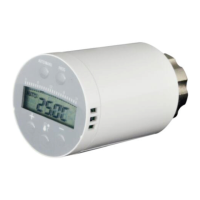
The SEA801-APP is an Electronic Radiator Controller designed for precise and independent control of heating radiators, offering both local and remote monitoring capabilities via a smartphone application. This stylish and accurate TRV (Thermostatic Radiator Valve) programmable controller can be fitted to new or existing thermostatic radiator valves, using a series of programmed settings to regulate room temperature effectively.
The core function of the SEA801-APP is to maintain a desired room temperature through PID control, ensuring efficient heating and energy saving. It supports 7-day independent programming, allowing users to set specific temperature schedules for each day of the week. This includes the ability to define two comfort and two economy periods daily, with options for uniform settings across all days or individual day customization.
A key feature is its remote monitoring capability, enabling users to control and monitor their radiator from a smartphone. The device can be added to the mobile app by a simple pairing process, involving simultaneous button presses on the thermostat to enter an "adding thermostat" mode, followed by an "add thermostat" action within the app's overview interface. If pairing fails, the thermostat will revert to its main screen, and the app will indicate the failure. Successful pairing displays the thermostat's coding number in the app.
The controller also includes a "Holiday mode" for constant temperature settings without a timer program, useful for extended periods away from home. Users can switch to manual operating mode and set a desired temperature, which will be maintained until the device is returned to automatic mode. A "Temporary override" function allows for temporary adjustments to the current program setting temperature, which will remain active until the next scheduled period begins.
For safety and convenience, the SEA801-APP incorporates a "Child lock function" to prevent unauthorized tampering. This feature is activated and deactivated by pressing specific buttons simultaneously for a few seconds. An "Open window function" detects sudden drops in temperature, indicating an open window, and automatically closes the valve to save energy. The valve will reopen when the temperature rises or after a set period, or can be manually reopened by pressing any button.
Operating the SEA801-APP involves a user-friendly interface with several buttons and a clear display. The "Auto/Manual mode switch button" toggles between automatic programmed control and manual operation. The "Program/Date/Time set button" is used for configuring schedules, date, and time. "Comfort/Economic temperature setting buttons" allow for quick adjustments to desired temperatures. "Raise" and "Lower" buttons are used for adjusting temperature or time settings.
The display provides visual cues for the controller's status, including indicators for "Auto mode," "Manual setting," "Holiday mode," and "Program setting mode." It shows the current set temperature or time clock, along with symbols for "Comfort mode," "Economic mode," "Frost protection open," and "Valve opening." A "program time period" indicator (0-24 hours) helps visualize the active schedule.
Installation is designed to be straightforward. After inserting batteries, the screen fully displays, shows the software version, and then a "TEST" symbol blinks, causing the connector to retract. This retraction facilitates mounting the adapter. The device supports RA and Caleffi adapters, which are tightened either with a screw or by hand, respectively. The thermostat is then screwed onto the adapter and hand-tightened.
The SEA801-APP includes several features aimed at maintaining its functionality and longevity. A "Low battery indicator" (a blinking battery symbol) alerts users when the batteries need to be changed. When the battery level is critically low, the valve automatically opens completely, and the screen display may turn off to conserve power.
To prevent valve seizure, a "Lime scale protection" feature ensures that if the valve is not fully opened within two weeks, it will automatically open and close for a short period. This action helps prevent the buildup of lime scale and ensures smooth operation. The display will show "AdAp" during this process.
"Frost protection" is another crucial maintenance feature. If the ambient temperature drops below 6°C, the radiator controller will open the valve until the temperature rises above 8°C. This prevents the radiator from freezing, protecting the heating system from potential damage.
The device also provides "Error codes" for troubleshooting. "Err1" indicates a short circuit in the NTC sensor, while "Err2" signifies an open circuit in the NTC sensor. These codes help users identify and address potential issues with the device's temperature sensing capabilities. If the program settings need to be reset to factory defaults, holding both the "+" and "-" buttons for at least 3 seconds will make the screen show "DEF" blinking three times, restoring all program settings to their original state.
 General
| Communication | Wi-Fi |
|---|---|
| Display | LCD |
| Installation | Wall-mounted |
| Power Supply | 2 x AA Batteries |
| App Control | Yes |
| Temperature Range | 5°C - 35°C |
| Type | Smart Thermostat Controller |
| Control Interface | Touch Buttons, Mobile App |

 To Next Page