ESPT JARUEN DE KO ESPT JARUEN DE KO
03025/03026
- 03 -
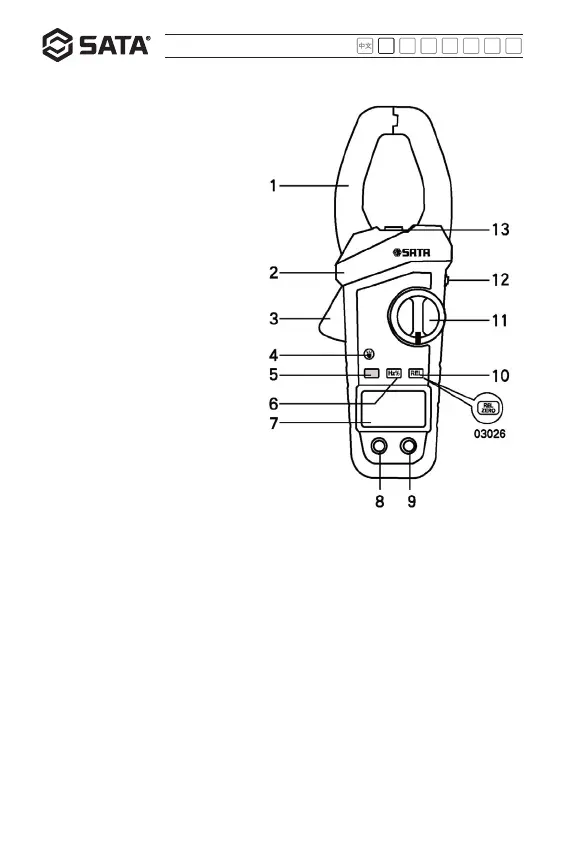
16
touching the head or the measured
conductor. When the meter is held
by hand, the fingers shall not go
beyond the insulated gate.
3. Trigger:
It is used to control the opening and
closing of the head.
4. Flashlight switch button
5. Function switching button
03025: This button is used for
function switch among resistance,
continuity and diode.
03026:This button is also used for
function switch among AC, DC, AC
and DC voltage.
6. “Hz%” function button
It is used to switch between
frequency measurement mode and
duty cycle measurement mode.
7. LCD
8. "COM" jack: Input jack of black
probe.
9. "INPUT" jack: Input jack of red probe.
10. 03025: "REL" button, used to enter and deactivate the relative value measurement mode.
03026: "REL/ZERO" button, used as a zero setting button during DC test.
11. Function/position switch
This switch is used for selecting desired function and position, and switching on or off
meter power.
12. "HOLD" button and backlight button
* Press the button for data hold;
* Press and hold this button for about 2 s to turn on or off the backlight. The backlight will
be turned off automatically about 15 s after turned on.
13. Flashlight source


 To Next Page