EasyManua.ls Logo

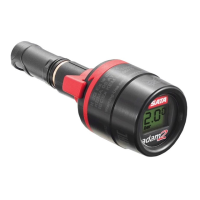
SATA adam 2 display - User Manual

SATA adam 2 display
14 pages
Print Icon
To Next Page IconTo Next Page
Loading...
SATA adam 2
SATA adam 2 mini, SATA adam 2 display, SATA adam 2 U
Betriebsanleitung | Упътване за работа | 使用说明书 | Návod k použití
Betjeningsvejledning | Kasutusjuhend | Operating Instructions Instruc-
ciones de servicio | Käyttöohje | Mode d'emploi | Οδηγίες λειτουργίας
Üzemeltetési utasítás | Istruzione d'uso | Naudojimo instrukcija
Lietošanas instrukcija | Gebruikershandleiding | Bruksveiledning
Instrukcja obsługi | Instruções de funcionamento | Manual de utilizare
Руководство по эксплуатации | Bruksanvisning | Navodilo za obrato-
vanje | Návod na použitie | Kullanım talimatı | Operating Instructions
163881-BAL-SATA adam 2.indb 1 12.02.2016 15:10:26

Questions and Answers

  • M
    Misty EscobarAug 2, 2025
    What to do if no pressure is displayed on SATA Measuring Instruments?
    • R
      Ricardo LiAug 3, 2025
      If no pressure is displayed on your SATA Measuring Instruments, first, replace the battery. If the issue persists, ensure the display is properly snapped into the dock. Slide in the display until it snaps home.
  • U
    ublakeAug 7, 2025
    Why display of SATA adam 2 display Measuring Instruments does not snap-in?
    • M
      Mary LynchAug 7, 2025
      If the display of your SATA Measuring Instruments does not snap in, it could be due to a damaged locking clip. In this case, replace the locking clip. Alternatively, the slide-in groove of the connection module might be clogged or damaged. Clean the groove, or replace the dock if necessary.
  • M
    Mary WolfeAug 12, 2025
    How to remove the display of SATA Measuring Instruments if it's stuck?
    • B
      brian49Aug 12, 2025
      If the display of your SATA Measuring Instruments cannot be removed or is difficult to remove, ensure the regulation wing is in the horizontal center position. Also, check if the slide-in groove is clogged and clean it if necessary. Another potential cause is that the locking clip has not snapped in; press in the locking clip. Finally, avoid soaking in solvent, as the special O-ring may be swollen.
  • M
    Melissa MathewsAug 16, 2025
    What to do if SATA Measuring Instruments leaks air between display and connection module dock?
    • C
      Craig WashingtonAug 17, 2025
      If air leaks between the display and connection module dock of your SATA Measuring Instruments, the O-ring beneath the locking clip might be missing or damaged. Replace the O-ring.
  • R
    randy95Aug 22, 2025
    Why SATA Measuring Instruments leaks air from the ball valve?
    • C
      Christine McdonaldAug 22, 2025
      If air leaks from the ball valve of your SATA Measuring Instruments when using it without the display, the ball valve may be clogged. Clean the ball valve.
  • V
    Vanessa SmithAug 27, 2025
    Why is the digital display of my SATA adam 2 display Measuring Instruments black or blurred?
    • P
      Phillip TaylorAug 28, 2025
      If the digital display of your SATA Measuring Instruments is either black or blurred, it may have been excessively exposed to cleaning solution. Refer to the cleaning instructions or consider replacing the digital unit.

Summary

Symbols

Technical Data

Scope of Delivery

Technical Design

Intended Use

Safety Instructions

General Safety Instructions

Provides general safety guidelines for using the device.

Specific Safety Advice

Offers specific safety advice and warnings for device operation.

Personal Protection Equipment

Use In Explosive Areas

Use

Disassembly and Assembly of the Display

Steps for disassembling and assembling the device's display unit.

Adjust Spray Gun Inlet Pressure

Cleaning of the Pressure Measuring Devices

Battery Replacement

Troubleshooting

Disposal

After Sale Service

Warranty; Liability

Spare Parts

Declaration of Conformity

SATA adam 2 display Specifications

General IconGeneral
BrandSATA
Modeladam 2 display
CategoryMeasuring Instruments
LanguageEnglish

Related product manuals