80
EN
Operating instructions pressure measuring devices SATA adam 2, SATA adam 2 U
7.2. Adjust Spray Gun Inlet Pressure [4]
Note!
• Fully pull the trigger [4-1] and adjust the spray gun inlet pressure with
the regulation wing [4-2], then release the trigger.
• With SATA adam 2 U fully pull the trigger [4-1] – air micrometer on
spray gun must be fully opened –and adjust the spray gun inlet pressure
according to [4-1], the release the trigger.
• If the required spray gun inlet pressure is not reached, please increase
pressure at the air supply; high pressure leads to increased trigger
forces.
8. Cleaning of the Pressure Measuring Devices
Warning! Attention!
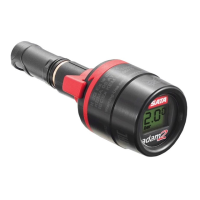
• Please make sure to remove the SATA adam 2 display before clean-
ing the spray gun in a gun washing machine (see chapter 7.1). Never
clean SATA adam 2 display in the washing machine! SATA
adam 2 dock can remain on the spray gun while cleaning the spray
gun in the gun washing machine.
• Please also observe the cleaning instructions for your SATA spray gun.
• Blow dry spray gun and material passage, air cap incl. thread and
gravityowcupaswellasthedock connection module with clean
compressed air after cleaning!
• Never soak the SATA adam 2 display or a spray gun in cleaning
agent!
• The SATA adam 2 display is exclusively to be cleaned with a
cloth soaked in cleaning agent. Afterwards, lubricate O-ring
[1-6] with high performance grease (Art. No. 48173).
• Use neutral cleaning solution (pH value 6 to 8)!
• Do not use acids, lyes, pickling agents, unsuitable reclaimed
materials or other aggresive cleaning media, such as Toluol,
for example!
• Do not clean the glass plate of the SATA adam 2 display with pointed,
sharp or abrasive objects!
• Please open the display in case of battery exchange only!
163881-BAL-SATA adam 2.indb 80 12.02.2016 15:10:48


 To Next Page