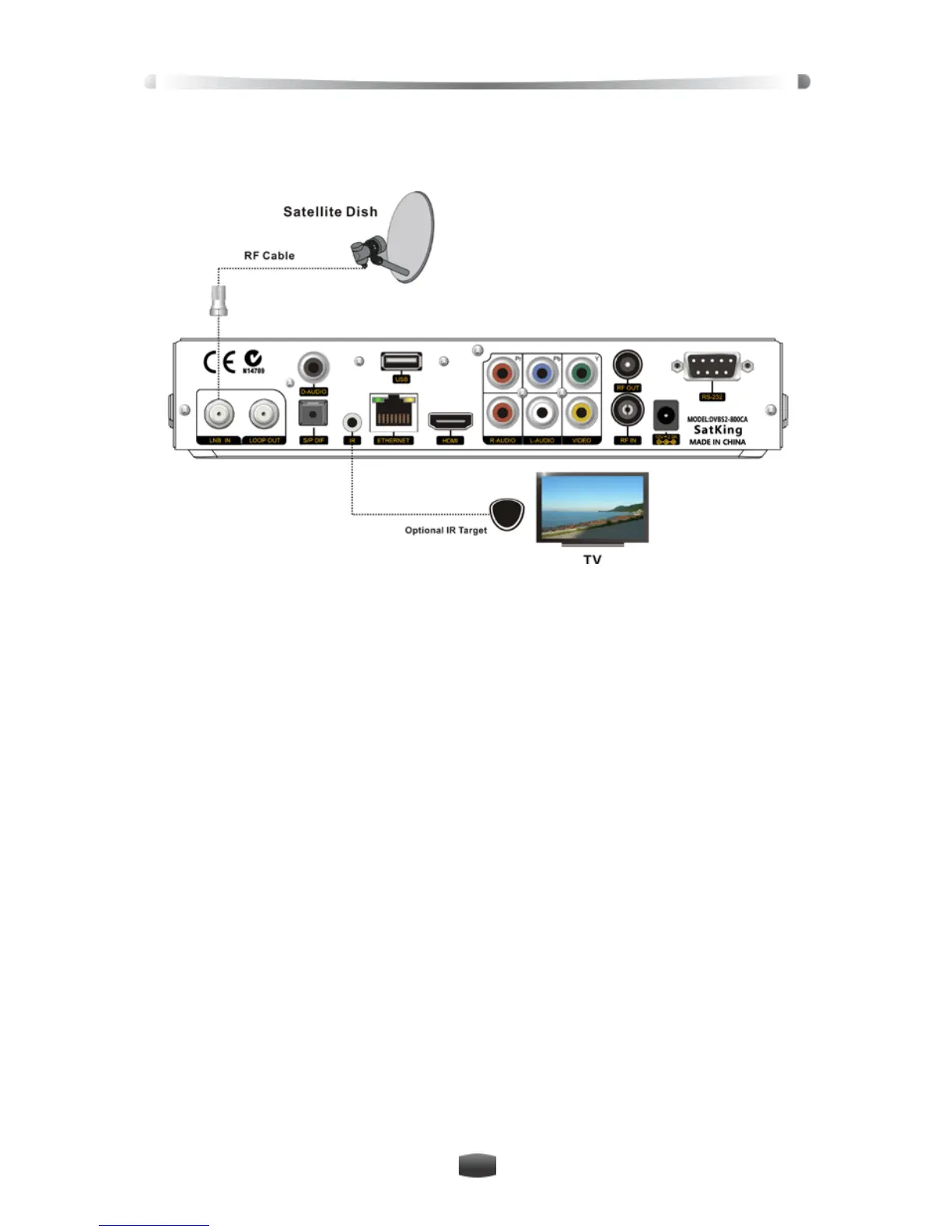
2.2 Connect Optional IR Target
Connect Optional IR Target to IR port and then you can place the receiver out of sight.
2.3 Connect other Device
For connection of other devices, please refer to following details:
Connect LOOP OUT port on the receiver to LNB IN port on 2
nd
receiver with an RF cable.
Connect D-AUDIO port on the receiver to corresponding port on amplifier with a D-AUDIO
cable, or connect S/P DIF port on the receiver to corresponding port on amplifier with an
S/P DIF cable, or connect R-AUDIO (red) L-AUDIO (white) ports on the receiver to cor-
responding ports on amplifier with an RCA cable.
Connect USB port on the receiver to USB device with a USB cable
Connect ETHERNET port on the receiver to Ethernet with a network cable (RJ-45).


 To Next Page