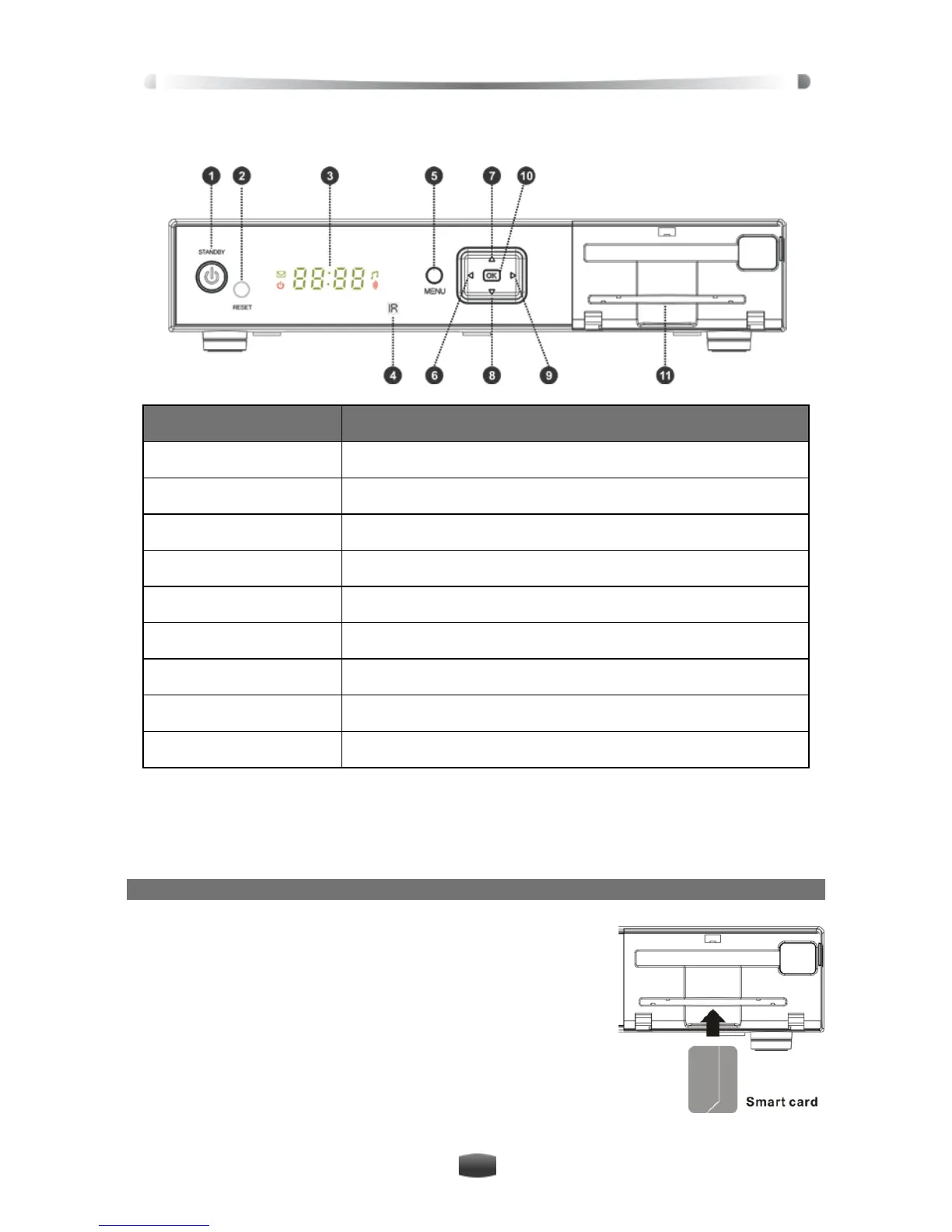
1.2 Front Panel
Name Function
1. STANDBY Switch between operation and standby modes
2. RESET Press the reset button in the event the unit freezes
3. DISPLAY Clock is displayed when unit is in Standby, CH# when on
4. IR Infrared remote sensor
5. MENU Display/exit from main menu
6/9.
Change channels or move cursor up/down
10. OK Display channel list or confirm operation
11. Smart card slot Open the cover to insert smart card
1.3 Conditional Access (CA)
Your VAST receiver requires the smart card to be inserted at all times to enjoy programs.
Note: The VAST smart card is already inserted
Insert Smart Card
1. Open the right-hand cover on front panel.
2. Face the side with electronic chip downwards and insert
the smart card into the lower slot horizontally according to
arrow direction.
Notes:
• The Smart Card number is displayed under Informa-
tion in the system setting menu.
• Please note the smart card number in case of queries.
• Do not bend or damage the smart card.
• Do not place the smart card in hot environment or under direct sunlight.


 To Next Page