Overview
■ Package Content
• ST-8802 Channel Filter
• Mini USB-male / A-male cable
• AC/DC power adapter
• Start Guide
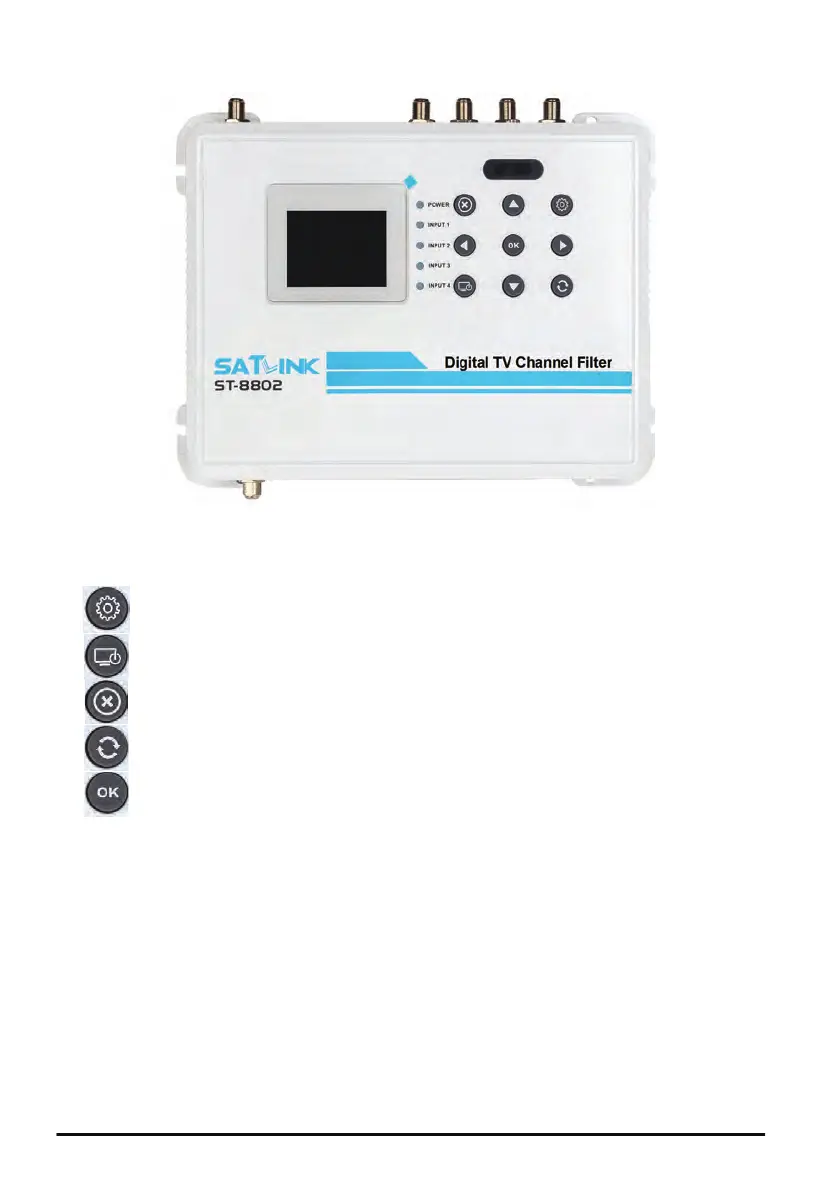
• 2.4” color LCD
• Keypad
• Main Menu
• Confirm the selection
• Cancel or Exit
• Rotate screen horizontally or
vertically
• Confirm the selection
•
◄►▲▼ Arrow keys to traverse
between fields or
increase / decrease
selected field value
• LEDs
• POWER solid red Power is up
• INPUT 1 to 4 flashing green No RF input
solid green RF input detected
■ Operation Panel
• Available video/audio source from
Cable TV or antenna
• Available TV set
• Available electrical power socket
Front Panel
• OUT RF output, 75Ω F
• IN1 to IN4 Antenna or Cable RF Input, 75Ω F
• 1000Base-T Gigabit Ethernet, RJ-45
• Mini USB USB for software upgrade from PC
• 12VDC IN Power Input
Back Panel
• TEST OUT RF output test port, 75Ω F, -20dB
• GND Grounding
• Cable TV (USA) J.83B
• Over-the-Air TV (USA) ATSC (8VSB), ATSC3
• Cable TV (EU, SA) DVB-C (J.83A/C)
• Over-the-Air TV (CO) DVB-T
• Over-the-Air (SA) ISDB-T(b)
■ Installation Requirement
■ Peripheral Interface
■ TV Standards
2
ST-8802 Digital TV Channel Filtering Optimizer/Encoder


 To Next Page