
 Need help?
Do you have a question about the Satlink ST-8802 and is the answer not in the manual?
Details the ST-8802's capabilities including channel capture, multiplexing, and support for various TV standards.
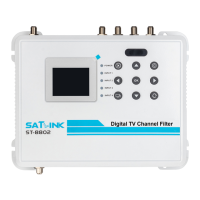
Describes the device's LCD, keypad, status LEDs, and their functions.
Details device connectors, included items, and installation requirements.
Outlines the TV broadcast standards (ATSC, DVB-T, etc.) compatible with the filter.
Illustrates combining HDMI video with terrestrial/cable TV channels using an RF modulator.
Shows how the ST-8802 can replace multiple components in a TV signal path.
Demonstrates combining HDMI video channels with DVB signals via an RF modulator.
Details how to configure channel index, status, name, input port, channel, and frequency.
Describes configuration options for antenna power, band selection, and preamplifier for input ports.
Covers OSD language, TV standard, country selection, and key tone settings.
Outlines configuration for IP address, subnet mask, default gateway, and factory reset.
Explains configuring OSD language, country, TV standard, and output attenuation before channel editing.
Guides on selecting input channels from antenna or cable, considering frequency and channel plans.
Details the procedure for extracting, shifting, and setting output channels using the device interface.
Instructions for connecting the device via Ethernet and configuring PC IP for web access.
Describes accessing and using the web management pages for device configuration.
Lists interface details, frequency range, input/output levels, gain, and protection.
Covers power supply, dimensions, weight, and operating/storage temperature ranges.
Discusses optimization of video/audio quality, packet latency, and encoding standards.
Provides reference channel plans and frequencies for DVB-T in specific regions.
Provides reference channel plans and frequencies for ATSC broadcasts in North America.
Provides reference channel plans and frequencies for ISDB-T(b) in South America.
Provides reference channel plans and frequencies for DVB-C broadcasts.
Provides reference channel plans and frequencies for J.83B broadcasts in North America.
Covers limited hardware warranty, software updates, and essential safety precautions for device usage.
Details FCC Class B equipment compliance and CE conformity declarations for EU regulations.
Provides guidance on identifying and resolving potential problems encountered during device operation.
The ST-8802 is a 32-Channel Digital TV Channel Filtering Optimizer/Encoder designed to capture up to 32 terrestrial or cable TV channels and deliver multiplexed TV signals over a coax network. This device acts as a programmable terrestrial TV and cable TV channel filter, combiner, converter, equalizer, and amplifier.
The primary function of the ST-8802 is to process and combine multiple TV channels from various input sources into a single, amplified output signal suitable for distribution over a coax network to multiple TVs. It can capture and compose up to 32 TV channels to create a multiplexed output channel plan, incorporating Automatic Gain Control (AGC) for consistent signal levels. The device supports all major TV standards, including ATSC, DVB-T, ISDB-T(b), and DVB-C, with selectable channel bandwidths of 6, 7, or 8 MHz.
The ST-8802 is designed to replace several components in the TV signal delivery path, such as channel boosters, filters, and frequency converters, offering a compact and cost-effective solution. It features four input ports, each with an integrated preamplifier and a 12 VDC antenna power supply, allowing for flexible input configurations. The output power level is adjustable between 33 and 53 dBmV, enabling it to drive signal coverage for multiple televisions.
The device can also work in conjunction with HDMI to RF modulators to combine multiple HDMI video channels with terrestrial or cable TV channels, providing a versatile solution for various application scenarios.
Input and Output:
General:
TV Standards Supported:
Video Quality: Optimized by determining the size and speed to transmit MPEG packets. Packet latency and delay variation are automatically adjusted for best quality and performance. Supports MPEG-2 or MPEG-4 encoding and video content not protected under High-Bandwidth Digital Content Protection (HDCP).
The ST-8802 offers intuitive operation through an on-panel keypad and a 2.4" color LCD screen. It also supports remote access and configuration via a web-based management interface.
Operation Panel:
OK button: Confirms selection.X button: Cancels or exits.POWER: Solid red indicates power is up.INPUT 1 to 4: Flashing green indicates no RF input, solid green indicates RF input detected.Peripheral Interface (Front Panel):
OUT: RF output, 75Ω F.IN1 to IN4: Antenna or Cable RF Input, 75Ω F.1000Base-T: Gigabit Ethernet, RJ-45 for network connectivity.Mini USB: For software upgrades from a PC.12VDC IN: Power Input.Peripheral Interface (Back Panel):
TEST OUT: RF output test port, 75Ω F, -20dB.GND: Grounding connection.Configuration:
Channel Composition: The device allows users to compose up to 32 TV channels from various input ports. This involves selecting an input channel, shifting its frequency if necessary, adjusting the output power level, and placing it as an output channel. After composing channels, a TV auto-scan or manual rescan is required for detection.
 General
| Brand | Satlink |
|---|---|
| Model | ST-8802 |
| Category | Media Converter |
| Language | English |

 To Next Page