3
English
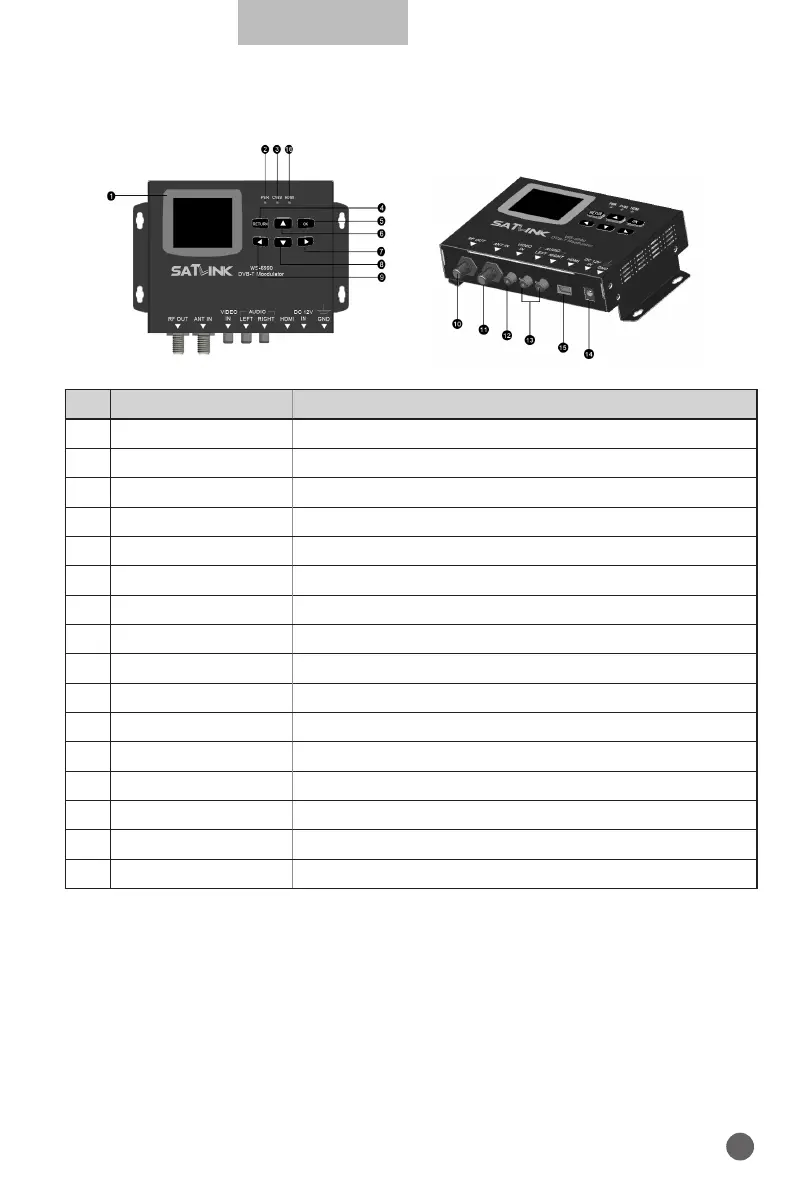
1.3 PRODUCT OVERVIEW & ILLUSTRATION
NO Description FUNCTION
1 LCD Screen Video display
2 PWR Power indicator light
3 CVBS CVBS indicator light
4 RETURN Return submenu and save settings
5 OK Confirm the current operation
6
Y
Change the frequency point or cursor up
7
B
Switch settings in menu or cursor right
8
Z
Change the frequency point or cursor down
9
A
Switch settings in menu or cursor left
10 RF OUT Rf output port
11 ANT IN Terrestrial Digital signal input port
12 VIDEO IN Composited video input port supports NTSC and PAL
13 AUDIO IN Stereo audio signal input port
14 DC 12V IN Connect to Adaptor Input
15 HDMI IN HDMI signal input port
16 HDMI HDMI indicator light


 To Next Page