Step 8
419200 www.sauder.com/servicesPage 12
å
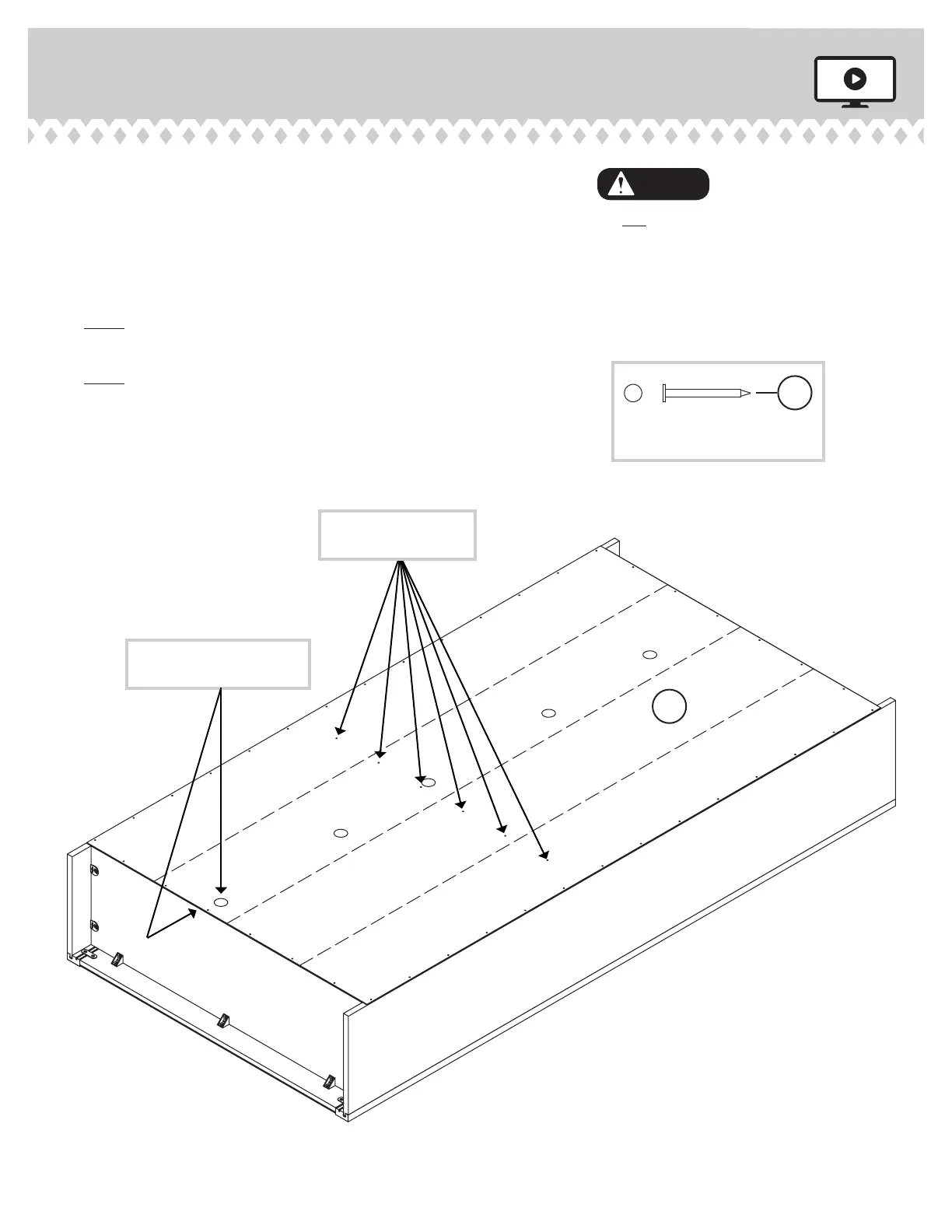
Unfold the BACK (E) and lay it over your unit.
å
Make equal margins along all four edges of the BACK (E).
Push on opposite corners of your unit if needed to make
it "square".
å
Fasten the BACK (E) to your unit using the NAILS (1N).
å
NOTE: Be sure to tap NAILS into the holes that line up
over the SHELF (D).
å
NOTE: Perforations have been provided for access
through the BACK. Carefully cut out the holes needed.
Do not stand the unit upright without the
BACK fastened. The unit may collapse.
Caution
Unfi nished
surface
NAIL
(46 used in this step)
1N
E
These holes must line
up over the SHELF (D).
This perforation should be
closer to the bottom edge.


 To Next Page