Step Step 27
å
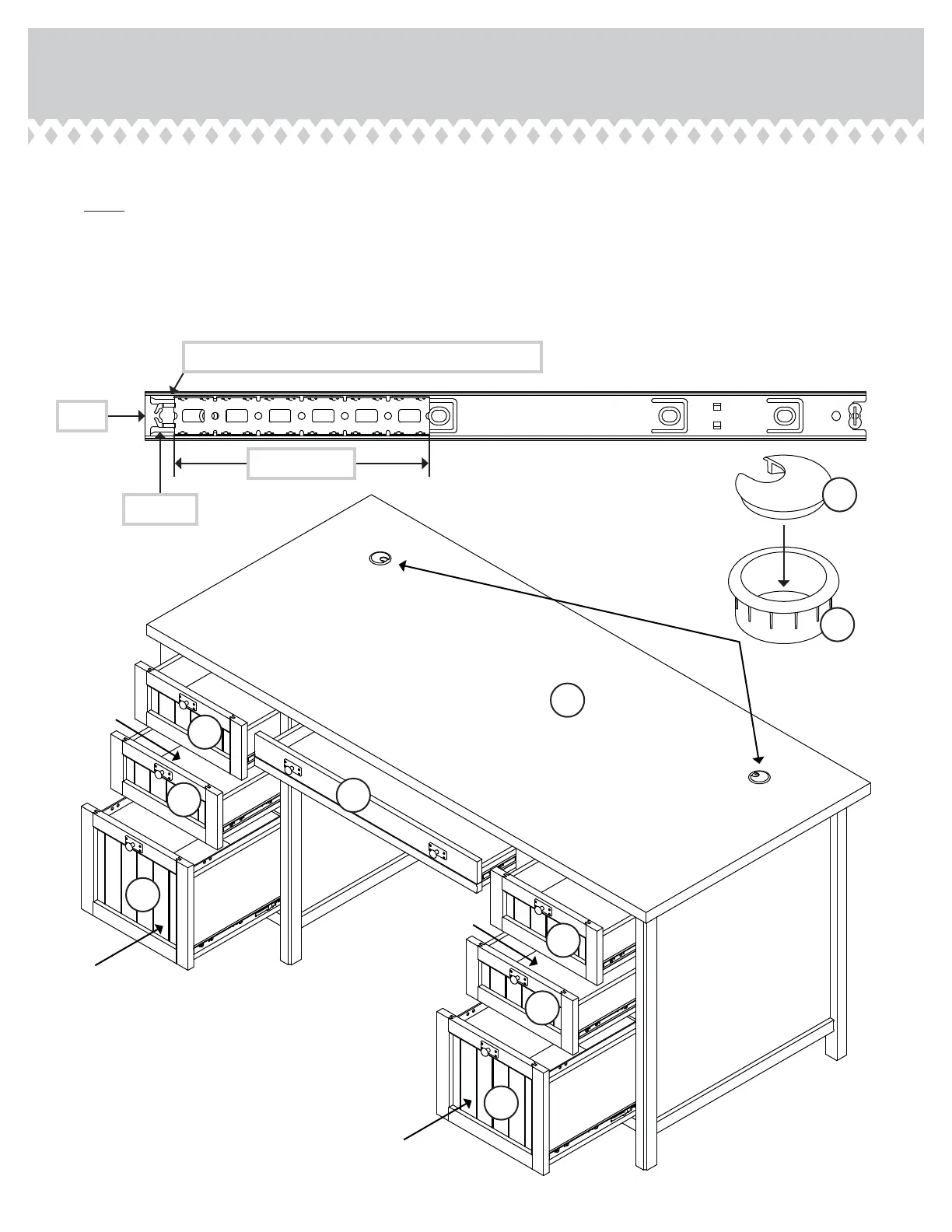
Carefully stand your unit upriht.
å
NOTE: Before insertin a drawer, be sure the INNER CARTRIDGE in the EXTENSION RAIL on your unit is all the way
forward. The INNER CARTRIDGE should click into place aainst the BLACK TAB.
å
To insert a drawer into your unit, line up the EXTENSION SLIDES on the drawer with the EXTENSION RAILS on the unit
and push the drawer into the unit until the drawer is fully inserted. The drawer will push in hard until it is all the way in, then
it will slide in and out easier.
å
Insert the GROMMET CAPS (1P) and GROMMETS (10P) into the lare holes in the TOP (U).
60 lbs.
25 lbs.
15 lbs.
35 lbs.
1P
10P
U
L
V
W
V
V
W
V
25 lbs.
25 lbs.
35 lbs.
25 lbs.
419954www.sauder.com/services
Pae 31
Extension Rail
Black tab
Click the inner cartride into place aainst the black tab.
Front
Inner cartride


 To Next Page