Step
å
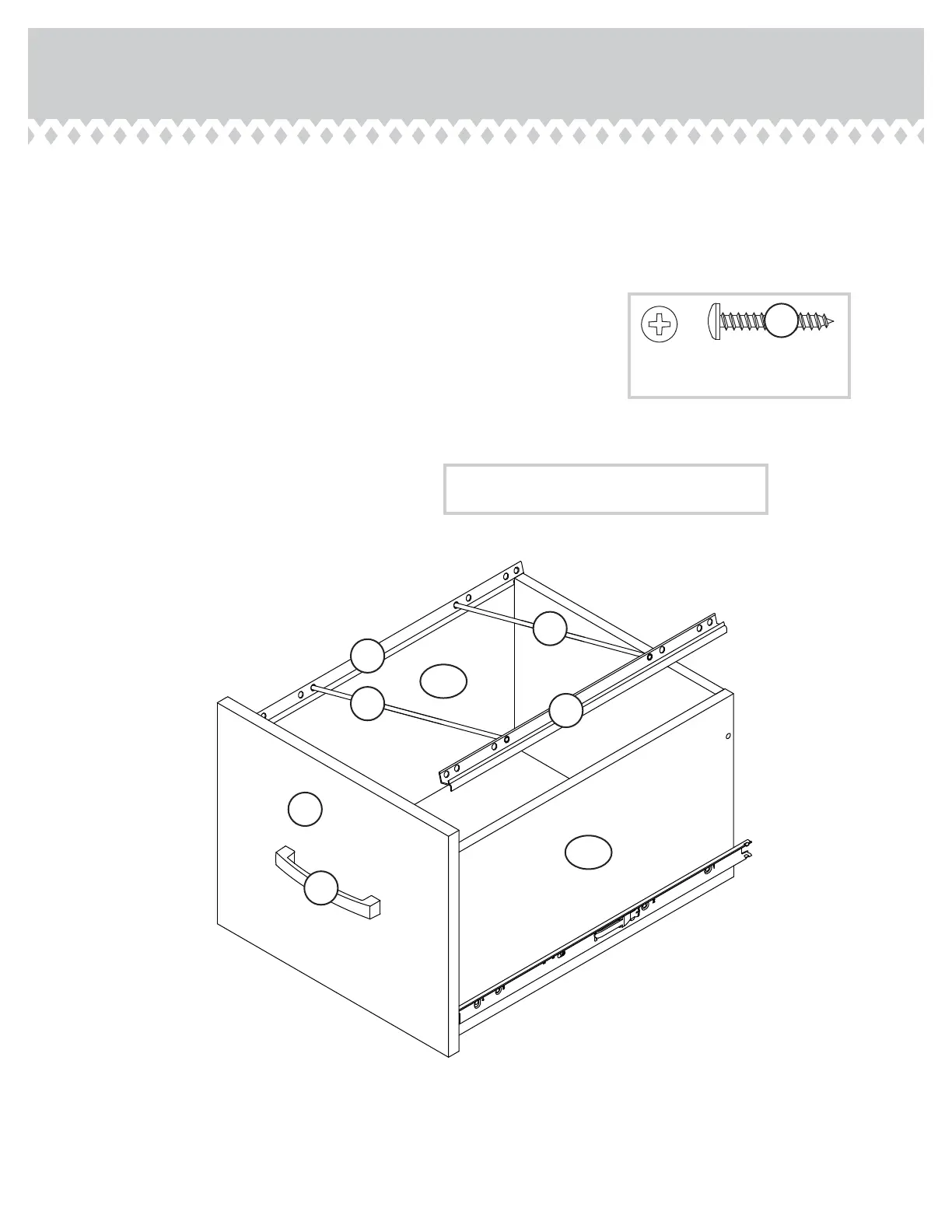
Push a FILE GLIDE (6B) onto the LARGE LEFT DRAWER SIDE (D88).
å
Slide the FILE RODS (8B) into the FILE GLIDE (6B) on the LARGE
LEFT DRAWER SIDE.
å
Slide another FILE GLIDE (6B) onto the other end of the FILE
RODS (8B), then press this FILE GLIDE over the LARGE RIGHT
DRAWER SIDE (D87).
å
Fasten a PULL (96K) to the LARGE DRAWER FRONT (T). Use two
BLACK 1" PAN HEAD SCREWS (60S).
å
Repeat this step for the other large drawer.
Step 19
408289 www.sauder.com/servicesPage 24
Insert the FILE RODS into the holes of your choice
in the FILE GLIDES, depending on your fi le sizes.
D87
D88
6B
8B
6B
8B
96K
BLACK 1" PAN HEAD SCREW
(4 used for the PULLS)
60S
T





 To Next Page