Step 23
403793 www.sauder.com/servicesPae 28
å
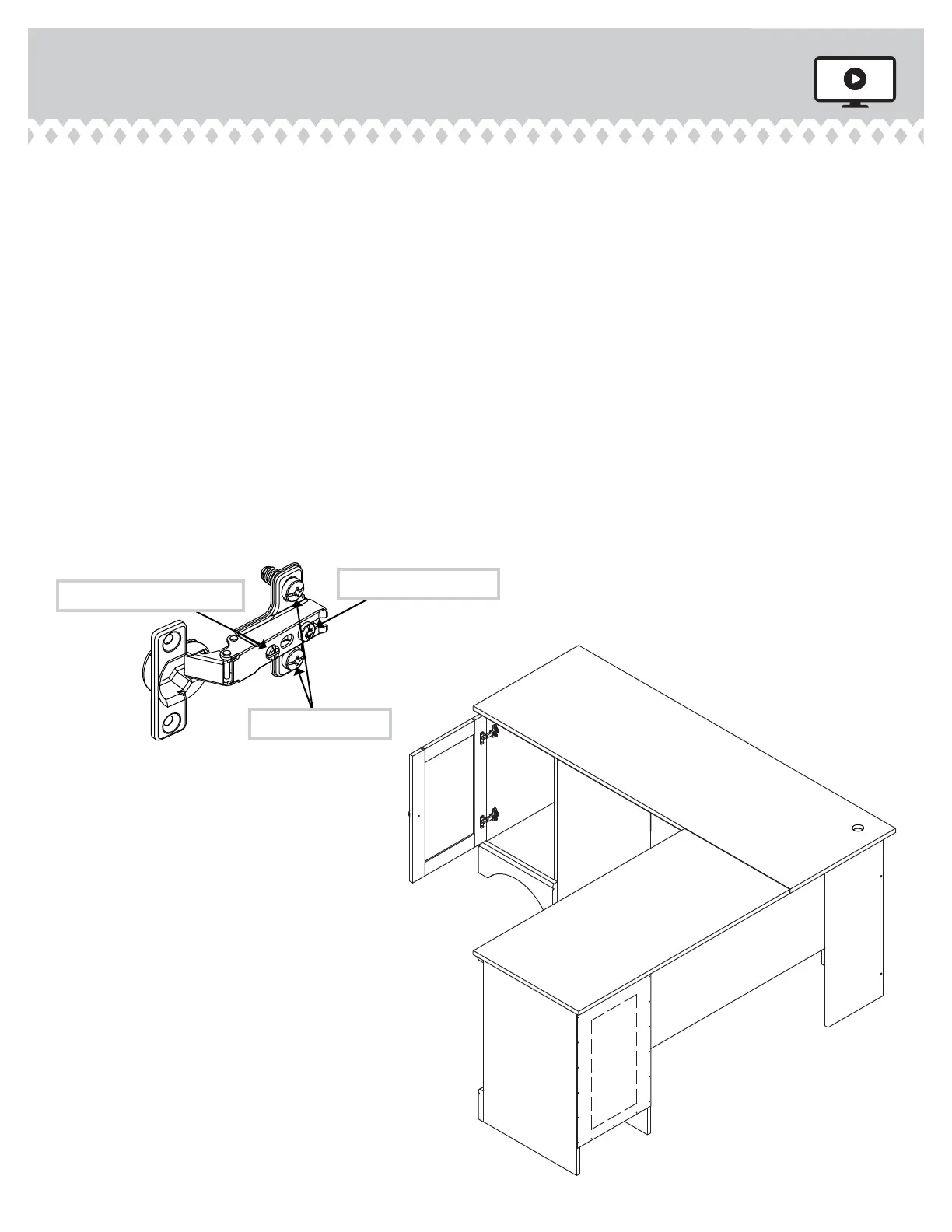
Refer to the enlared diaram to identify the parts on
the HINGES.
å
The DOORS may need some adjustments. Follow the text below
to make needed adjustments.
å
DOOR ADJUSTMENTS:
To adjust the DOORS from side to side (horizontal), turn the
adjustin screw in or out.
å
To adjust the DOORS up and down (vertical), loosen both
vertical adjustment screws. Move the DOORS up or down to the
desired location. Tihten the screws after makin adjustments.
å
To adjust the DOORS in or out (depth), loosen the mountin
screw one turn and move the DOORS in or out, as needed.
Tihten the mountin screw after makin adjustments.
Adjustin screw (horizontal)
Mountin screw (depth)
(vertical adjustment)



 To Next Page