å
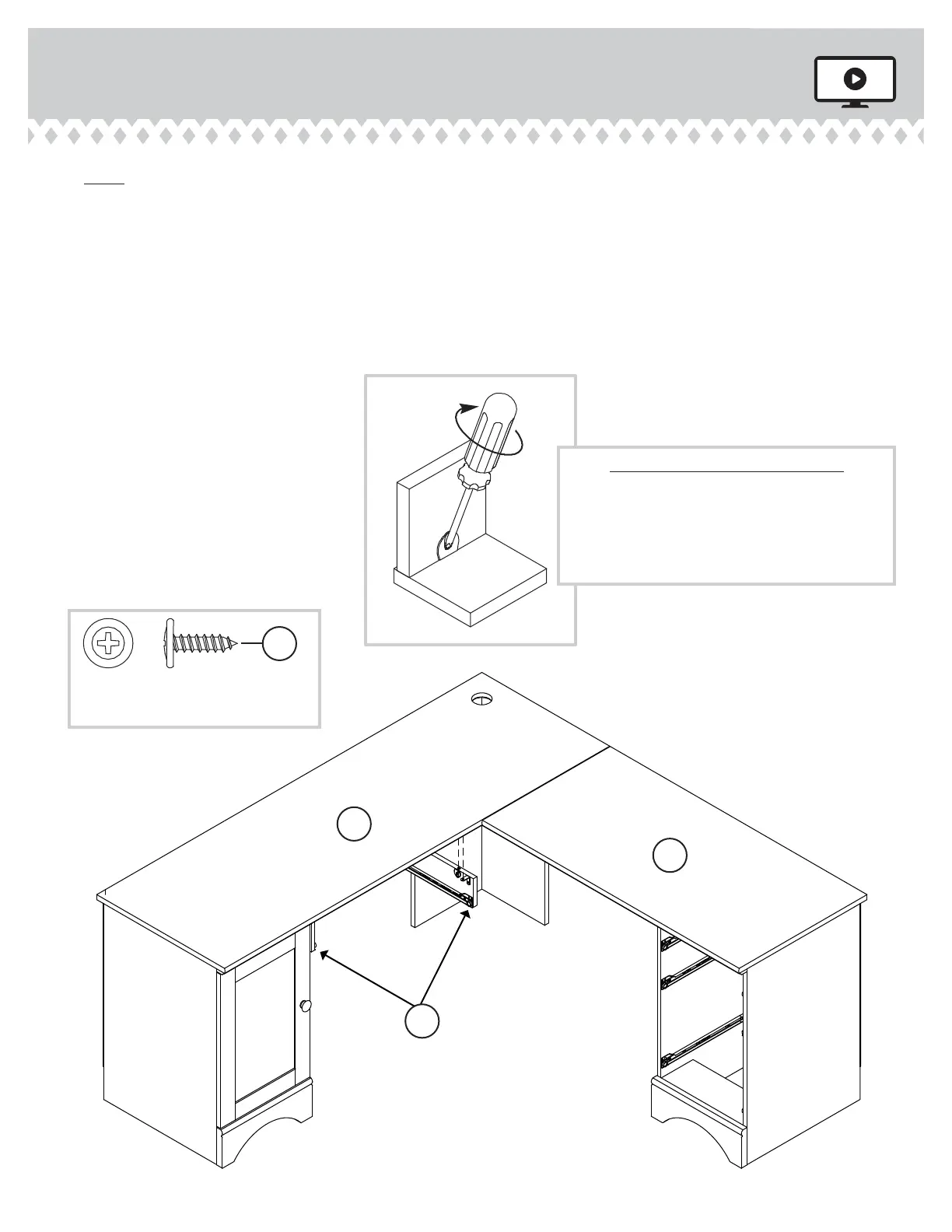
NOTE: The KEYBOARD SHELF can be attached to the riht side, left side, or the
center of your desk. If you want your SHELF on the riht, fasten the KEYBOARD
UPRIGHTS (S2) to the SMALL TOP (H2). If you want your SHELF in the center,
fasten the KEYBOARD UPRIGHTS (at an anle) to both TOPS (G3 and H2). The
diaram below is showin the option of the SHELF on the left side.
å
Fasten the KEYBOARD UPRIGHTS (S2) to the TOP (G3). Tihten four HIDDEN
CONNECTORS and use four BLACK 9/16" LARGE HEAD SCREWS (JJJ).
Step 25
403793 www.sauder.com/servicesPae 30
How to use the HIDDEN CONNECTOR
To fasten two parts together using the
HIDDEN CONNECTORS, insert your
screwdriver, at an angle, into the slot in the
HIDDEN CONNECTOR. While pushing the
screw into the hole of the adjoining part,
turn the screwdriver clockwise to tighten.
G3
H2
S2
BLACK 9/16" LARGE HEAD SCREW
(4 used for the METAL BRACKETS)
JJJ



 To Next Page