å
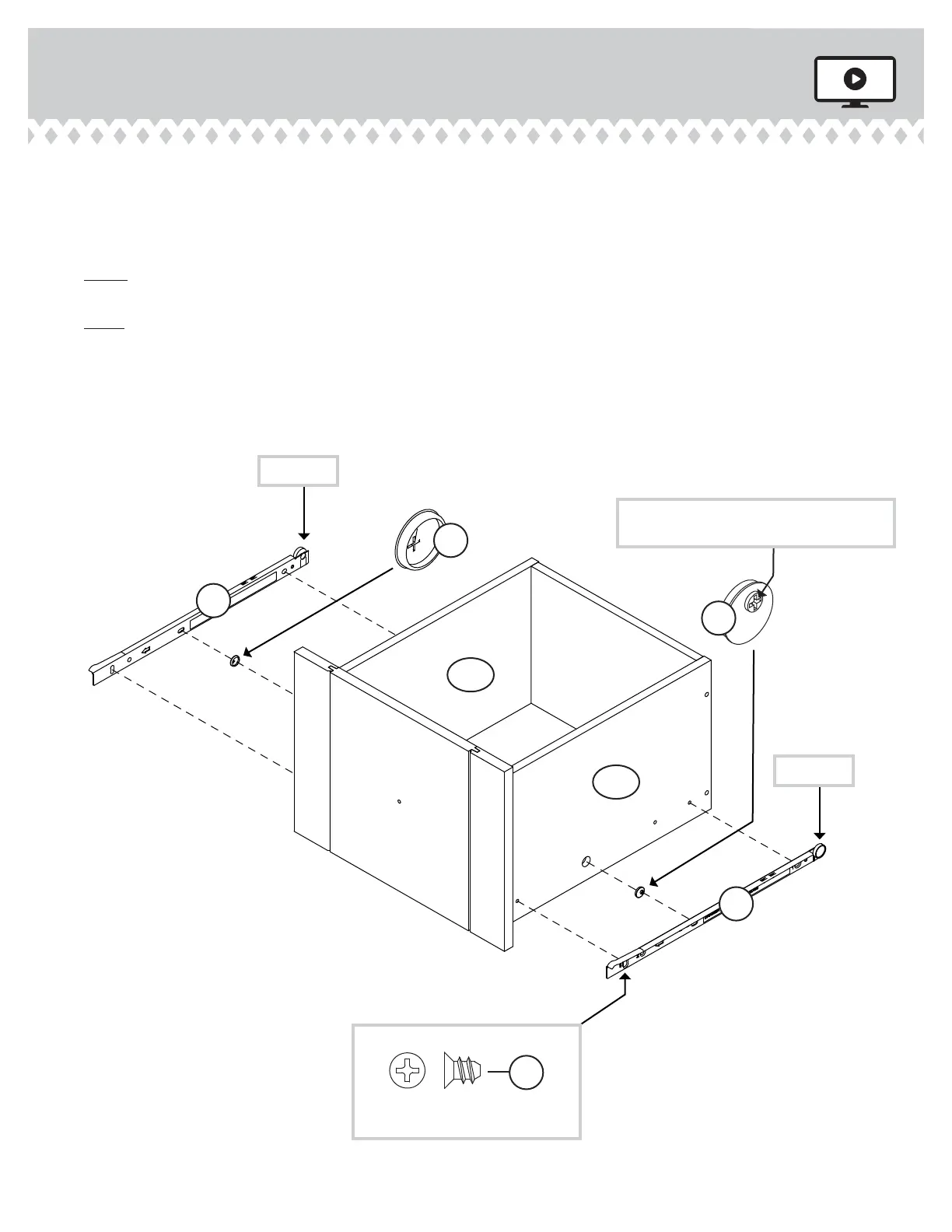
Insert a SLIDE CAM (EEE) into each DRAWER SIDE (D28 and D29).
å
Fasten the SLIDES (II and JJ) to the DRAWER SIDES (D28 and D29).
Use four GOLD 5/16" FLAT HEAD SCREWS (LLL) throuh
holes #1 and #3.
å
NOTE: The DRAWER SLIDES are marked "DRAWER RIGHT" and
"DRAWER LEFT" for easy identifi cation.
å
NOTE: The screw head in the CAM must be visible throuh the
slotted hole in the SLIDE.
å
Repeat this step for the small drawers usin DRAWER
RIGHTS (35DC) and DRAWER LEFTS (35DD).
Step 27
403793 www.sauder.com/servicesPae 32
II
JJ
Screw head - turn CAM to line up holes in
the SLIDES with holes in DRAWER SIDES
1
2
3
EEE
EEE
1
2
3
Roller end
Roller end
D28
D29
GOLD 5/16" FLAT HEAD SCREW
(12 used in this step)
LLL
(4 screws per drawer)



 To Next Page