Step 8
å
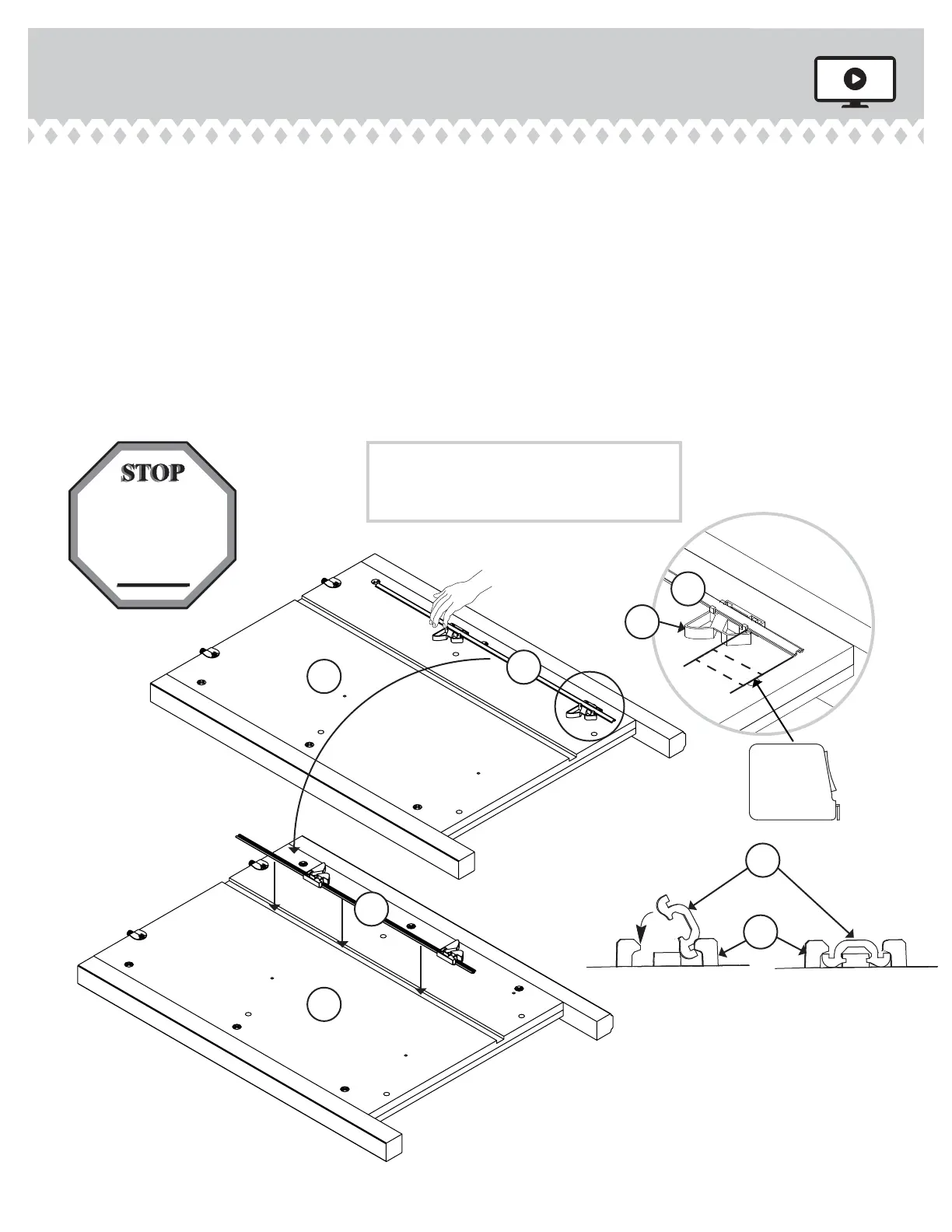
Diaram 1. Measure 1-1/2" from one end of the INTERLOCK TRACK (22G). Position the INTERLOCK TRACK as shown.
å
SAFETY STOP / TRACK ATTACHMENT: Diaram 2. Tilt the fi rst ede of the INTERLOCK TRACK (22G) into the SAFETY
STOPS (29G).
å
Diaram 3. Rotate the INTERLOCK TRACK and apply force to snap the second ede into the SAFETY STOP.
å
Diaram 4. Repeat the SAFETY STOP / TRACK ATTACHMENT for the next SAFETY STOP while holdin the previously
completed SAFETY STOP in its location hole. Repeat these steps until all STOPS have been attached. Visually check that
all INTERLOCK TRACK edes have been snapped into the SAFETY STOPS as shown in diaram 3.
å
Diaram 5. Remove the INTERLOCK TRACK assembly from Diaram 4 and fl ip it over before insertin the INTERLOCK
TRACK (22G) with SAFETY STOPS (29G) into the roove in the RIGHT END (A).
Be sure the
interlock track
snaps into each
SAFETY STOP.
5.
4.
3.
2.
F
L
I
P
O
V
E
R
T
R
A
C
K
1-1/2"
1.
The interlock system is a safety feature
that prevents more than one drawer
from opening at the same time. Do not
use excessive force to open the drawers.
22G
29G
29G
22G
22G
22G
Tape Measure
A
A
420040 www.sauder.com/servicesPae 12




 To Next Page