SBIG STF-8300 Manual
memory. To make sure you have the latest firmware periodically
run the Driver Checker, which checks our servers for later drivers
and updates your system accordingly.
Serial Number – If you ever need to know this, here it is. It’s on the label
on the back of the camera as well.
Readout Mode Table – This shows the various readout modes the STF-
8300 supports. The High-resolution mode offers the full 3326 x
2504 resolution with 5.4 micron square pixels. The STF-8300 also
supports binning whereby groups of pixels are combined to form a
single larger pixel. This reduces the resolution but increases the
sensitivity as larger pixels capture more light. The Medium and
Low-resolution modes utilize 2x2 and 3x3 binning as you can see
by the Image Height/Width and Pixel Size entries.
Finally, review the information presented, then close the dialog by clicking
in it.
Camera Setup
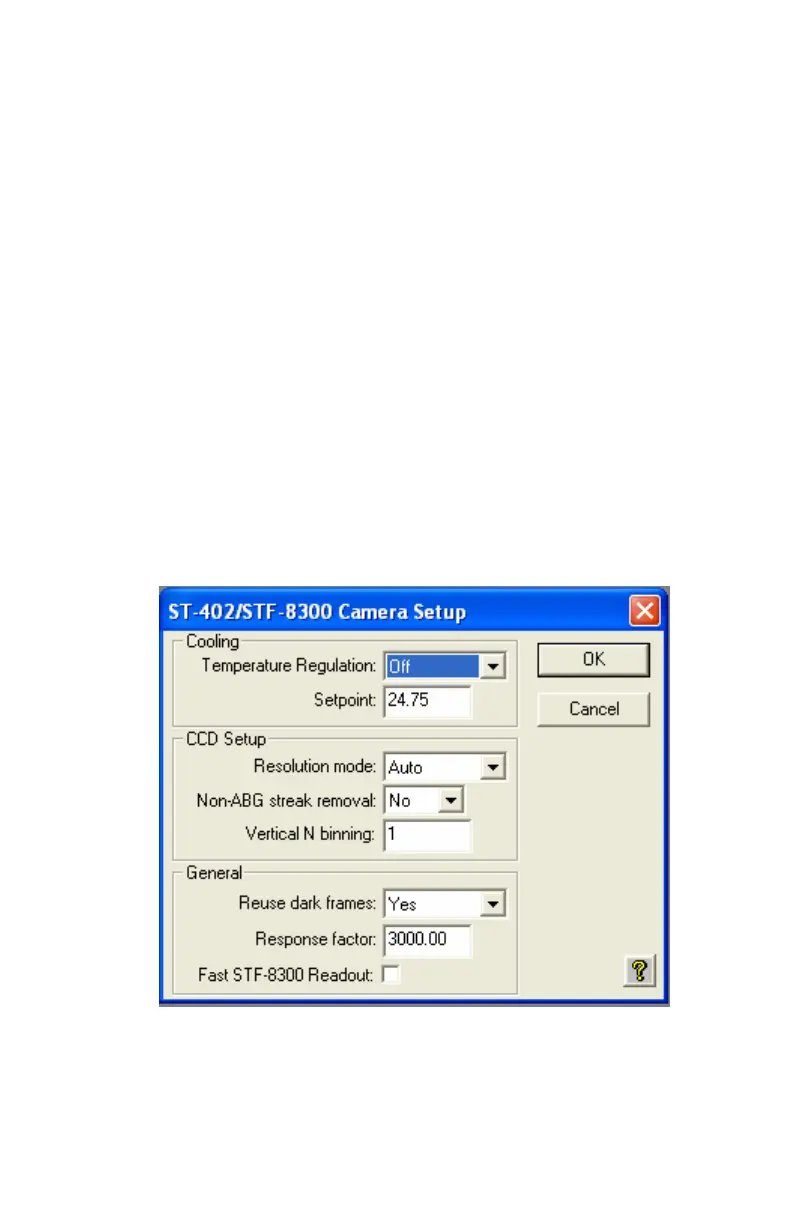
Use the Setup command in the Camera menu to see the STF-8300 Camera
Setup dialog shown below.
The key items in this dialog are described individually below.
Temperature Regulation – This allows you to turn the TE cooling on and
off. Typically at the start of an imaging session you’ll turn the
cooling on and then back off at the end of the night. For now let’s
just leave it off.
16


 To Next Page