SBIG STF-8300 Manual
2. Installing the Software on 32-bit or 64-bit Windows Systems
This section tells you how to do a fresh install of SBIG Cameras on your
32-bit or 64-bit Versions of Windows XP, Vista or Windows 7. The Driver
Checker program will automatically install 32-bit or 64-bit drivers based on
your version of Windows.
1. Make sure no SBIG cameras are attached to your system.
2. Make sure your account has Administrator privileges then run the
SetupBitDriverChecker64.exe program to install the 64 Bit compatible
SBIG Driver Checker application on your system (On Vista and Win 7
do not select "run" until after Driver Checker is installed).
3. On Vista and Win 7 based systems, find the icon for the SBIG Driver
Checker by opening the Start menu and typing SBIGDriver in the
search box. The icon should appear above the search box. Right click
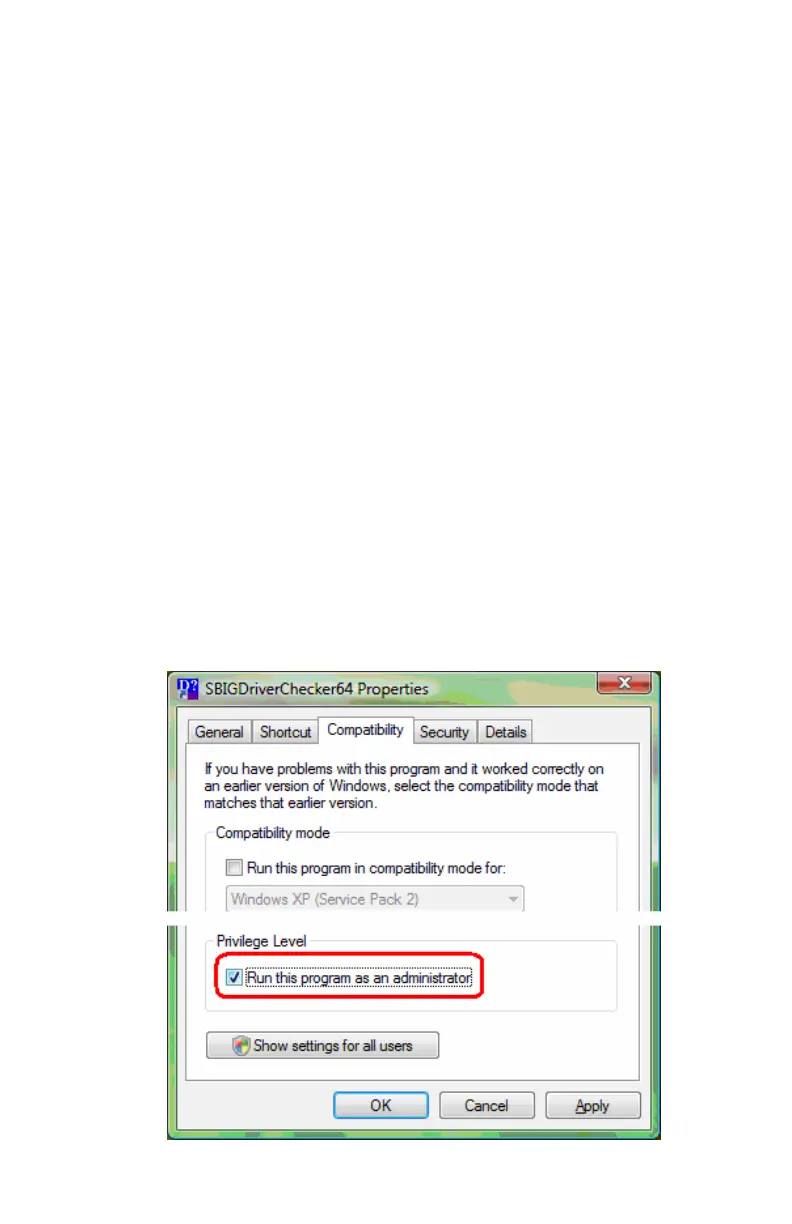
the icon and select Properties then click the Compatibility tab. Click
the “Run this program as an administrator” as shown below and then
hit the OK button.
Note: Under Vista and Win 7 there are 2 levels of administrator
privileges: one at the account level and one at the program level. To
properly install the drivers the Driver Checker application requires
both.
4


 To Next Page