Page 3 of 7
1. Pushbuttons
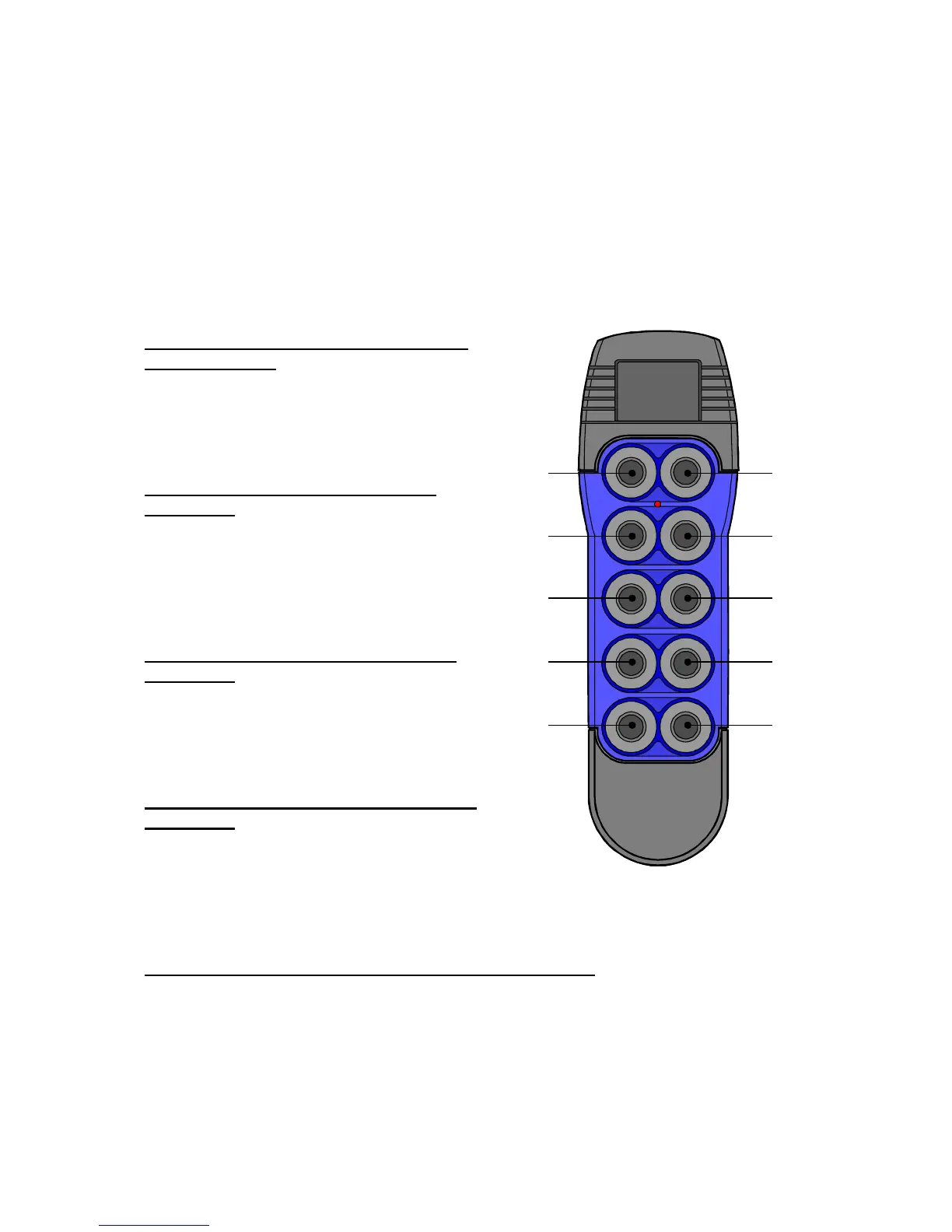
Push buttons 1 – 8 are proportional push buttons.
Push buttons 9 is a one step push button used as function switch. Pushbutton 10 is a two steps
push button.
1.1. Transmitter start up
Set the transmitter into operational mode 1
from switched off
• Press and keep pressed the button #10
• Press and release button #9
• Release button #10
• Transmitter is now in operational mode
Set the transmitter into test mode from
switched off
• Press and keep pressed buttons #1 and #2
• Press and release completely button #10
• Release all buttons
• Transmitter is now in test mode
Set the transmitter into assign mode from
switched off
• Press and keep pressed buttons #3 and #4
• Press and release completely button #10
• Release all buttons
• Transmitter is now in assign mode
Set the transmitter into calibrate mode from
switched off
• Press and keep pressed buttons #2 and #4
• Press and release completely button #10
• Release all buttons
• Transmitter is now in calibrate mode
Set the transmitter into information mode from switched off
• Press and keep pressed buttons #1 and #3
• Press and release completely button #10
• Release all buttons
• Transmitter is now in information mode
1
3
5
7
9


 To Next Page