Page 4 of 7
2. Mode description
2.1. Operational mode
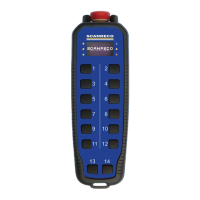
• Push buttons 1 – 8 controls pre defined motions of the crane (mapping set in the
receiver)
• Push button 9 changes into operational mode 2
• Every time push button 9 is toggled, the display shows the operative mode “1” or "2"
for 8 seconds.
• Push button 10 (any step) will switch the transmitter completely off
2.2. Operational mode 2
To work in mode 2 push, and keep down, push-button no.9.
Releasing push-button no.9 will bring into operational mode 1.
• Push buttons 1 – 4 controls pre defined motion
s of the crane and 5 – 8 controls pre
defined on off signals on the crane (mapping set in the receiver)
• Push button 9 changes into operational mode 2
• Every time push button 9 is toggled, the display shows the operative mode “1” or "2"
for 8 seconds.
• Push button 10 (any step) will switch the transmitter completely off
2.3. Test mode
• All segments in the 7-segment display is lit
• All diode indicators are lit
• The on board buzzer is used to indicate function of all push buttons.
• The number in the 7-segment display cycle through 0 to 9 while buzzer sounds
proportionally to the pressure on each button (push button 1 to 8).
• Push button 9 will only beep once each toggle.
• Push button 10 (both steps) will switch the transmitter completely off
• No connection to receiver is possible
2.4. Assign mode
• The transmitter will transmit an assign command to a near by receiver (distance ~15
cm), the transmission will continue until the transmitter timeout is reached (2s - 5s -
10s - infinite), during this time the receiver must be rebooted with the "pairing plug"
connected.
• Push button 10 (any step) will switch the transmitter completely off


 To Next Page