QUICK GUIDE
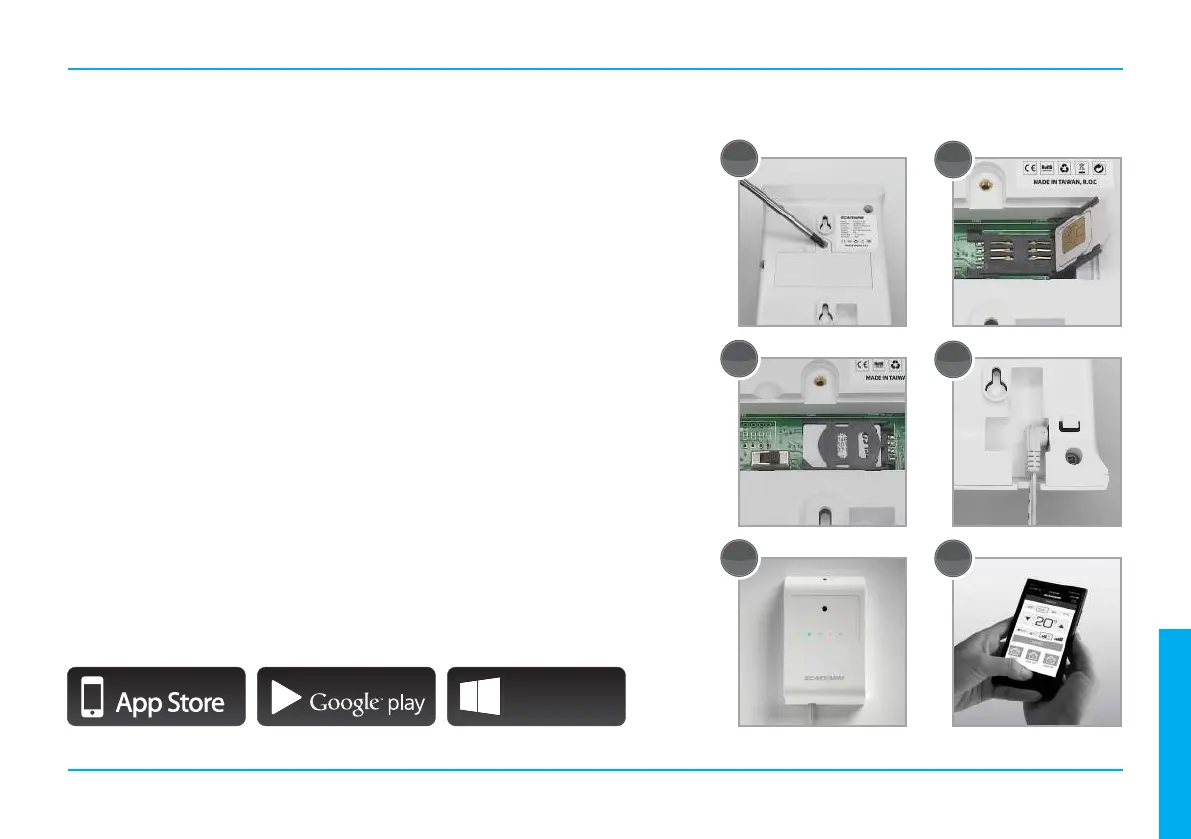
1. Locate the service cover and remove the screw to enter the
compartment for the baery switch and SIM-card holder.
2. Open the slide for the SIM-card holder and insert a standard SIM-card
with the security PIN-code deacvated.
3. Close the slide for the SIM-card holder and turn on the baery switch.
4. Reinstall the service cover and connect the external 230/12V power
supply adapter to the unit.
5. Install the wall bracket directed towards the heat pump and place the
unit on the bracket.
6. The unit is now ready to be remote controlled by SMS or the Scanvarm
smartphone applicaon for iOS, Android and Windows Phone.
GETTING STARTED
3
1
2
3
4
6
5
IPHONE APP ON
ANDROID APP ON
Windows
Phone App
ENGLISH



 To Next Page