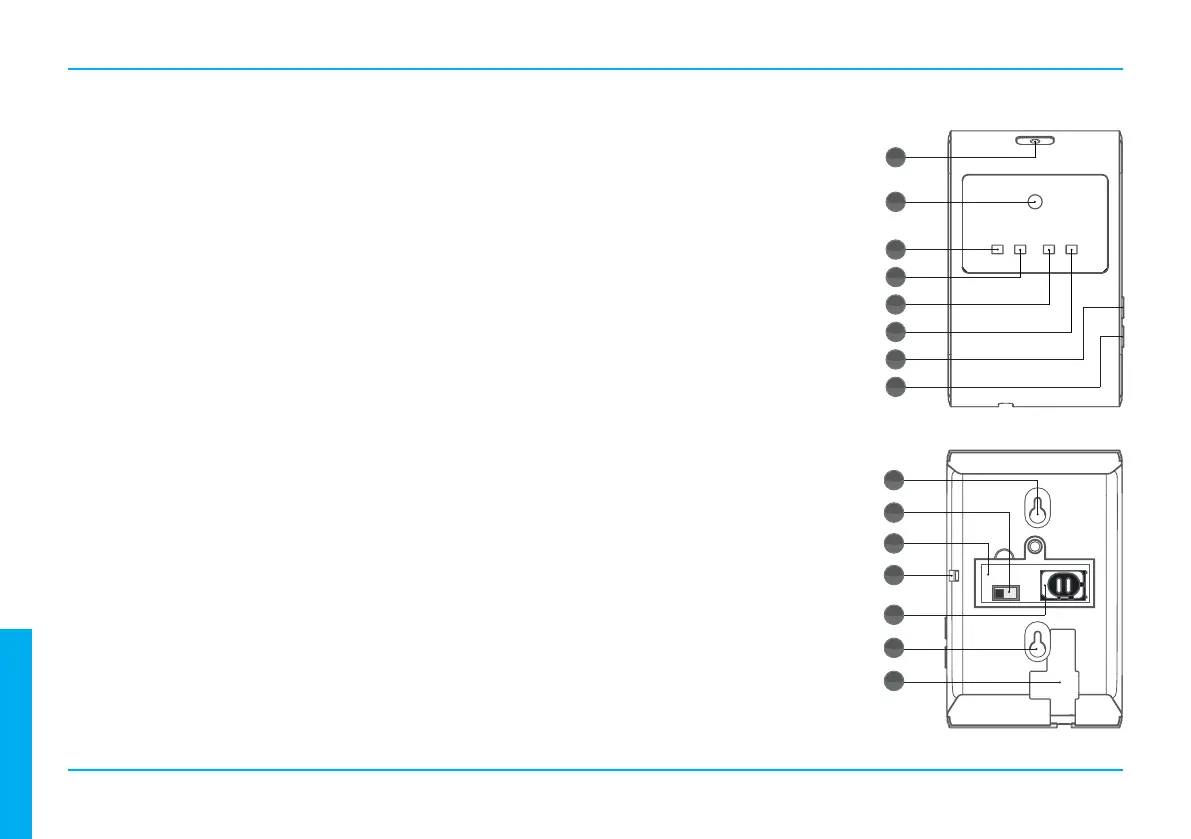
PARTS DESCRIPTION
1.
Sends infrared signals straight up.
2.
Sends infrared signals straight forward.
3.
ON: External power supply connected.
OFF: External power supply disconnected.
4.
ON: Baery power supply connected.
OFF: Baery power supply disconnected.
Flash: Low baery level.
5.
ON: No GSM signal.
OFF: Normal.
Flash: SIM-card / GSM module error.
6.
OFF: Normal.
Flash: Sends IR signals to heat pump.
7.
Press the buon to read current GSM signal strength.
GSM indicator ashes from 1 (low) to 10 (high) mes,
depending on signal strength.
8.
Sends a test signal from the unit.
9.
For easy installaon with wall bracket.
10.
ON: Baery power supply acvated.
OFF: Baery power supply deacvated.
11.
Compartment for the baery switch and
SIM-card holder.
12.
Reads current room temperature. Do not
block this hole.
13.
When installing the SIM-card the internal
power supply switch must turned OFF and
the external power supply be disconnected.
14.
For easy installaon with wall bracket.
15. .
Connecon for 12V DC, 1A power adapter.
GETTING STARTED
2
1
2
3
4
5
6
7
8
9
10
11
13
12
14
15
ENGLISH



 To Next Page