Installation and start up
Warning:
BIOUSSE SAS will in no circumstance be held responsible for an incorrect
installation carried out by a user leading to injuries and/or the total or partial
destruction of one of the simulator’s elements.
When starting up the « Simfish simulator please proceed as follows:
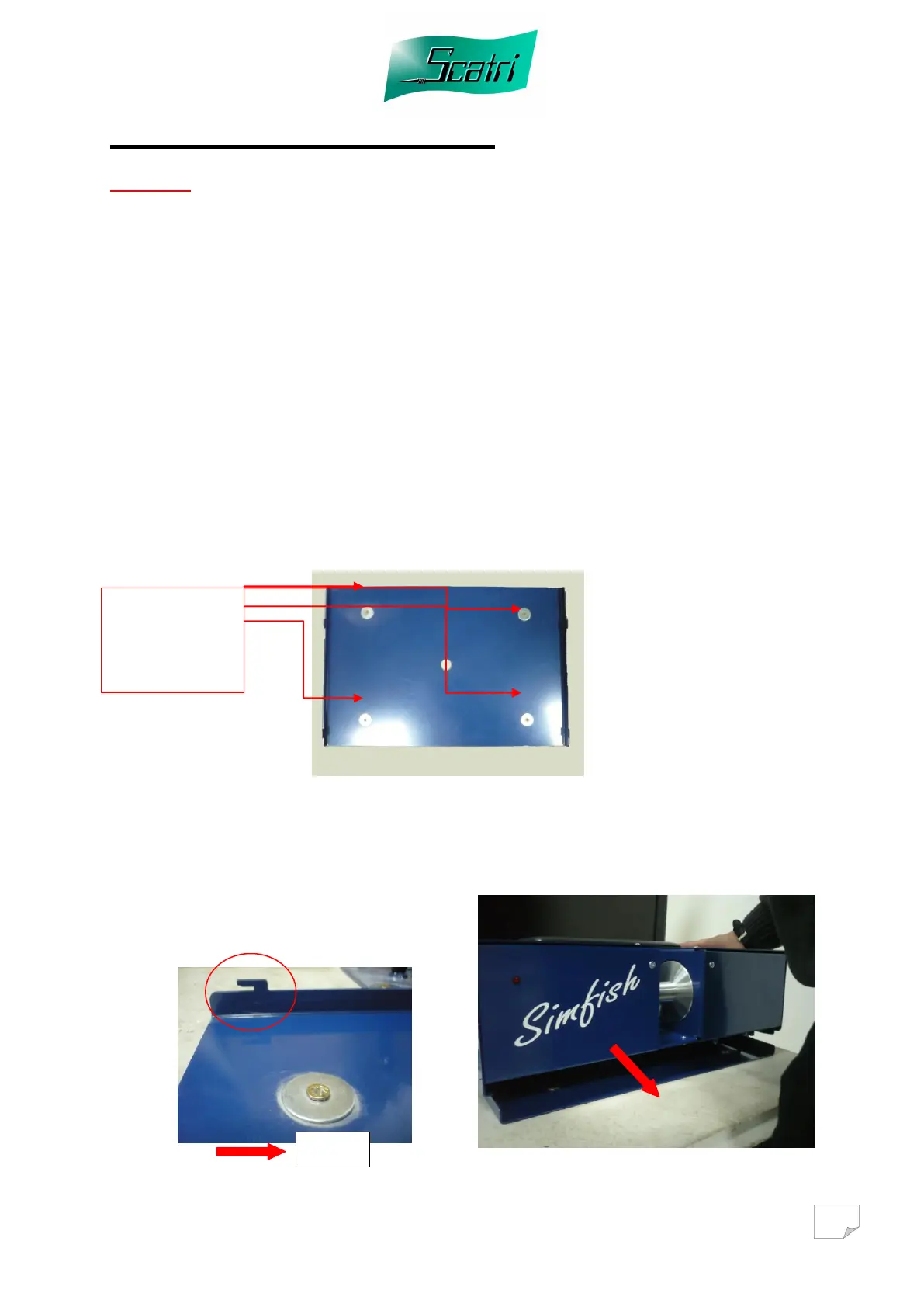
1. Take the fixing base and fix it firmly to the ground or on a removable support
of the « concrete trap door plate » type. If you chose a removable support, it
must be sufficiently heavy to withstand the traction of the fish you will select.
Generally, a 15 kg support will suffice. Make sure the support does not move
on a slippery surface.
Example: concrete on a tiled surface is not recommended, whereas concrete
on a fitted carpet or a rubber surface is a good solution.
Another solution to fix it is
to use a strong Velcro.
For example:
10cm x 20cm can have
100kg resistance.
2. Take the simulator and position it on its base. The latter is equipped with 4
spurs to fix the simulator. Engage the 4 spurs inside the slots of the simulator
and pull the simulator towards you. Once this is done, check that the whole set
is well fixed.
Fix with 4 screws
plus washers
and plugs.



 To Next Page