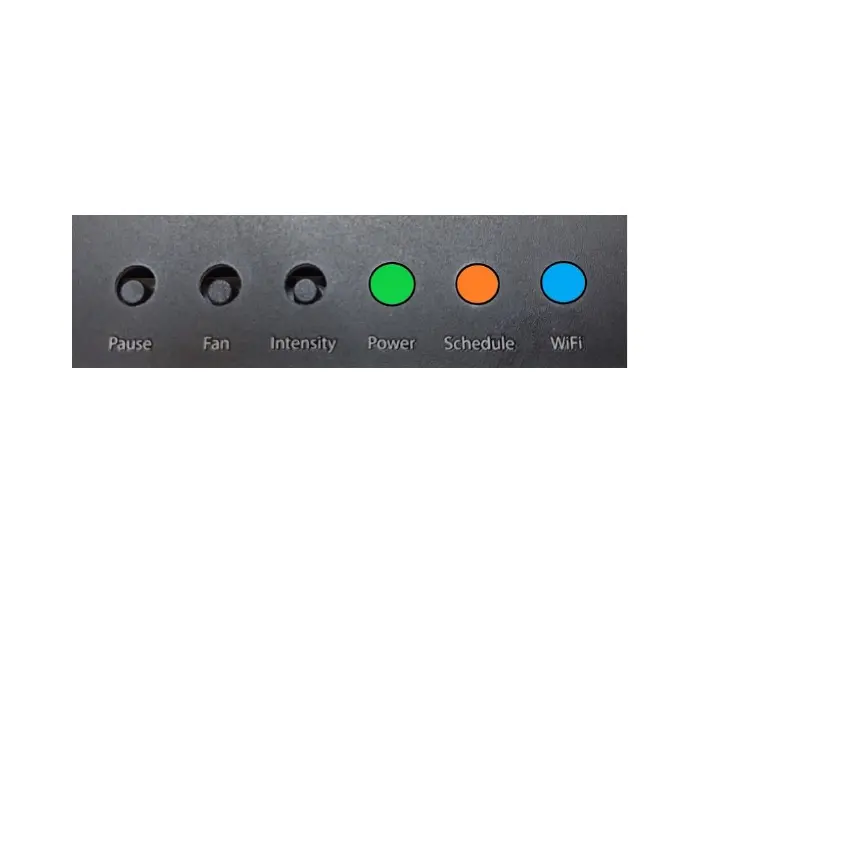
UNDERSTANDING THE LED LIGHTS
The lighted LED indicators on your ScentAir Direct signals the status of your
device: Power, Schedule, and Wi-Fi connectivity.
Power: O GREEN LED Light
• Off - No power is flowing to the device.
• Blinking – The device is currently downloading a firmware update.
• Solid – Power is flowing to the device. Default from Factory.
Schedule: O ORANGE LED Light
• Off – No event is currently running.
• Slow Pulsing – The device has been paused.
• Fast Pulsing – The device is in a resting cycle of a schedule. Default from Factory.
• Solid – A scheduled Event is running.
Wi-Fi: O BLUE LED Light
• Off – The device is not connected to Wi-Fi. Default from Factory.
• Slow Pulsing – The device has a saved network and is searching for Wi-Fi.
• Fast Pulsing – The device is connected to your local Wi-Fi, but not online.
• Solid – The device is online and connected to a Wi-Fi network


 To Next Page