EasyManua.ls Logo

Schauer CM6A - User Manual

Default Icon
12 pages
Print Icon
To Next Page IconTo Next Page
Loading...
1
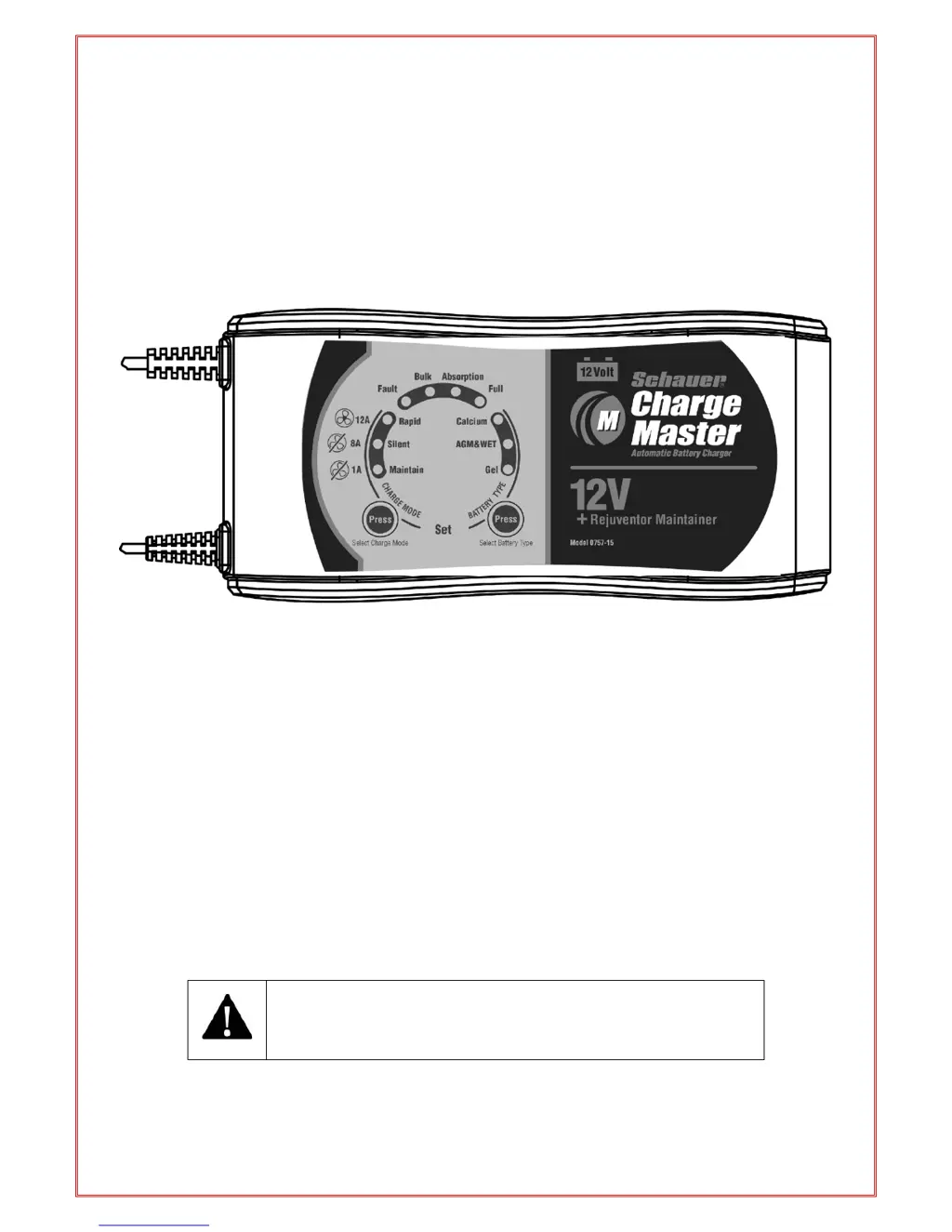
User Manual
12 Volt Battery Charger
1/4/6 Amp & 1/8/12 Amp
Plus
Battery maintainer and Rejuvenator
Model No. CM6A (0757-14CEC) / CM12A (0757-15CEC)
THIS MANUAL CONTAINS IMPORTANT SAFETY AND
OPERATING INSTRUCTIONS
READ ENTIRE INSTRUCTION BEFORE USE

Questions and Answers

  • K
    kim05Aug 8, 2025
    What to do if there is no charging current from Schauer CM6A?
    • M
      montoyaanitaAug 8, 2025
      If there is no charging current from your Schauer Battery Charger, the battery could be severely sulphated; check the battery's condition and age. Alternatively, the battery might have a damaged cell, indicating it needs replacement. Another possibility is that the charger is in overheat protection mode; move the battery and charger to a cooler environment.
  • K
    Kevin CoxAug 18, 2025
    What to do if the full/float light won't come on on Schauer CM6A Battery Charger?
    • C
      courtney96Aug 18, 2025
      If the 'Full/Float' light on your Schauer Battery Charger doesn't illuminate, it could be due to several reasons. The battery capacity might be too large for the charger, causing it to time out; in this case, verify that the charger specification matches the battery capacity. Alternatively, the battery might be defective and require replacement. Another possibility is that the battery is severely sulphated; try switching the charger off and on, then select a higher charge rate setting, ensuring it doesn't exceed your battery's maximum charge limit.
  • V
    Victoria JohnsonAug 28, 2025
    Why does my Schauer CM6A Battery Charger have no DC output?
    • A
      alexiscastilloAug 28, 2025
      If your Schauer Battery Charger has no DC output, it may be due to a short circuit in the output. Inspect the DC connection between the charger and battery, making sure there are no short circuits. Another possible cause is reverse polarity connection to the battery. Ensure that the crocodile clips or ring terminals are connected with the correct polarity.

Summary

Safety and Precautions

General Safety Warnings

Critical warnings regarding explosive gases, electrical hazards, and proper charger usage.

Personal Safety Precautions

Guidelines for personal safety, handling battery acid, and avoiding sparks near batteries.

Temperature and Safety Protection

Details on internal overheat, timer, reverse polarity, and short circuit protections.

Preparation and Connection Procedures

Preparing the Battery for Charging

Instructions on preparing the battery, including terminal cleaning and electrolyte levels.

Charger Location Guidelines

Recommendations for placing the charger to avoid battery gases and ensure ventilation.

DC Connection Precautions

Steps and warnings for connecting the charger to a battery installed in a vehicle.

Connecting Battery Outside Vehicle

Detailed steps for safely connecting the charger to a battery removed from the vehicle.

Product Features and Operation Modes

Main Features Overview

Highlights key features like microprocessor control, rejuvenation, and maintenance.

ECO Mode for Energy Saving

Explanation of the ultra-low power consumption mode for energy efficiency.

Charge Modes Explained

Details on Rapid Charge, Silent Charge (Night Mode), and Maintenance modes.

Battery Types and Capacity

Information on compatible battery types and recommended capacities for charging.

Technical Specifications

Detailed electrical and physical specifications for CM6A and CM12A models.

Charging Process Stages

Description of charging stages: Qualification, Rejuvenation, Soft Start, Bulk, Absorption.

Float and Maintenance Modes

Explanation of Float Mode for ready-to-use status and Maintenance for long-term care.

Disconnecting the Battery Charger

Step-by-step instructions for safely disconnecting the charger from the battery.

Indicators and Troubleshooting

LED Status Indicator Table

Table detailing the meaning of different LED indicators during operation and charging.

Charging Curve and Process Details

Visual representation of charging stages and detailed explanation of the process.

Troubleshooting Common Problems

Guide to identify and resolve issues like no indicator lights, no output, or no charging.

Maintenance Information

Guidelines for basic maintenance, cleaning, and service of the battery charger.

Schauer CM6A Specifications

General IconGeneral
BrandSchauer
ModelCM6A
CategoryBattery Charger
LanguageEnglish

Related product manuals