ExMax- 50.75 ►
ExMax- 100 ►
ExMax- 150 ►
ExMax- 30 -F ►
ExMax- 50 -F ►
ExMax- 60 -F ►
40 s/90° ►
60 s/90° ►
90 s/90° ►
120 s/90° ►
150 s/90° ►
00
01
02
03
04
05
06
07
08
09
ExBox
a
a
a
b
b
b
+
~
+
~
+
~
+
~
−
~
−
~
−
~
−
~
PE
PE
PE
PE
1
1
1
1
2
2
2
2
3
3
3
3
4
4
4
4
PA
PAPA
PA
1 42 3 5 6
< 5° > 85°
75 Nm
▼
50 Nm
100 Nm
150 Nm
30 Nm
50 Nm
60 Nm
▼
U < 90 V AC/DC 2 AT 10 AT
U > 90 V AC/DC 5 AT 10 AT
S
T
www.schischek.com
Schischek GmbH Germany, Muehlsteig 45, Gewerbegebiet Sued 5, 90579 Langenzenn, Tel. +49 9101 9081-0, Fax +49 9101 9081-77, E-Mail info-de@schischek.com
ExMax-M-3P_en
V04 – 14-Jan-2019
ExMax-... ExMax-...-F ExMax-...-S ExMax-...-SF
Special option ... -CTM ... -VAM
Electrical connection Parameters, adjustments and failure indication
Parameter selection
Functions, adjustments and parameters
Type
Running times Position of switch (S)
Torques
Example:
ExMax-50.75
Requested parameter:
Torque 75 Nm
Motor running time 90 s/90°
Result:
Switch position 07
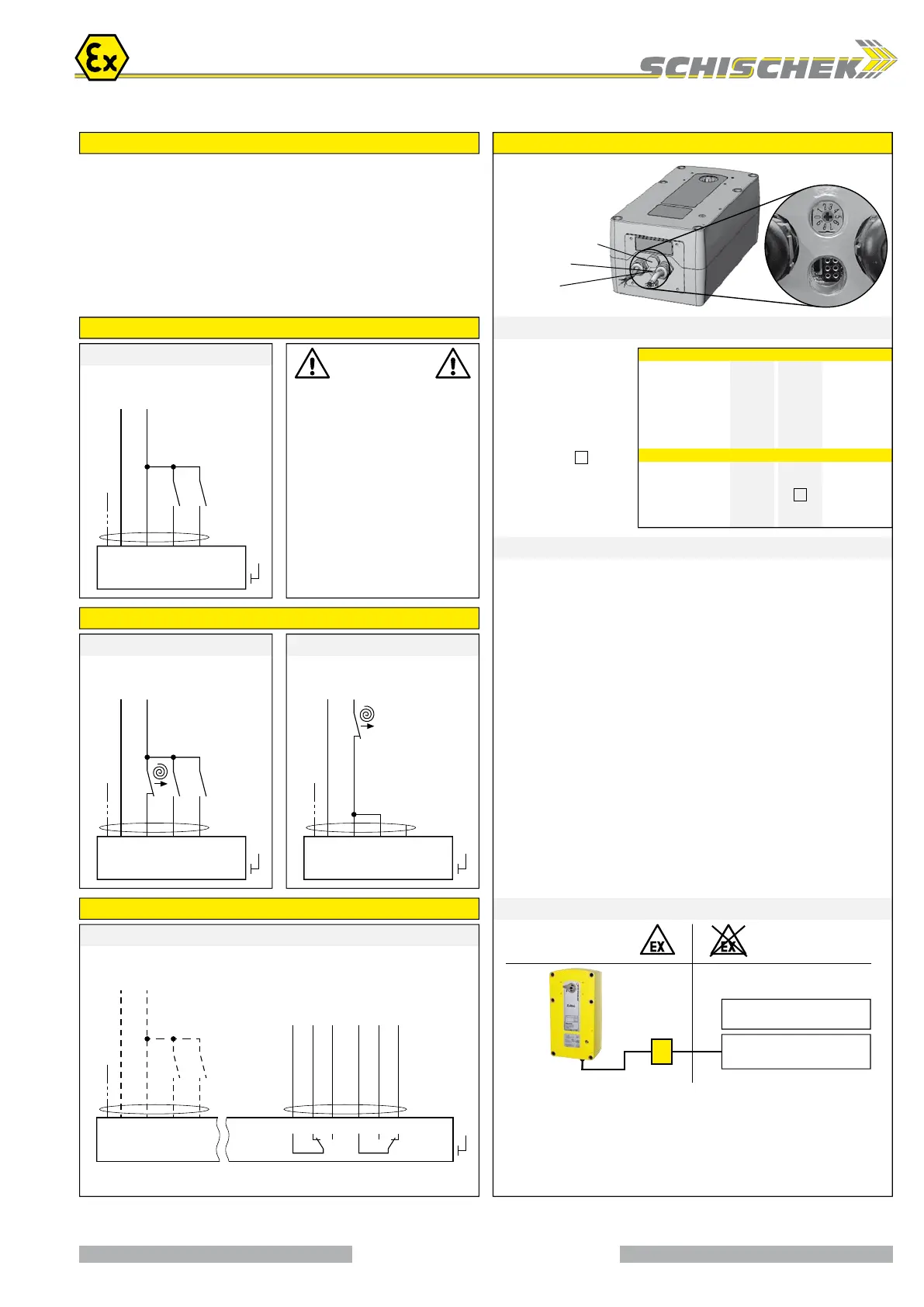
All actuators are equipped with a universal supply unit working at a voltage range from
24...240 VAC/DC. The supply unit is self adjusting to the connected voltage!
The safety operation of the spring return function works if the supply voltage is cut.
For electrical connection inside hazardous areas an Ex-e terminal box, certificated in acc.
with ATEX is required (e.g. ExBox).
An over-current protection fuse < 10 A has to be provided by installer.
Note: the initial current is appr. 2 A for 1 second.
Integrated auxiliary switches signal the rotation angle’s position. U
min
and I
min
change once
the switches were operated with higher voltage or current.
Installation
Supply *
24...240 VAC/DC ± 10 %
* electrical wiring see diagrams
On-off / 3-pos. SB 2.2
On-off / 3-pos. SB 1.0
On-off (1 wire) SB 2.3
Wiring of integrated auxiliary switches SB 3.0
Wiring diagram ExMax- ... (without spring return)
Wiring diagram ExMax- ... -F (with spring return)
Wiring diagram ExMax- ... -S and ... -SF
Attention!
At 1-wire control
mode the heater
does not work in
case of open contact.
Wiring of actuator acc. to type and
application see diagrams above
Wiring of the integrated, potential free
auxiliary switches
24...240 VAC/DC
24...240 VAC/DC
24...240 VAC/DC
24...240 VAC/DC
Attention
During commissioning apply
a self adjustment drive.
Regard duty cycle at
motor running times!
Never use spring return
actuators without external load.
Ex area –
zone 1, 2, 21, 22
Safe area
Auxiliary switches *
see Technical data
Integrated auxiliary switches,
Grid fuse-protection recommended.
min. max.
A) Self adjustment of angle of rotation
Turn switch (S) to position 02 (low torque) or 07 (high torque). Press button (T) for
a minimum of 3 seconds. The actuator drives to both end positions and detects the
blocking positions. The LED flashes GREEN during adjustment.
The adjustment takes about 180 seconds (90 sec. “On”, 90 sec. “Off”).
B) Selecting motor running time and torque
Adjust parameters only if actuator is in idle state or without applied potential.
Turn switch (S) to the position required for the intended operation acc. to table
above. The selected parameters will be carried out at the actuator’s next operation.
C) Additional information for control in 3-pos. operation
a closed, b open = direction I a and b closed = motor doesn’t work
b closed, a open = direction II a and b open = motor doesn’t work
The rotation direction (I and II) depends on left/right mounting of the actuator to the
damper. To reverse the rotation direction (by motor) exchange the electrical wiring
of terminal 3 and 4.
▪ Do not open the cover when circuits are live
▪ Connect potential earth
▪ Close all openings to ensure enclosure protection
▪ Clean only with damp cloth, avoid dust accumulation
Switch – Push button – Lamp
for adjustment
(behind the blanking plug)
10-position switch (S)
3-colour LED
Push button (T)
3 / 4




 To Next Page