EasyManua.ls Logo

Schlage LINK BE369 - User Manual

Schlage LINK BE369
7 pages
Print Icon
To Next Page IconTo Next Page
Loading...
Schlage Wireless Locks
User Guide
Contents
Programming and User Codes .......................................... 2
Programming Code ........................................................... 2
User Codes ....................................................................... 2
Turn Lock Feature ............................................................... 2
Replacing the Batteries ...................................................... 3
BE369 Deadbolt ................................................................ 3
FE599 Lever Lock ............................................................. 3
Restoring Factory Settings ................................................ 4
Vacation Mode ..................................................................... 4
Manual Programming ......................................................... 4
Manual Programming Functions ....................................... 5
Emergency Key Override ................................................... 6
BE369 ................................................................................ 6
FE599 ................................................................................ 6
Troubleshooting .................................................................. 6
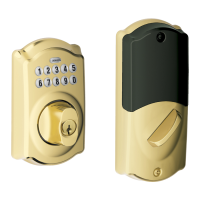
Lock Parts
Keypad
• Located on the outside of the lock.
• Used to enter codes for programming and unlocking.
Thumbturns
• On the BE369 Deadbolt only.
• The inside thumbturn may be rotated at any time to retract (unlock) or extend (lock) the bolt.
• The outside thumbturn can be rotated to retract the bolt after a valid user code has been
entered.
• The outside thumbturn can also be rotated to extend the bolt after the
Schlage button has been pressed when Turn Lock feature is enabled.
Lever
• On the FE599 Lever Lock only.
• The inside lever can be rotated at any time to retract the latch.
• The outside lever can be rotated at any time, but will only retract the
latch when the lock is unlocked.
Cylinder
• Located on the outside of the lock.
• Used only in emergency situations to unlock the lock. See
Emergency Key Override on page 6 for more information.
Lock and Unlock Buttons
• On the FE599 Lever Lock only.
• Used to put the lock in a locked or unlocked state.
• When these buttons are used, the lock will remain locked or unlocked
until locked or unlocked using the buttons, web interface or phone
application.
Lock and Unlock Light
• On the FE599 Lever Lock only.
• Lights red when inside lock button is pressed.
• Lights green when inside unlock button is pressed.
• Lights only when an inside button is pressed. Does not remain lit.
FE599 Lever Lock
BE369 Deadbolt

Questions and Answers

  • V
    Vincent OwensAug 10, 2025
    Why Schlage LINK BE369 Locks button does not light when pressed?
    • R
      Ryan WilsonAug 10, 2025
      If the Schlage button on your lock doesn't light up when pressed, it could be due to two reasons. First, the lock keypad might be locked out because too many incorrect codes were entered. In this case, wait 30 seconds and try again. Second, the battery might be dead, so replace it.
  • R
    reidbrendaAug 15, 2025
    How to unlock Schlage Locks if user code doesn't work?
    • C
      Christopher MasonAug 15, 2025
      If entering a valid user code using the keypad does not unlock your Schlage lock, it might be in vacation mode. To resolve this, enter the six-digit programming code or uncheck the vacation checkbox.
  • J
    James AguilarAug 22, 2025
    What to do if Schlage LINK BE369 Locks button blinks red?
    • A
      Arthur RodriguezAug 22, 2025
      If the Schlage button blinks red, even when no buttons have been pressed, it means the battery is critically low. You should replace the battery.
  • R
    Robert CrawfordAug 28, 2025
    Why can't I add a new user code to my Schlage LINK BE369?
    • T
      thomaslisaAug 28, 2025
      If you cannot add a new user code to your Schlage lock, there are several possible reasons: 1. You may have already stored the maximum of 19 user codes. Delete at least one existing user code and then try adding the new one. 2. If adding a user code at the keypad, ensure that the first user code entry matches the second entry. Try again, making sure you enter the same code twice. 3. The first four digits of the new user code may match the first four digits of the programming code. Change the programming code or select a different user code to add. 4. The user code you are trying to add may already exist in the lock. Select a different user code.
  • J
    Jasmine AndersonSep 2, 2025
    Why is there a delay before Schlage Locks unlock?
    • A
      Alejandra LewisSep 2, 2025
      If there is a delay before the Schlage lock unlocks after entering a valid user code, the battery might be low. Replace the battery to solve this issue.

Summary

Lock Parts Overview

Keypad Description

Describes the external keypad for code entry and programming.

Thumbturn Operation

Details the operation of interior thumbturns for deadbolts.

Lever Functionality

Explains the function of the interior and exterior levers on lever locks.

Cylinder Purpose

Outlines the use of the cylinder for emergency key override.

Lock and Unlock Buttons

Describes buttons used to manually lock or unlock the FE599 Lever Lock.

Lock and Unlock Light Indicator

Explains the LED indicator for lock/unlock button actions on FE599 Lever Lock.

Programming and User Codes Management

Programming Code Usage

Details the use and changeability of the lock's programming code for manual operations.

User Code Management

Explains how user codes are used for unlocking and managed via keypad or web.

Turn Lock Feature Configuration

Describes the feature that requires a code to lock from outside on BE369.

Battery Replacement Procedures

BE369 Deadbolt Battery Replacement

Step-by-step instructions for replacing batteries in the BE369 Deadbolt.

FE599 Lever Lock Battery Replacement

Step-by-step instructions for replacing batteries in the FE599 Lever Lock.

Factory Settings Restoration

Vacation Mode Operation

Manual Programming Functions

Keypad Programming Steps

Guides on adding/deleting codes, changing settings, and enabling/disabling features via keypad.

Emergency Key Override

Schlage LINK BE369 Specifications

General IconGeneral
BrandSchlage
ModelBE369
CategoryLocks
ConnectivityZ-Wave
KeypadYes
User CodesUp to 19
Remote AccessYes
FinishSatin Nickel
Backset2-3/8" or 2-3/4"
KeywaySchlage C
CompatibilityZ-Wave enabled systems

Related product manuals