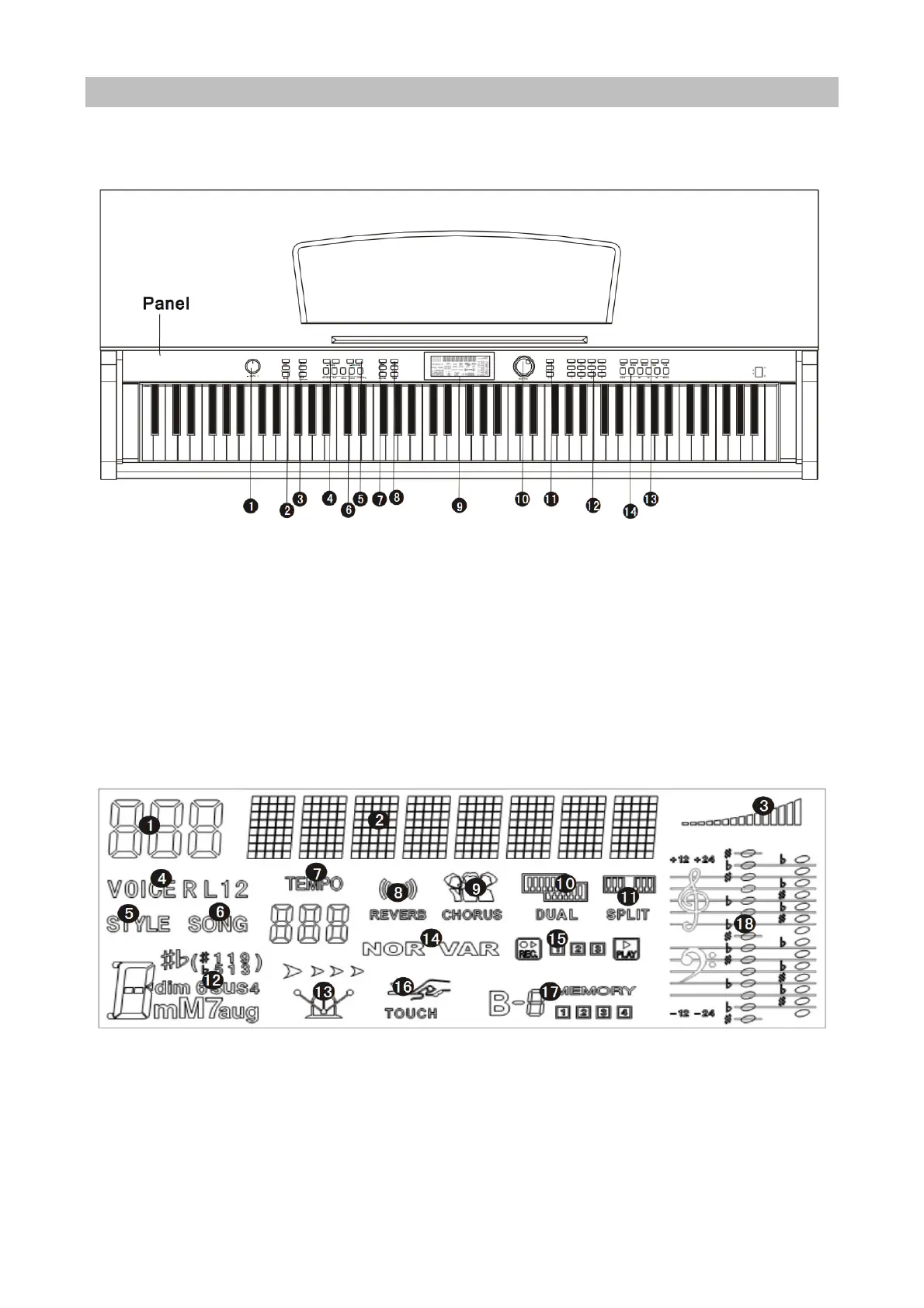
Panel Control and External Function
Panel Control
1. Main volume
2. Tempo
3. Accompaniment Volume
4. Intro/Ending, Sync, Fill-In 1,Fill-In 2,
Start/Stop
5. Metronome, Single Finger, Fingered,Full Range
Chord, Chord Close
6. Recording,Audio Track 1,Audio Track 2,
Accompaniment Track, Play,Transpose -
,Transpose+
7. Function Menu,Sound Console Button
8. LCD Display Screen
9. Demo, Style, Voice, Button
10. Song,Teaching1,Teaching2,Teaching3
11. .Digit Control button
12. .Keyboard Split, Dual, Touch, Reverb, Chorus
13. Store,M1,M2,M3,Memory Bank Button
14. Power Switch Button
LCD Display Screen
1. Digital Display Area
2. Characters Display Area
3. Volume
4. Voice Selection
5. Style Selection
6. Song
7. Tempo
8. Reverb
9. Chorus
10. Dual
11. Keyboard Split
12. Chord Display Area
13. Metronome
14. Fil l- in1/Fil l- in2
15. REC/Play
16. Touch
17. Memory State
18. Staff


 To Next Page