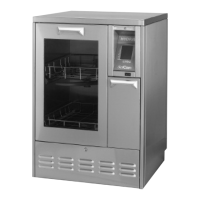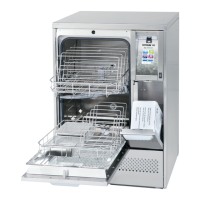
What does CF20 Condenser system failure mean on SciCan HYDRIM M2 G4?
- NNancy NorrisSep 4, 2025
A CF20 error indicates the unit was not able to cool down. Check that water hoses are not kinked. If issue persists, further assistance is needed.
What does CF20 Condenser system failure mean on SciCan HYDRIM M2 G4?
A CF20 error indicates the unit was not able to cool down. Check that water hoses are not kinked. If issue persists, further assistance is needed.
Why is the printer not printing from my SciCan Washer?
If the printer is not printing, check that the printer is ON and has paper. Also, verify that the printer and baud rate are set correctly. Finally, ensure that the printer is plugged into both the SciCan Washer and the electrical outlet.
What to do if there is a “printing” message on my SciCan HYDRIM M2 G4?
If there is a 'printing' message at the end of the cycle without a printer attached, ensure that “serial” is selected in the Setup Menu under Printer / USB setup.
What to do if the wash arms do not rotate in my SciCan HYDRIM M2 G4 Washer?
If the wash arms do not rotate, remove them, clean them thoroughly, and then reinstall them.
What to do if CF4 Water evacuation failure occurs on SciCan HYDRIM M2 G4 Washer?
If a CF4 Water evacuation failure occurs, check that the drain hose is not kinked and ensure that the filters in the bottom of the chamber are not obstructed.
Why do operating cycles appear to be taking too long to complete on my SciCan Washer?
If operating cycles are taking too long, verify that the incoming hot water temperature is within the recommended range. Also, ensure that the hot and cold hoses are not reversed.
Why is my SciCan Washer drying performance inadequate?
If the drying performance is inadequate, try increasing the drying time in the user menu. You may also need to change the Hepa filter. Ensure you are not overloading cassettes or instrument baskets, and check the wash arms for any debris.
Why are my instruments not clean after using the SciCan HYDRIM M2 G4?
If instruments are not clean after a wash cycle, ensure that you are not overloading cassettes or instrument baskets. Also, avoid loading too many cassettes into the SciCan Washer. Check the filters and wash arms for any debris. If the problem persists, further assistance is needed.
What does CF21 Dosing system failure mean on SciCan HYDRIM M2 G4 Washer?
A CF21 error means there is a chemical dispensing system failure. Tighten the detergent cap, check for leaks. If issue persists, further assistance is needed.
What to do if the SciCan Washer touchscreen does not come on?
If the touchscreen or the unit does not turn on, first ensure that the power button is switched ON. Then, check that the plug is properly inserted into the wall socket. If it still fails to power on, further assistance is needed.
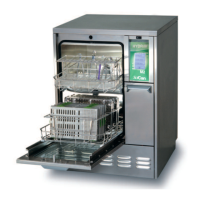
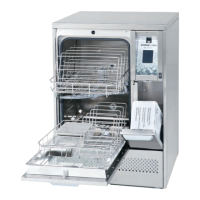
Identifies key components of the HYDRIM M2 G4 unit.
Details the connectors and hoses at the rear of the unit.
Provides guidance on disposing of packaging and the old unit.
Explains the importance of water quality for cleaning performance.
Details the procedure for testing water hardness and setting the softener.
Guidelines for cleaning and disinfecting medical instruments.
Tips for achieving optimal cleaning results with the HYDRIM.
Details the available cycles, their parameters, and water usage.
Examples of how to load instruments for effective cleaning.
Details two reference load configurations used for type testing.
Explains the main functions and icons on the touchscreen interface.
Outlines the structure of the setup menus for User, Technician, and Setup.
Configuration options for language, country, and time.
Settings for date, unit ID, drying counter, and screensaver.
Adjustments for salt regeneration, screen contrast, and themes.
Procedures for creating user names and PINs.
Connecting to wired and wireless networks, and enforced usage.
Step-by-step guide on how to start and run a cycle.
How to stop cycles and access other menu functions.
Procedure to open the door manually during a power outage.
Steps to view cycle data directly on the unit's touchscreen.
How to transfer cycle data to a computer using a USB drive.
Instructions for connecting and configuring printers or data loggers.
Guidance on the safe handling and use of the cleaning solution.
Steps for replacing the cleaning solution container.
Procedures for cleaning the unit and changing the air filter.
Procedures for cleaning the filter and maintaining wash arms.
Information on required annual maintenance.
Tests performed during installation and commissioning.
Routine checks to be performed by the user.
Periodic tests performed by a qualified engineer.
Tests for door lock, wash arm rotation, and door seal.
Procedures for checking filters and load carriers, and examining for soil.
Problems with cleaning, power, and wash arm rotation.
Troubleshooting slow cycles, detergent messages, and drying performance.
Problems related to printing and data logging.
Explains specific error codes and their causes/solutions.
| Type | Washer |
|---|---|
| Brand | SciCan |
| Model | HYDRIM M2 G4 |
| Capacity | 2 instruments |
| Weight | 90 lbs |
| Electrical Requirements | 120V, 60Hz |
| Water Supply | Cold and Hot Water |
| Water Consumption | 1.2 gallons |