KEYPAD FUNCTIONS
9
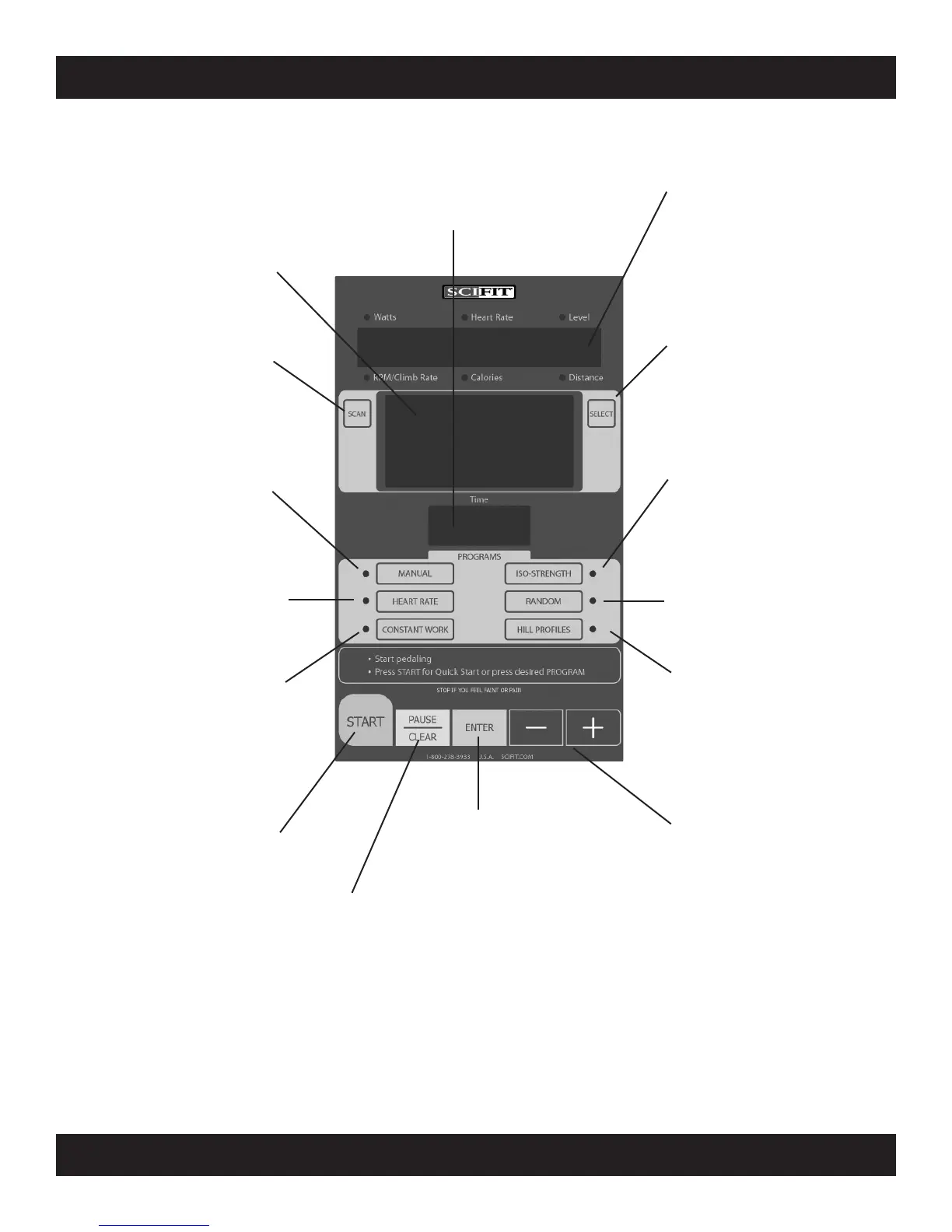
MANUAL - The Manual program allows
the user to set the intensity at any level.
This level will not change unless the user
manually increases or decreases the
intensity using the UP or DOWN arrow
keys.
HEART RATE - The Heart Rate
pro-
gram enables the user to set a target
heart rate. Through real-time monitor-
ing of the user’s heart rate, the computer
maintains the user’s heart rate near this
established target rate by altering the in-
tensity. This program will work only with
the optional chest strap.
CONSTANT WORK - In the Constant
W
ork program, pedal resistance is au-
tomatically adjusted to compensate for
any changes in pedal speed (RPM), thus
workload (watts) will remain constant at
any given setting. Therefore, at higher
RPM’s, the perceived load on the muscles
is reduced while maintaining a target
wattage.
ISO-STRENGTH - The ISO-Strength
program
enables the user to set the tar-
get RPM rate. The computer continuous-
ly monitors the RPM, and increases the
resistance if the measured RPM exceeds
the target RPM.
RANDOM - The Random
program pro-
vides a different program each time. The
level of intensity throughout this program
varies in a random fashion.
HILL PROFILES - Select between six
different profiles of various intensity and
intervals. The six profiles are;
Course, Sprints, Twin Peaks, Peak, Pro-
gressive, Multi-Peak
SCAN - When Scan K
ey is pressed, the
display will return to the normal, scan
view of all the function values.
SELECT - The Select key locks the dis-
play functions at their current set
tings.
When pressed again, Select will cause
the display to roll to its next mode and
lock it there.
START - The Start key provides a one-
touch “quickstart” in Manual mode, or af-
ter logging into a program, the start key
will activate the selected program.
PAUSE/CLEAR - The Pause/Clear
key
will pause the timer any time during a
program. Pressing Pause/Clear when
in the paused mode will clear the pro-
gram. To restart a paused program,
press start.
ENTER - The Enter key
is pressed to
enter selected values for the following
workout parameters. Program, Level
and Time.
- and + - When pressed before a work-
out has begun, the
plus and minus keys
are used for increasing the value of the
workout parameters. Time and Level
(the desired values can then be chosen
using the Enter key).
When pressed during a workout, these
keys may also be used to:
(1) Change the intensity level in the
Manual, Random and all Hill Profile pro-
grams.
(2) Change the target heart rate in the
Heart Rate program.
(3) Change the target wattage in the
Workload Control (watts) program.
(4) Change the target RPM value in the
ISO-Strength (Isokinetic) program.
Work Level Status Screen - The Work
Level Status Screen gives a progressive
real-time indication of current work level
of any and all programs.
TIME - The Time readout displays the
user input of
work level desired in a pro-
gram, also the amount of workout time
desired. During the running of a pro-
gram it displays the amount of minutes
that are left in the workout program.
Message Screen - The Message screen
displays instructions on how to start and
input program parameters. It also gives
feedback information particular to each
program i.e. Watts (indication of work),
Heart Rate amount, Level of intensity,
RPM turned, Calories burned, Distance
traveled. Red LED lights light up next to
the corresponding output.


 To Next Page