ASSEMBLY
7
Optional Wheelchair Platform
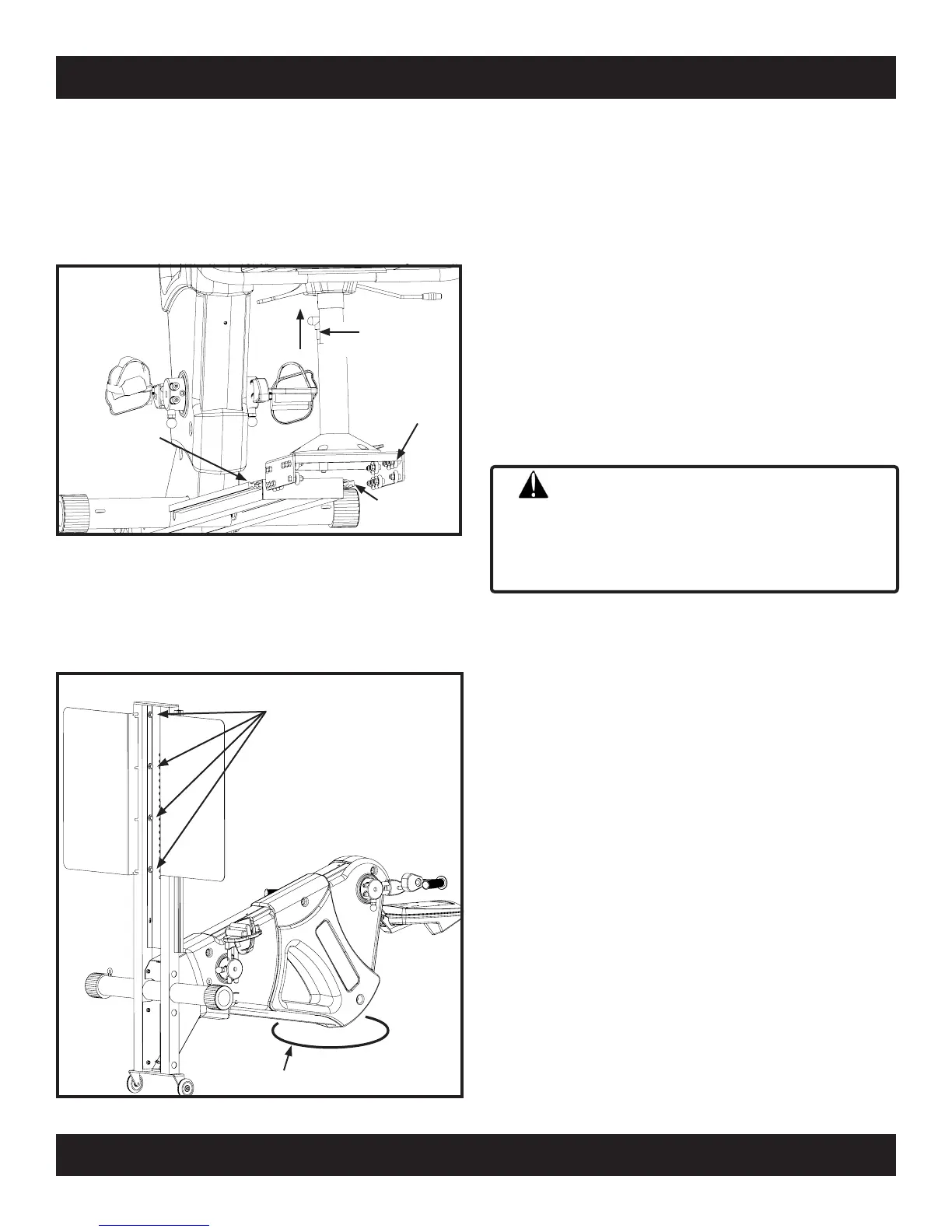
To install the optional wheelchair platform you must
first remove the seat assembly from the base. Pull up
and hold seat
adjustment rod. Slide seat assembly to
the rear until seat roller wheels disengage seat roller
tracks.
(A) Loosen
Four (4) Bolts
(B) Slide Slots
Under Washers
(C) Tighten Bolts
Protective Pad
With the aid of an assistant, carefully raise the base
up, and lower the work console down until the console
is resting on the floor. To prevent damage to the case,
place a pad, piece of carpet or cardboard between the
case and floor.
Left Roller
Track
Right Roller
Track
Seat Roller
Wheels
Seat
AdjustmentRod
(A) With a 1/2” socket, loosen the four back end bolts
that secure the Stainless Steel Adjustment Track to
base frame, just enough to slide the platform under
the lockwasher. NOTE: Do Not remove or loosen
bolts more than
necessary. (B) Engage slots of
wheelchair platform over the four bolts, between the
lockwasher and square tube. With the flat horizontal
surface of the wheelchair platform flush against base
frame square tube, (C) tighten the four bolts. Repeat
process for the opposite side.
With an assistant, carfully lower the base to the floor.
Reinstall seat by engaging the upper and lower seat
roller wheels onto the left and right roller track. Pull
up seat adjustment rod and slide seat assembly to
Monocoque
Frame is top heavy. Two people are
required to position frame in place. Failure to support
frame properly may result
in injury to yourself and/or
others.
CAUTION



 To Next Page