13
OVERVIEW
FEATURES/OPERATIONS SAFETY AND EMERGENCY FEATURES
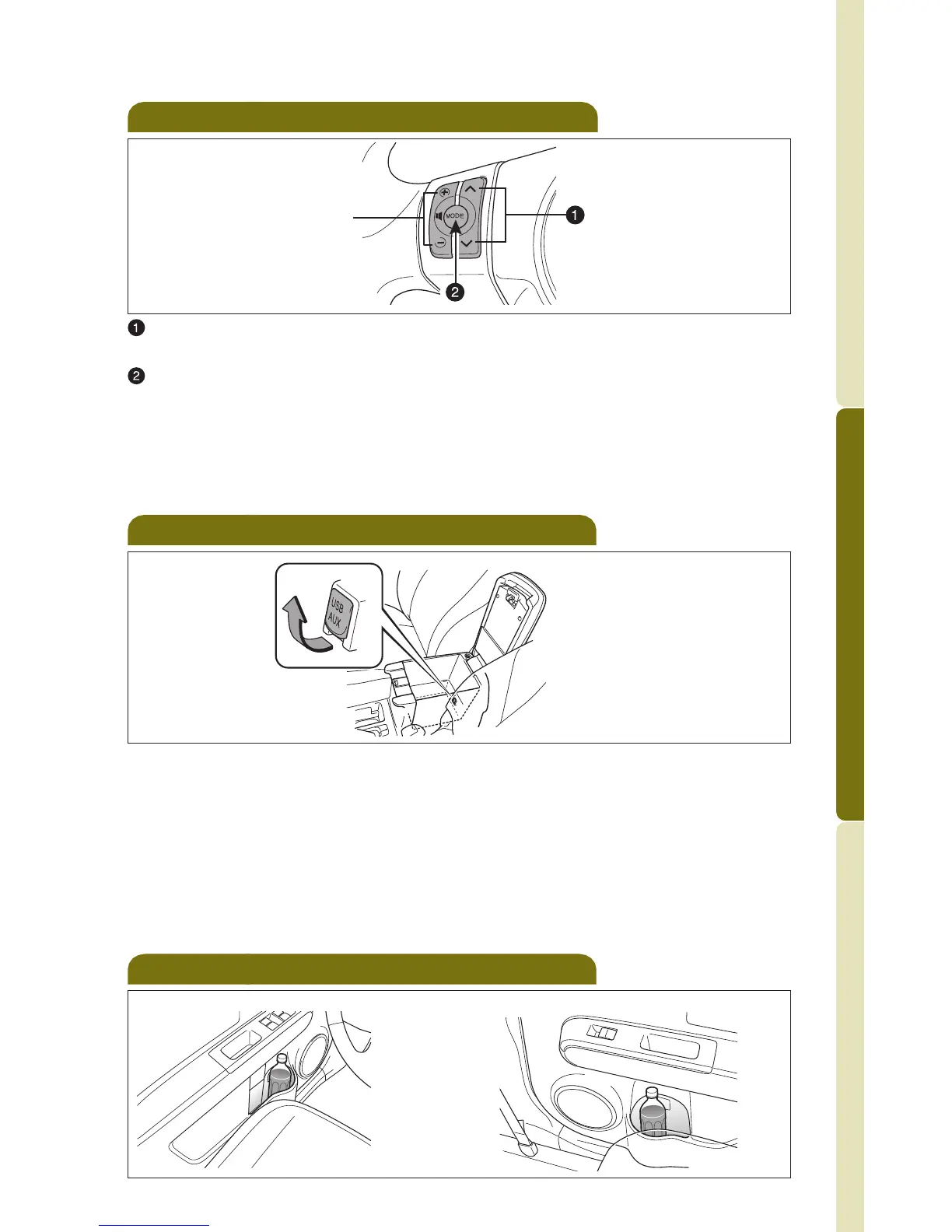
Steering wheel switches
“ ”
Use to search within the selected audio medium (radio, CD, iPod, etc.).
“MODE”
Push to turn audio ON and select an audio mode. Push and hold to turn
the audio system OFF.
Refer to the SCION Audio System Owner’s Manual or SCION Navigation
System Owner’s Manual for more details.
>
>
USB/AUX audio jack
By inserting a mini plug into the AUX or USB/AUX audio jack, you can
listen to music from a portable audio device through the vehicle’s speaker
system while in AUX or USB/AUX mode.
If you do not have a SCION genuine audio system, you will not be able to
use the USB adapter or AUX jack.
Refer to the SCION Audio System Owner’s Manual or SCION Navigation
System Owner’s Manual for more details.
Volume control
Bottle holders
Front door
Rear door
414636M2.qxd 3/4/10 7:41 PM Page 13



 To Next Page