128-7907A
12 of 32
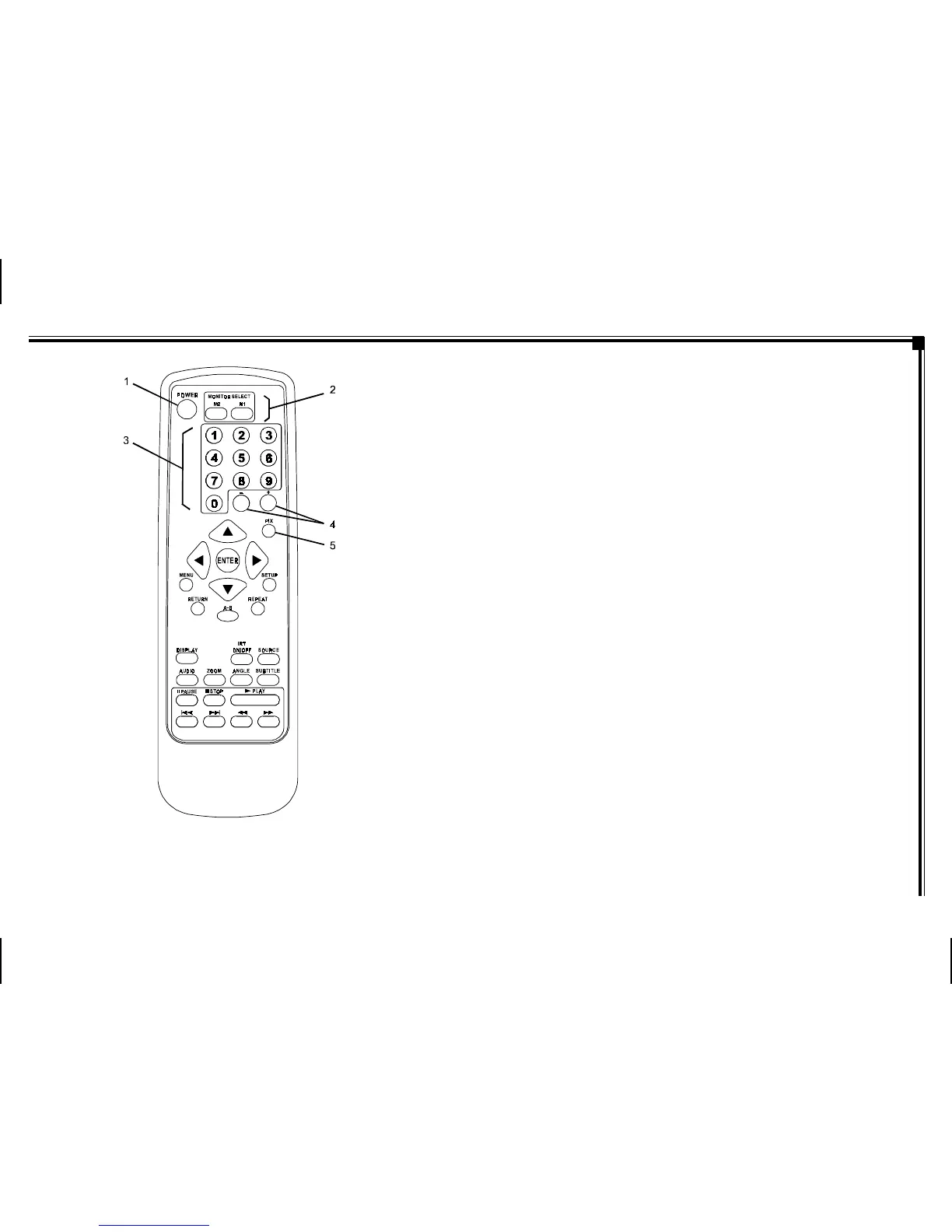
Figure 1a. Remote Control
-5-
1. POWER Button* – Press this button to turn M1 or M2
Monitor ON. Press the button again to turn M1 or M2
Monitor OFF.
2. Monitor Select (M1 and M2 Buttons) – Press
corresponding button to change the Remote Control
code to enable control of the M1 or M2 Monitor.
3. NUMBER Buttons – Allows the user to enter the
numbers 0 to 9 for selection of CD tracks, DVD
chapters, and password setting.
4. UP/DOWN (+/-) Buttons – Use these buttons
to make picture adjustments in the picture select
mode.
5. PIX Button (PICTURE SELECT) – Each time this button
is pressed, the on screen picture adjustment displays
the “adjustment bar” for BRIGHTNESS, CONTRAST,
COLOR or TINT. Once the desired adjustment bar is
displayed, use the (+) / (–) button to adjust the setting.
The OSD will automatically turn off if no adjustments are
made within 6 seconds, or if any other button is pressed.
REMOTE CONTROL FUNCTIONAL
DESCRIPTION
* Function control is available on the unit and remote control.
NOTE: To control the individual units (M1 Monitor / M2 Monitor)
press either M1 or M2 before pressing any other button. For
example, to turn M1 Monitor ON, press M1 and then the power
button.



 To Next Page