08
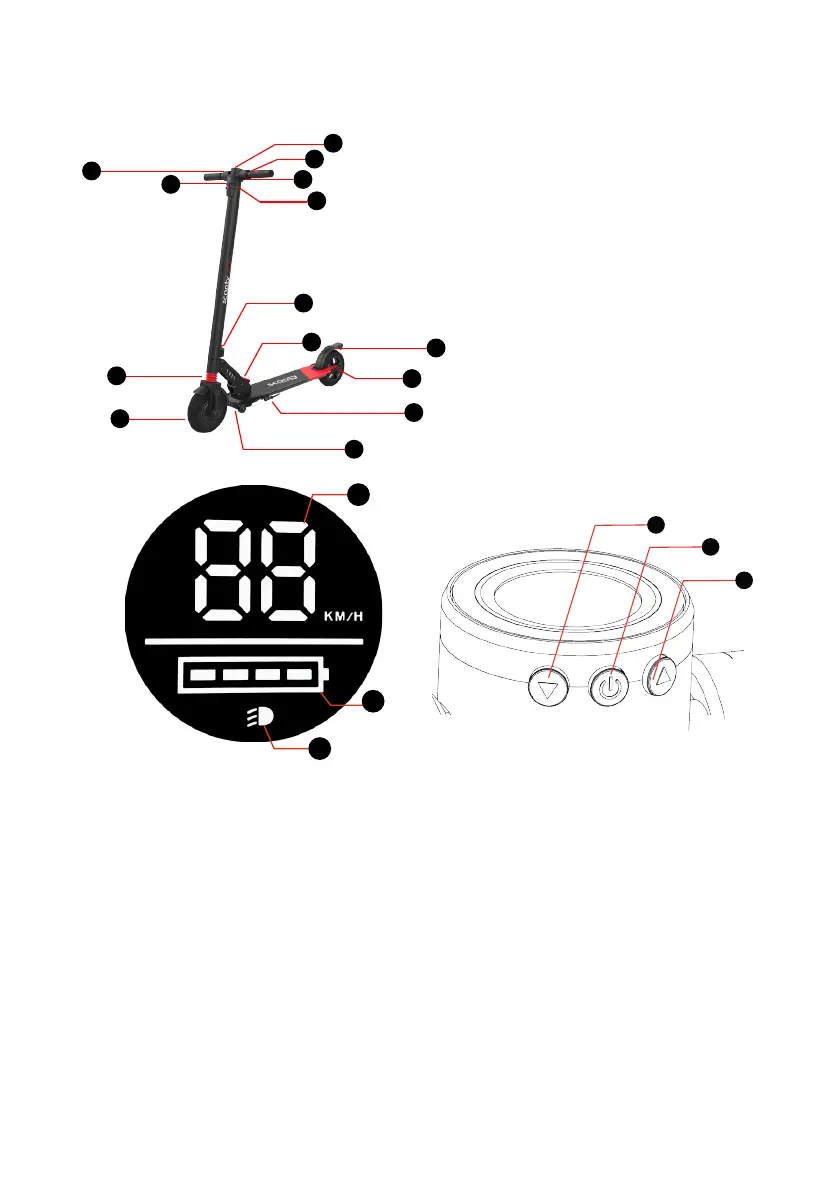
3. DESCRIPTION OF THE DEVICE
2
4
9
11
13
8
6
12
7
1
10
3
5
14
(1). LCD monitor
(2). Accelerator
(3). Electronic brake
(4). LED lighting
(5). Charging port
(6). Front drive wheel
(7). Steering column lock
(8). Release lever
(9). Foot brake
(10). Crutch
(11). Training wheels
(12). Suspension
(13). Rear Light (optional)
(14). Bell (optional)
1
3
2
4
5
6
(1). Acceleration / brake gauge / errors indicator (2). Battery level indicator (3). Lights
indicator (4). Speed - and ON/OFF lights button (5). ON/OFF device button
(6). Speed +
• To activate or deactivate the LED lighting press the ON/OFF LED lighting
button (4)
• The rear light (13) is only active when the LED lighting is active.
• To turn the device on/o: Press and hold the ON/OFF button (5) for
3seconds. The device turns o automatically after 180 seconds of inactivity.
• To increase or decrease the speed level: Briey press the speed
controller (4) or (6). There are 3 levels of maximum speed: P1: 6 km/h,
P2: 15 km/h et P3: 25 km/h. The mode is displayed on (1) from P1
(lowest) to P3 (highest) when stopped.
• The brake light is switched on as soon as the electronic brake is applied.



 To Next Page