Your EDMI Electric meter
Navigating the menu on your electricity meter
Now that your smart meter is up and running, you can start to enjoy the benefits that smart
technology has to oer. This step by step guide will help you navigate around your meter
from checking your balance to topping up your credit.
1. Press any button on the meter to illuminate the display
screen
2. Press and hold the OK button to access the meter menu
3. Each press of the OK button will take you through the
menu options
4. Once you have reached your desired menu option you
Press and hold the OK button which will then present
with further sub menus
5. To return to the main menu Press and hold the return
button
6. There are 5 Menu options however under each category
there are further options
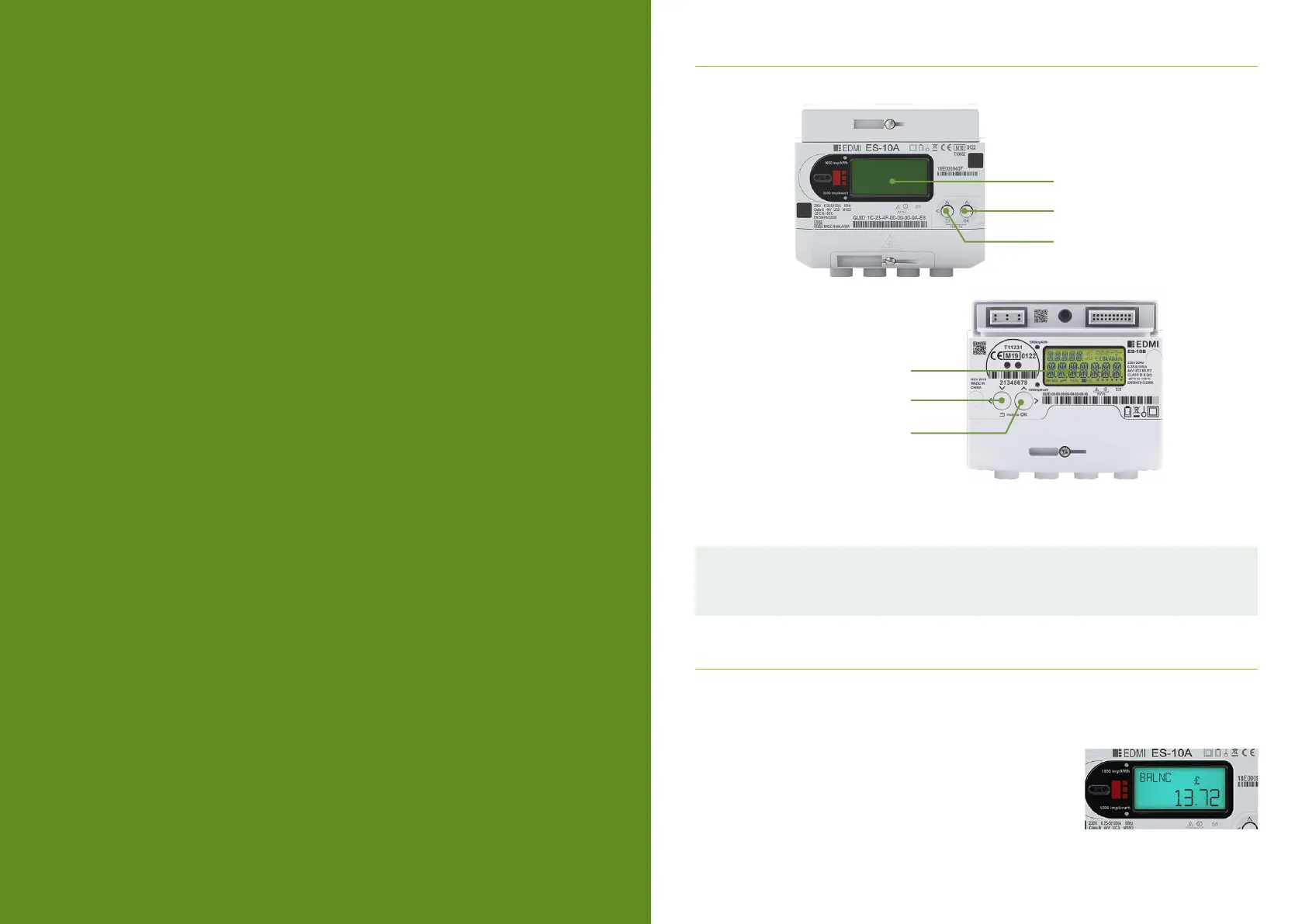
ES-10B
ES-10A
OK Button
OK Button
Return Button
Return Button
Display Screen
Display Screen
Both EDMI models 10A and 10B operate in exactly the same way, the only dierence is your
‘return’ and ‘ok’ buttons are situated on the opposite side of meter.



 To Next Page